Use the JobAdder integration with Kynzo to bring saved target customer contacts into a LinkedIn™ workflow built to keep you visible, remembered, and in the right conversations when business development opportunities appear.
Recruiter business development rarely fails from a lack of effort—it fails because of timing. In JobAdder, you have target clients neatly organized, but the live conversations happen across LinkedIn™. When you are juggling placements, candidate screenings, client calls, and delivery, you cannot spend hours manually scrolling feeds hoping to catch a client post.
By the time you see a key client's update, another recruiter has already commented. They are the one who gets noticed. Their insight is what the hiring manager remembers. You are left sending cold check-in emails that get ignored because you were invisible during the live moment.
Showing up consistently is not about vanity metrics or generic likes. It is about building memory equity so when a hiring need emerges, you are the recruiter they think of first.

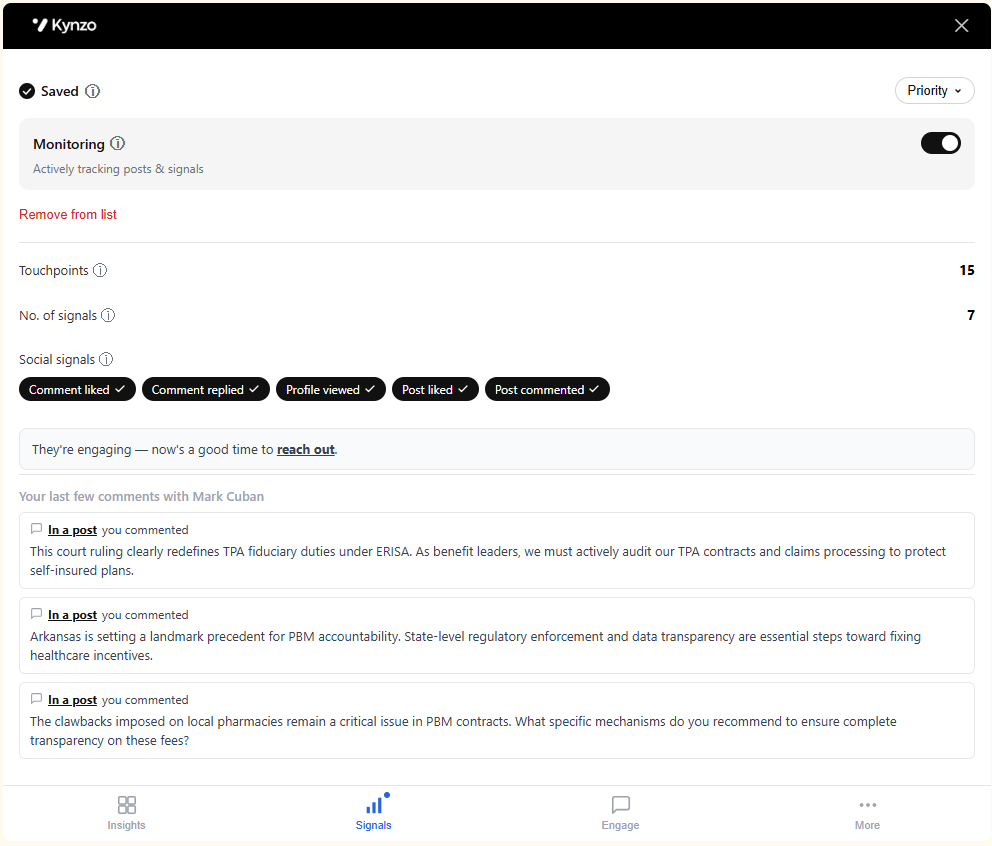
Cold outreach feels transactional, but public engagement builds trust. When target JobAdder contacts like, reply to, or view your comments, Kynzo captures those social signals so you know exactly when a relationship has warmed up enough for direct conversation.
We build integrations that help recruiters turn relationship signals into follow-up. If you want to partner with Kynzo, email us and we will share the integration plan and technical requirements.
The JobAdder integration helps recruiters bring saved target customer contacts into Kynzo so LinkedIn™ engagement becomes part of a repeatable business development workflow instead of something teams try to remember manually.
It helps recruiters move saved target customer contacts from JobAdder into a LinkedIn™ workflow where they can spot the right moments to engage, stay visible, and follow up while the relationship is warm.
Because passive viewing does not make you memorable. Customers are far more likely to remember the recruiter who congratulated them, added an insightful comment, or showed up in the right conversation at the right time. That is what helps recruiters stay memorable when opportunities arise.
A useful comment can create visibility far beyond the original post because it can be seen by people in the customer's professional circle. The value is not just impressions or likes. The value is being remembered as someone who showed up with relevance.
No. That is the point of the JobAdder integration. If your team already saves target customers in JobAdder, you can bring those contacts into Kynzo and work from the relationships you already care about.
Kynzo brings target customer contact data from JobAdder together with LinkedIn™ profile context so recruiters can keep account visibility and engagement activity connected in one workflow. It is designed for business development contacts, not candidates.
No. The JobAdder integration is focused on target customer contacts and LinkedIn™ relationship-building workflows. It does not sync candidates into Kynzo.
Kynzo helps recruiters spot activity from saved contacts so they can engage while the conversation is still relevant. That matters because timing is often the difference between being ignored and being remembered.
Kynzo syncs JobAdder daily so saved target customer contacts stay available in your workflow without your team having to rebuild lists manually.
Yes. The Kynzo Chrome extension supports the LinkedIn™ workflow and helps recruiters act on the contacts and conversations that matter after those contacts are brought in from JobAdder.
Get the Kynzo Chrome extension first, then follow the setup walkthrough video on this page to connect JobAdder and bring your saved contacts into Kynzo.
Recruitment team of 10+? Talk to us