Use the Recruit CRM integration with Kynzo to bring saved target customer contacts into a LinkedIn™ workflow built to keep you visible, remembered, and in the right conversations when business development opportunities appear.
For agency recruiters using Recruit CRM, the bottleneck is rarely a lack of motivation. It is the constant tug-of-war between urgent job orders and proactive client business development. While you are busy sourcing candidates, coordinating interviews, and managing client feedback, business development on LinkedIn™ gets pushed to tomorrow.
Meanwhile, active clients and high-value target accounts are posting on LinkedIn™ right now. When you do not show up in their comments, competing agency recruiters step in. They build familiarity, demonstrate sector expertise, and establish rapport with your target hiring managers in plain sight.
By bringing Recruit CRM contacts into a focused engagement feed, Kynzo helps you protect your client relationships and expand account share in just minutes a day.
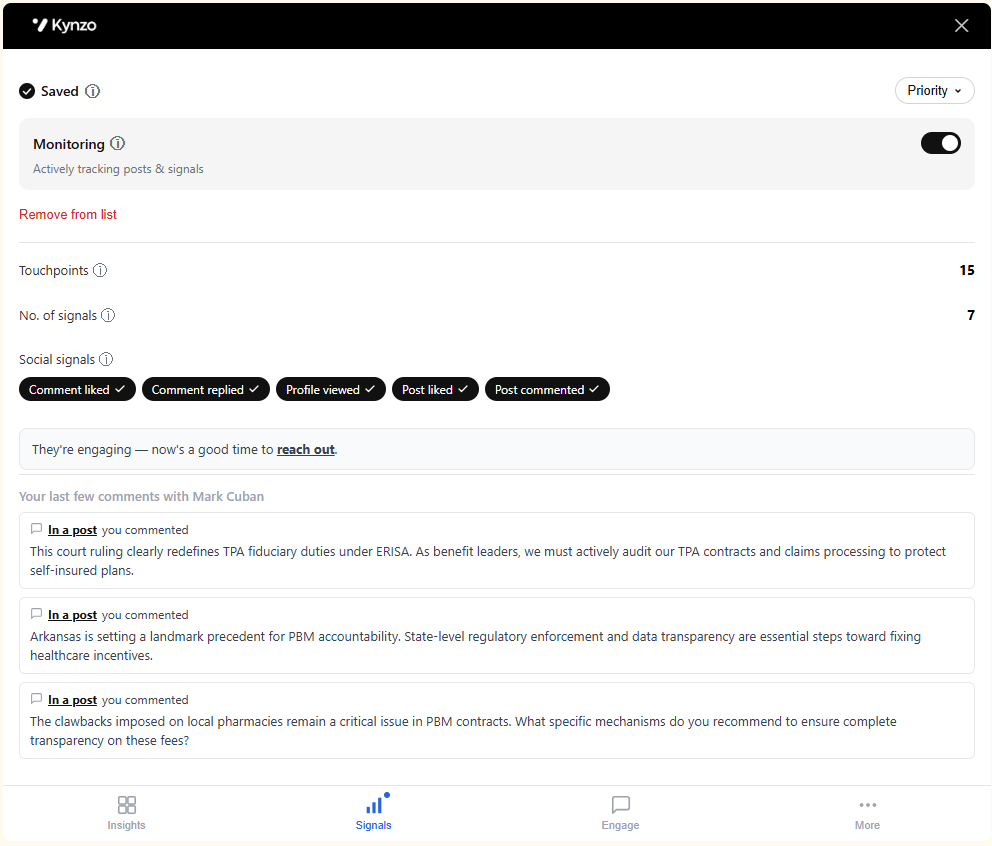
Recruiters who pitch immediately after connecting often burn bridges. Kynzo gives you the social signals you need to read the room. When saved Recruit CRM contacts reply to your thoughtful comments or check your profile, you have clear indicators that it is the right time to reach out.
We build integrations that help recruiters turn relationship signals into follow-up. If you want to partner with Kynzo, email us and we will share the integration plan and technical requirements.
The Recruit CRM integration helps recruiters bring saved target customer contacts into Kynzo so LinkedIn™ engagement becomes part of a repeatable business development workflow instead of something teams try to remember manually.
It helps recruiters move saved target customer contacts from Recruit CRM into a LinkedIn™ workflow where they can spot the right moments to engage, stay visible, and follow up while the relationship is warm.
Because passive viewing does not make you memorable. Customers are far more likely to remember the recruiter who congratulated them, added an insightful comment, or showed up in the right conversation at the right time. That is what helps recruiters stay memorable when opportunities arise.
A useful comment can create visibility far beyond the original post because it can be seen by people in the customer's professional circle. The value is not just impressions or likes. The value is being remembered as someone who showed up with relevance.
No. That is the point of the Recruit CRM integration. If your team already saves target customers in Recruit CRM, you can bring those contacts into Kynzo and work from the relationships you already care about.
Kynzo brings target customer contact data from Recruit CRM together with LinkedIn™ profile context so recruiters can keep account visibility and engagement activity connected in one workflow. It is designed for business development contacts, not candidates.
No. The Recruit CRM integration is focused on target customer contacts and LinkedIn™ relationship-building workflows. It does not sync candidates into Kynzo.
Kynzo helps recruiters spot activity from saved contacts so they can engage while the conversation is still relevant. That matters because timing is often the difference between being ignored and being remembered.
Kynzo syncs Recruit CRM daily so saved target customer contacts stay available in your workflow without your team having to rebuild lists manually.
Yes. The Kynzo Chrome extension supports the LinkedIn™ workflow and helps recruiters act on the contacts and conversations that matter after those contacts are brought in from Recruit CRM.
Get the Kynzo Chrome extension first, then follow the setup walkthrough video on this page to connect Recruit CRM and bring your saved contacts into Kynzo.
Recruitment team of 10+? Talk to us