

Account-Based LinkedIn for Recruiters: A 2026 Playbook
Account-based LinkedIn means choosing a short list of target companies and hiring managers, then building familiarity with those specific people before you ever pitch. For agency recruiters, that means you stop broadcasting InMail to everyone and start showing up, consistently and usefully, in the feeds of the 30 to 100 decision-makers who can actually hand you a search.
Most guides that rank for this topic cover account-based marketing (ABM) with paid LinkedIn ads. That is one lever. Recruiters developing client relationships have a second, cheaper one: organic engagement with the posts hiring managers already publish. This guide covers both, then goes deep on the organic workflow: how to pick accounts, find the right contact, nurture prospects with comments, pace the activity safely, and read the signals that tell you when to start a warm conversation.
Key Takeaways
- Account-based LinkedIn is a targeting discipline: a defined list of companies and named hiring managers, not a broad audience.
- Hiring signals (open roles, growth news, leadership changes) tell you which accounts to prioritize and who owns the vacancy.
- Nurturing works when you comment with substance on a prospect's posts first, then ask for a small next step, not a call.
- Track account-level coverage and engagement signals (replies, profile views, connection accepts), not raw activity counts.
- Automation should augment your judgment and keep human pacing, never simply multiply messages.
Table of Contents
- What account-based LinkedIn actually means
- Organic engagement versus ads: where each fits
- Step 1: Choose accounts with a tight profile
- Step 2: Find the person who owns the vacancy
- Step 3: Build a dedicated feed, not a bigger inbox
- Step 4: Nurture prospects with comments before messages
- Step 5: Automate carefully, with human pacing
- Step 6: Track signals that tell you when to reach out
- A weekly routine for one recruiter
- Where Kynzo fits
- Common mistakes to avoid
- FAQ
- Sources
What account-based LinkedIn actually means
The term comes from ABM, which the Association of National Advertisers describes as an approach that combines targeted, insight-led marketing with sales to strengthen relationships and drive growth in specific new and existing accounts. The principle is the same for a recruitment agency: you pick the accounts first and tailor everything to them.

On LinkedIn, "ABM ads" usually refers to paid campaigns. LinkedIn ABM advertising delivers personalized ads to a defined list of target accounts using company list targeting, rather than broad audience targeting. The same source describes three tiers: 1:1 (one account per campaign), 1:few (5 to 20 similar accounts) and 1:many (100 or more accounts).
Recruiters can borrow that tier logic without spending on ads:
| Tier | Who it covers | Recruiter version | |---|---|---| | 1:1 | One strategic account | A top client or dream account where you map several stakeholders and engage each by hand | | 1:few | 5 to 20 similar accounts | A niche, such as Series B fintechs hiring engineers, with shared talking points | | 1:many | 100+ accounts | A wider watchlist where a feed and light-touch commenting keep you visible |
Organic engagement versus ads: where each fits
Paid ABM is a legitimate part of the mix, especially for larger firms. One agency analysis of 72 advertisers that ran both formats found named-company campaigns earned 28% more landing page clicks per impression than attribute-based campaigns, at a 75% higher CPM. That is a quality-over-cost trade, and it only makes sense if you have content worth clicking and enough fee potential per account.
The sequencing advice is useful even if you never buy an ad. For cold audiences, start with thought-leader content that shares genuine insight , move engaged people toward consideration, and keep the hard sell for later. Translate that to organic work: your comments and posts are the thought-leader layer, and the discovery-call request is the hard sell you hold back.
For most agency recruiters and owners, organic engagement is the better starting point. It costs only time, it targets individuals rather than companies, and it builds the one-to-one familiarity that makes a first message feel expected.
Step 1: Choose accounts with a tight profile
A long list of famous brands is not a target list. Define an ideal-company profile: industry, size, growth stage, hiring pattern, and the roles where your agency has real placement history. Then add signals that suggest a company needs outside help now.
Useful triggers include:
- Open postings for roles you fill, especially ones that have been live for weeks.
- Funding or growth news that implies headcount expansion.
- Leadership changes, since new leaders often rebuild teams and reset vendor lists.
- Departures that leave a team short.
Our breakdown of LinkedIn buying signals goes further on how to read these. For the wider business development context, see our guide to recruiter business development on LinkedIn .
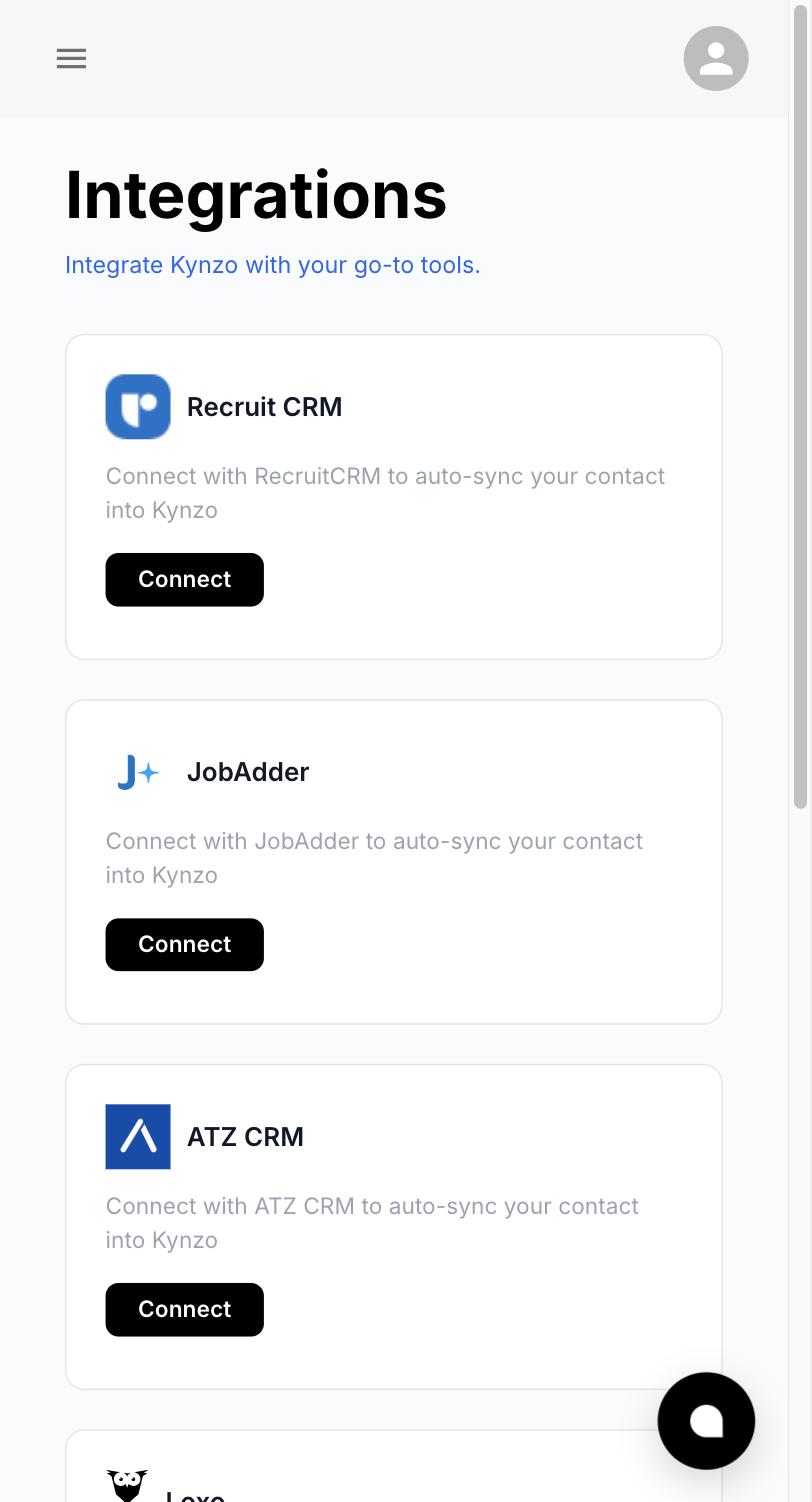
Keep the record simple. For each account, capture the company, the role, the job URL, the hiring manager and their profile link. A spreadsheet works for a handful of accounts. Past that, sync from your CRM so the list stays current. Kynzo can synchronize accounts from Recruit CRM, JobAdder, Zoho Recruit, HubSpot, Crelate and Loxo, and you can also save profiles or posts manually. If HubSpot is your system, our HubSpot and LinkedIn integration guide covers the setup logic.
Step 2: Find the person who owns the vacancy
The recruiter or HR contact on a posting runs the process. The hiring manager owns the outcome, and usually the budget conversation about using an agency. Your job is to engage the hiring manager while treating HR and talent acquisition as partners once a conversation opens.
A workable method:
- Read the job description for the team name and reporting line.
- If a person is named, start there. If not, target the functional leader one level above the role .
- Match seniority to the vacancy. The same guidance suggests a manager or director for an individual-contributor hire, a VP or functional head for a manager hire, the C-level owner for a director or VP hire, and the founder or an adjacent leader when it is the company's first hire in that function.
- When two people look plausible, pick the one with broader scope. They can forward you to the right owner.
If you use Sales Navigator, filters help narrow the list. One hiring-focused guide suggests filtering by managerial level, time in position, geography and connection degree , favoring people who have been in role under two years and first- or second-degree connections where possible. That guide is written for job seekers, but the filter logic transfers directly to recruiter business development.
For executive search, the buyer is often a CEO, board member or CHRO. Our pages on executive search on LinkedIn and executive search outreach cover the differences.
Map more than one contact
ABM treats a purchase as a group decision. The ITSMA-backed Rethink ABM deck reports that in the 2023 Client Buying Index, 49% agree there is greater risk in making poor decisions /Momentum%20ITSMA_%20Rethink%20ABM%20NY_MainStage.pdf) as solutions grow more complex and costly. Hiring an agency is a smaller decision than buying enterprise software, but the same instinct applies: the hiring manager, the HR or TA lead and sometimes a finance approver all shape the outcome. For your top accounts, track two or three people, not one.
Step 3: Build a dedicated feed, not a bigger inbox
LinkedIn's general feed is built for engagement, not for your target list. A hiring manager's post can disappear under unrelated content within hours. The fix is a separate view that shows only your accounts.
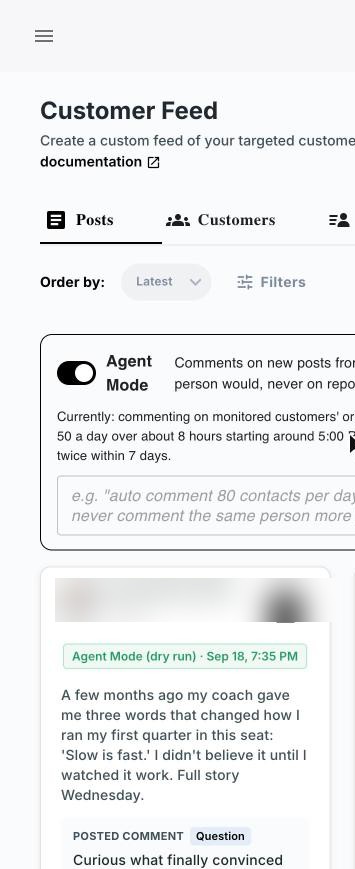
This is what Kynzo's Customer Feed is for. With the Chrome extension, you save target profiles and company accounts (or sync them from your CRM), and their posts and activity appear in one curated stream. You open it, see what your 60 accounts said today, and act on the three posts that deserve a response.
Step 4: Nurture prospects with comments before messages
Nurturing on LinkedIn is not drip messaging. It is a sequence of low-pressure, useful interactions that earn recognition. The pattern is simple: engage with a relevant post, offer an insight or resource, keep it non-sales, and ask permission for a small next step instead of pitching.
Here is a practical cadence for one target hiring manager:
- *Weeks 1 to 2: Follow, view their profile, and leave two or three substantive comments on their posts.
- *Week 2 or 3: Send a connection request with a short note tied to something they posted. No pitch.
- *Weeks 3 to 5: Keep commenting. Share one relevant market data point if it fits the thread.
- *After a warm signal: Send a short message that references your prior exchange and asks a small question, such as whether a hiring plan for the quarter is on the table.
What a strong comment looks like
A good comment adds something the post did not say. It might share a hiring-market observation, a short example from a search you ran, or a sharper question. A weak comment praises the post and attaches your name to it.
Example. A VP of Engineering posts about struggling to close senior backend hires. Weak: "Great post, so true!" Stronger: "We see the same pattern: candidates with offers in hand drop out when the process runs past three weeks. Teams that cut a round usually keep their top pick. Did tightening the loop change your close rate?"
The second version shows you understand the problem, gives a specific observation and invites a reply, without selling.
If you want to practice the format, our free LinkedIn comment generator drafts comment options you can edit.
Step 5: Automate carefully, with human pacing
The risk with automation is volume without judgment. The ANA's ABM committee has discussed how AI can help scale buyer-group orchestration while augmenting strategy and execution rather than simply automating more activity . The same session framed the real challenge as scaling ABM to hundreds or thousands of accounts without losing its impact. That is the standard to hold yourself to.
Kynzo's AI Agent is designed for that balance. It drafts or publishes context-aware comments in your voice, with specialized tones, active hours, daily caps and randomized delays as human-pacing controls. We built it so the volume stays modest and the comments stay tied to what each person actually wrote.
Whatever tool you use, apply these rules:
- *Cap daily activity. A handful of thoughtful comments beats dozens of generic ones.
- *Stay inside your target list. Account-based means no spraying.
- *Review drafts for your top accounts. Hand-write or edit anything aimed at a 1:1 account.
- *Keep your active hours realistic. Activity at 3 a.m. local time looks automated.
- *Read LinkedIn's current User Agreement and professional community policies before enabling any automation, since platform rules can change.
Step 6: Track signals that tell you when to reach out
You do not need a call with every account. You need to know when a relationship is warm enough for a direct conversation. The signals worth logging:
- Replies to your comments
- Likes on your comments
- Profile views from target contacts
- Connection accepts
- Direct inquiries
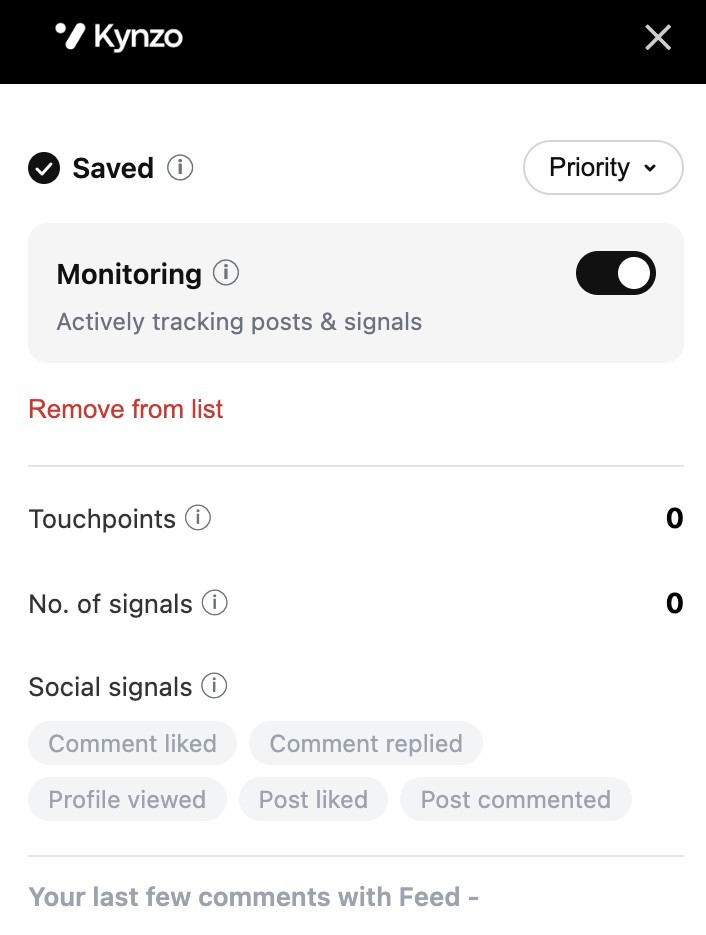
Kynzo tracks these signals so you can see when a contact moves from passive to engaged. Our guide to LinkedIn engagement metrics explains how to read them.
For outcome metrics, a hiring-signal playbook recommends tracking invitation acceptance, reply rate and the share of lists refreshed weekly . Benchmarks vary widely by niche and seniority, so build your own baseline over a few months and compare against it.
At the account level, measure stakeholder coverage: how many of your mapped contacts have interacted with you? A single interested junior contact is a weak signal. Engagement from the hiring manager and a second stakeholder is a stronger reason to open a conversation.
A simple warm-outreach trigger
Use a rule so you are not guessing. For example: when a mapped hiring manager has replied to a comment or accepted your connection request, and the account has an open role in your niche, send a short message within two business days. Adjust the rule to your own conversion data.
A weekly routine for one recruiter
This is a realistic schedule for a recruiter covering 50 accounts:
| Day | Task | Time | |---|---|---| | Monday | Review new hiring signals, add 3 to 5 accounts, assign a hiring manager to each | 30 min | | Tuesday to Thursday | Open the feed, comment on the top posts, edit any AI drafts | 15 min a day | | Friday | Review signals, send warm messages to contacts who engaged, update the CRM | 30 min |
That is about two hours a week. The consistency matters more than the intensity.
Where Kynzo fits
If you want this workflow without building it from spreadsheets and browser tabs, Kynzo is a LinkedIn-focused AI engagement platform for agency recruiters, recruitment agencies and search consultants. The Chrome extension is free to install. It gives you the Customer Feed, CRM account sync, the AI Agent for comments in your voice, and signal tracking for replies, profile views and connection accepts.

Plans on the pricing page are Starter at $12.90 per month, Pro at $30 per month and Elite at $50 per month. You can also explore the platform at kynzo.io . For more workflows, browse our agency recruitment business development strategies .
Common mistakes to avoid
- *Targeting HR only. HR runs the process but often does not own the agency decision. Engage both, starting with the hiring manager.
- *Pitching in the connection note. It ends the relationship before it starts.
- *Chasing activity metrics. Dozens of comments with no replies from mapped contacts is noise, not progress.
- *Ignoring stale lists. Hiring managers change jobs. Refresh your list weekly.
- *Commenting on everything. Pick posts where you have a real point of view.
FAQ
What is account-based marketing on LinkedIn?
It is a way of focusing effort on a defined list of target companies rather than a broad audience. On LinkedIn, that can mean paid campaigns aimed at a company list, or organic engagement with named decision-makers. Recruiters typically use the organic version to build client relationships.
How do I nurture prospects on LinkedIn without being spammy?
Start by commenting thoughtfully on their posts and viewing their profile, then connect with a note that references something they shared. Hold the pitch until they have engaged back. When you do reach out, ask for a small next step instead of a meeting.
Who should a recruiter target at a hiring company?
The hiring manager who owns the role, or the functional leader one level above if you cannot find them. Treat HR and talent acquisition as partners once the conversation is open. For top accounts, map two or three stakeholders.
Do I need LinkedIn ads for an account-based approach?
No. Ads can add reach and are worth considering when your fee potential per account is high. Many agency recruiters start with organic commenting and a dedicated feed, then add paid ABM later if it fits their budget.
Can I automate LinkedIn engagement safely?
Use automation to support your judgment, not to multiply volume. Set daily caps, randomized delays and realistic active hours, keep comments specific to each post, and review LinkedIn's current rules before you start.
Sources
- Account-Based Marketing Committee, ANA
- ABM Virtual Committee meeting, ANA
- How to Scale 1:1 LinkedIn ABM Campaigns, UserLed
- LinkedIn ABM: How to Run Account-Based Marketing, Kiin
- ABM Ads: The Complete Guide, ZenABM
- From Hiring Company to Buying Committee, SyncGTM
- Cold outreach to hiring managers, Part 2, interviewing.io
- Rethink ABM presentation deck, ITSMA /Momentum%20ITSMA_%20Rethink%20ABM%20NY_MainStage.pdf)
- Hiring Signals Playbook, Prosyo
- LinkedIn Prospecting Playbook, Kakiyo