

LinkedIn Follow-Up Automation for Recruiters: Track Replies
The best LinkedIn follow-up for an agency recruiter starts before the message. You automate the watching, the drafting and the logging, so every follow-up lands on someone who has already seen your name in a conversation they care about. Kynzo does this with a dedicated Customer Feed of your target hiring managers, an AI Agent that comments in your voice at human pace, and a signal log of replies, comment likes, profile views, connection accepts and inquiries. You send the personal message when the signal says the contact is warm.
Most "follow-up automation" tools do the opposite. They queue a connection request, then message two, three and four on a timer, whether or not the hiring manager has shown any interest. This guide covers what to automate, what to keep personal, how to track replies and comment replies, how to route them into your CRM, and how to stay inside LinkedIn's rules.
Key Takeaways
- Automate the monitoring, drafting and logging around a target hiring manager. Keep the first real conversation and the discovery-call ask in your own hands.
- Warm follow-up beats timed sequences: a comment reply, profile view or connection accept tells you when to message, so you are not guessing from a calendar.
- Track reply quality, not only reply volume. Response rate and interested rate are different numbers and need to be measured separately.
- LinkedIn does not permit third-party tools that automate activity on its site, so pacing, caps, human review and a light footprint matter more than speed.
- Log every signal against the account in your recruiting CRM so the next follow-up has context.
Table of Contents
- What LinkedIn follow-up automation should (and should not) do
- Follow up on signals, not on a calendar
- How to track LinkedIn replies
- Build the workflow around target hiring managers
- Route and record replies in your CRM
- Measure whether follow-up is working
- Stay inside LinkedIn's rules
- Where Kynzo fits
- A sample weekly routine
- FAQ
- Sources
What LinkedIn follow-up automation should (and should not) do
For a recruiter selling to hiring managers, a follow-up is not a nudge. It is the next step in a relationship with a person who controls a fee. The job of automation is to make sure that relationship does not go cold because you were busy on a search.
The parts that are safe and valuable to systematize:
- *Monitoring. Knowing when a target hiring manager posts, changes jobs, announces a funding round or comments on something. LinkedIn's general feed buries these in noise.
- *Drafting. A first draft of a comment or message that references the actual post, in your tone, so you edit instead of starting from a blank box.
- *Pacing. Spreading activity across working hours with daily caps and randomized gaps instead of bursts.
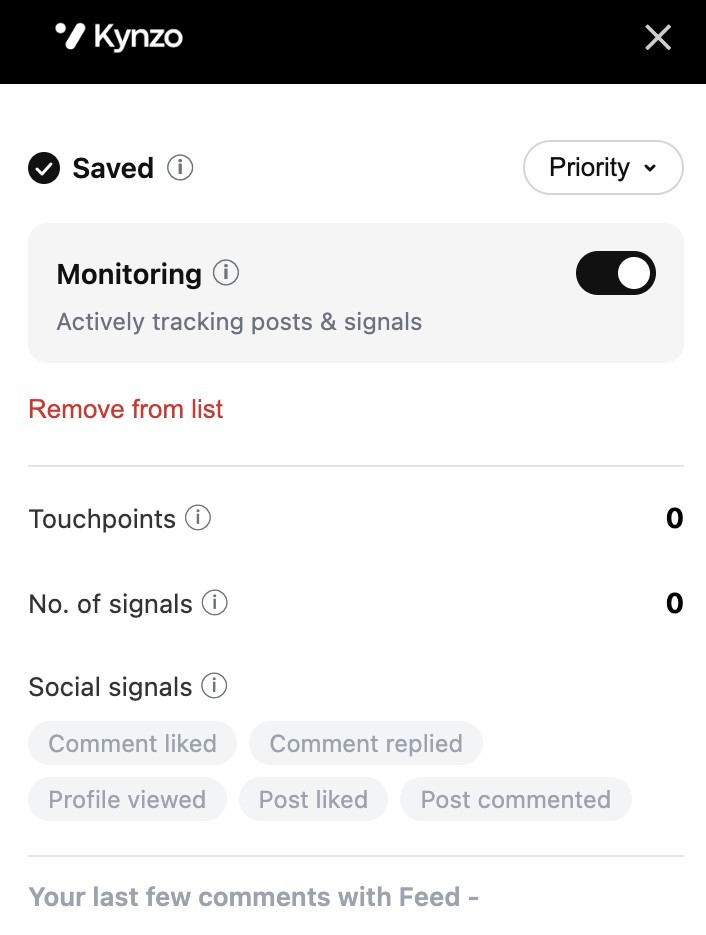
- *Logging. Recording who replied, who liked your comment, who viewed your profile and who accepted your connection, in one place.
- *Reminders. Surfacing the contacts who have shown the most recent signals, so your day starts with a short list.
The parts that stay personal:
- The first direct message after a signal.
- Any conversation about a live search, fees or terms.
- Replies to a hiring manager who asks a real question.
- The decision to ask for a call.
That split is what "warm" means in practice. The automation produces the context and the timing. You supply the judgment and the voice when it counts.
Why timed message sequences miss the point
A sequence assumes the contact will eventually respond to volume. Hiring managers receive a steady stream of cold InMail and templated pitches from agencies, and identical messages are exactly what spam filters and human readers learn to ignore. We cover the account-level consequences in our guide to LinkedIn mass messaging risks and the content side in how to avoid LinkedIn spam .
Native tools have a narrower scope. LinkedIn Recruiter, for example, lets you schedule one automated second InMail when a candidate does not respond, with a window of 3 to 28 days, according to a 2026 guide summarizing LinkedIn Recruiter Help . That is built for candidate outreach inside Recruiter. Business development with hiring managers is a different job, and a single reminder InMail does not build familiarity.
Follow up on signals, not on a calendar
The core idea: a follow-up is best sent right after the contact does something. A reply under your comment, a like on it, a look at your profile or an accepted connection request are all small, public or semi-public acts that say "I noticed you." Any one of them turns a cold message into a warm one, because you can reference what just happened.
Here are the signals we treat as most useful, roughly from weakest to strongest:
| Signal | What it usually means | Suggested next move | |---|---|---| | Comment like | Acknowledged, low effort | Keep commenting on their next posts | | Profile view | Curious about who you are | Check for a pattern of repeat views, then connect or follow up | | Connection accept | Open to being in your network | Send a short, non-pitch note referencing a recent post | | Reply to your comment | Willing to talk in public | Continue the thread once, then move to a direct message | | Inbound question or inquiry | Active interest | Respond personally the same day and propose a short call |
We go deeper on interpretation in our write-ups on LinkedIn engagement signals and LinkedIn buying signals .
How to track LinkedIn replies
Readers asking how to track replies usually mean two different things: replies to direct messages and replies to comments. They behave differently, so track them differently.
Tracking replies to messages and connection follow-ups
Direct-message replies are the easiest to see and the easiest to lose. A workable routine:
- *Check one inbox on a fixed schedule. Pick two windows a day, for example mid-morning and late afternoon, and clear LinkedIn messages then. Constant checking costs search time.
- *Tag the outcome. Use a short list: replied-interested, replied-not-now, replied-wrong-person, no reply. Four labels is enough.
- *Record the date and the trigger. Note what preceded the message: a comment thread, a connection accept, a post. This is how you learn which triggers produce conversations.
- *Set the next touch immediately. A "not now" reply is not a no. Add a reminder for a few weeks out tied to a business event such as a new requisition or a leadership change.
Tracking replies to your LinkedIn comments
This is the part most guides skip, and it is where the warmest signals live. When you comment on a hiring manager's post, replies from them or from others in the thread are public proof of attention. Tracking them by hand means scrolling notifications, which LinkedIn mixes with everything else.
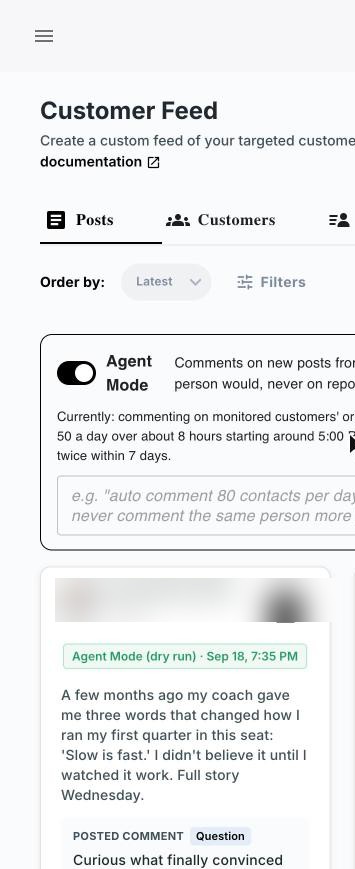
Kynzo's approach is to keep target hiring managers and company accounts in a dedicated Customer Feed through the Chrome extension, so their posts sit apart from the general feed. The platform tracks engagement signals including replies, comment likes, profile views, connection accepts and inquiries, so you see in one place who responded to what. Our guide to tracking LinkedIn posts shows how to set up the feed, and LinkedIn comment automation covers the commenting side.
What to do with a reply under your comment
A reply from the hiring manager deserves a human answer. Our rule of thumb:
- *First reply from them: respond within the same working day, with something specific, not thanks alone.
- *Second exchange: if the thread is going somewhere, move it to a direct message: "Happy to share what we are seeing in [their market]. Want me to send a short note?"
- *No further reply: leave it. Do not chase a comment thread with a message the same hour.
Build the workflow around target hiring managers
A follow-up workflow is only as good as the target list behind it. For a boutique agency or search team, a list of 50 to 150 hiring managers and company accounts is easier to work well than thousands.

Step 1: Define who is on the list
Start with the hiring managers and talent leaders at companies where you already have a placement, a past conversation or a strong candidate to show. Add accounts hiring in your niche. Our executive search outreach guide and the piece on LinkedIn lead generation for recruiters cover how to prioritize.
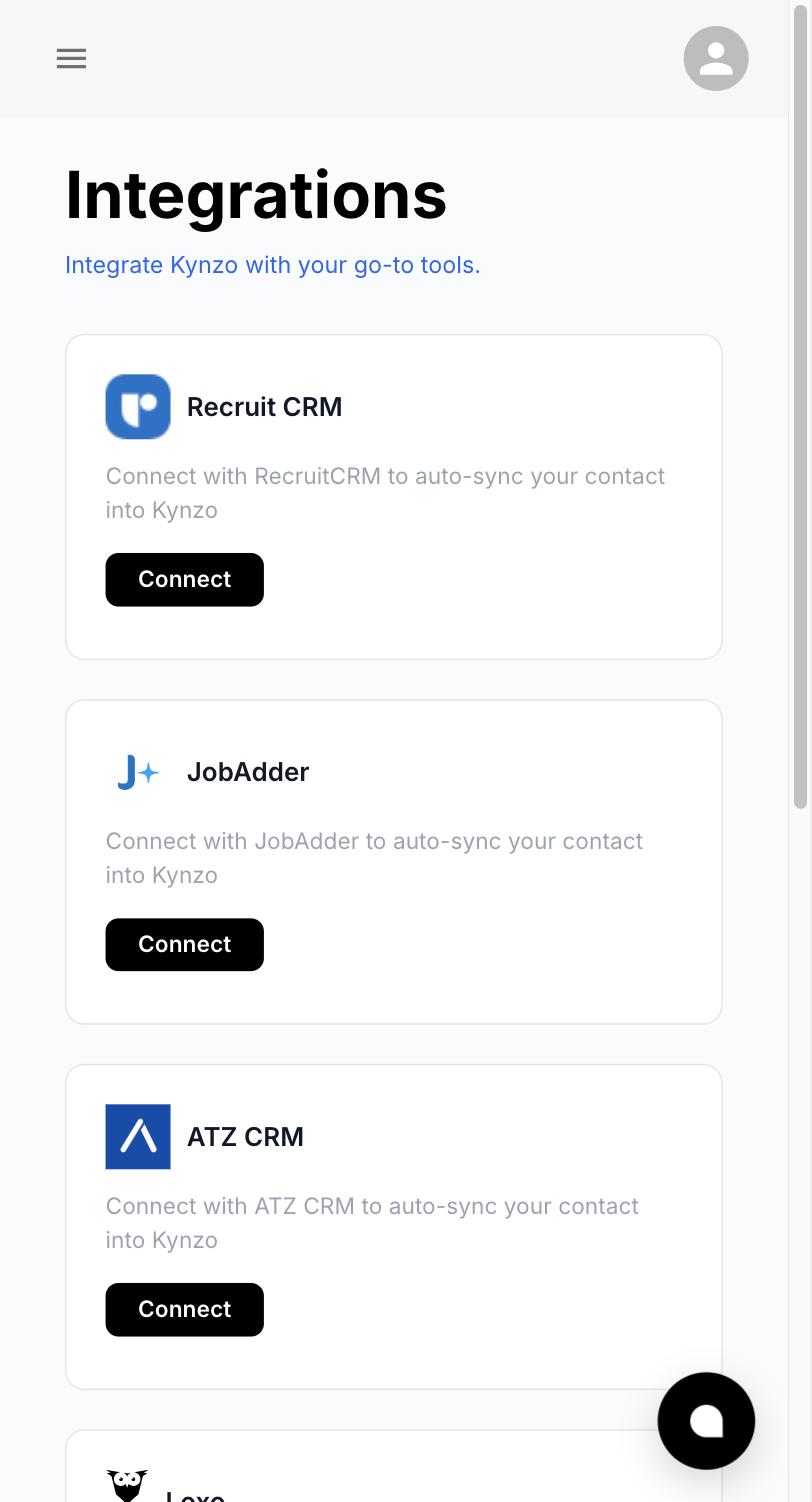
Kynzo can synchronize accounts from recruiting and CRM systems such as Recruit CRM, JobAdder, Zoho Recruit, HubSpot, Crelate and Loxo, and you can also save profiles or posts manually. The point is that the list you already maintain becomes the feed, so you are not rebuilding it in a second tool.
Step 2: Set up the Customer Feed
With the Chrome extension, the people on your list show up in a single feed of their posts and activity. This replaces the habit of opening LinkedIn, scrolling past unrelated content and hoping to spot a hiring manager's update. The feed gives you a short daily review instead.
Step 3: Comment first, in your voice
Before any message, comment on posts where you have something to add. The Kynzo AI Agent drafts or publishes context-aware comments using your voice, with selectable tones. You can review drafts before they go out, or let the agent publish within the limits you set.
Good comments share a pattern:
- They reference a specific point in the post.
- They add a short observation from your side of the market.
- They do not pitch.
A hiring manager who posts about a tough quarter of engineering hiring, for instance, gets a comment about what you are seeing in offer-acceptance timelines, not a line about your agency.
Step 4: Set human-pacing controls
Pacing is where follow-up automation either looks like a person or looks like a script. Kynzo gives you active hours, daily caps and randomized delays. Pick conservative numbers, keep activity inside your actual working day and avoid sudden jumps in volume.
Step 5: Watch for the trigger, then message
When a signal appears, open the contact in your signal log and send a short direct message that references it. Our outreach cadence guide lays out spacing for the touches that follow.
A message built on a signal can be this short:
"Thanks for the thoughtful reply on your post about backfilling senior finance roles. I work with a few teams on the same problem and have a view on what is moving candidates right now. Worth a 15-minute call next week?"
Compare that with a cold line sent on day three of a sequence. The first one has a reason to exist.
Route and record replies in your CRM
A reply that lives only in LinkedIn is easy to forget. Three habits keep follow-up connected to the rest of your business development:
- *One account record per company. Log the hiring manager's name, the signal, the date and your response against the company in your recruiting CRM or HubSpot.
- *A simple priority order. Inquiries first, then replies to your comments, then connection accepts, then repeat profile views, then likes. Work the list top down.
- *A weekly review. Once a week, scan the signal log for accounts with several signals and no conversation yet. Those are the follow-ups most likely to be welcomed.
Because Kynzo syncs target accounts with the CRMs above, the list that drives your feed is the same list your team uses to track business development. That keeps ownership clear when several consultants work the same client.
Measure whether follow-up is working
Track outcomes at two levels: activity and conversation quality.
*Activity metrics
- Comments posted per week on target accounts
- Signals received per week (replies, accepts, views, inquiries)
- Direct messages sent after a signal
*Conversation metrics
- *Response rate: the share of outreach messages that get any reply.
- *Interested rate: the share of respondents who express real interest in continuing.
- *Discovery calls booked per 100 signal-triggered messages.
- *Calls that turn into a search or a placement agreement.
Keep the first two separate. Kula's sourcing metrics guide makes the point with an example: a campaign with a 35% response rate but a 5% interest rate suggests the message gets attention from the wrong audience. For client development the same logic applies. Many replies from people with no hiring authority is a targeting problem, and your list is the fix.
Run the measurement over 6 to 8 weeks before judging, since relationship-building works on the hiring manager's timeline, not yours. Compare signal-triggered messages against your older cold messages from the same period, using your own CRM data.
Stay inside LinkedIn's rules
This part is not optional reading. LinkedIn's help center states that it does not permit third-party software, including bots and browser plug-ins or extensions, that scrapes, modifies or automates activity on its website, and it also bans tools that try to manipulate its content algorithms ( LinkedIn Help: Prohibited software and extensions ). Read that page and the User Agreement before you automate anything, and decide how much activity you want a tool to handle for you.
Practical habits that keep your footprint closer to ordinary use:
- Keep daily activity modest and inside your normal working hours.
- Avoid bursts of connection requests or identical messages.
- Review comment drafts so each one says something specific about the post.
- Never use fake accounts or engagement pods.
- Do not copy profile data in bulk.
Kynzo's controls for active hours, daily caps and randomized delays are built for this kind of pacing, and its comment drafts are context-aware rather than templated. Whatever setup you choose, you stay responsible for your account, so review the rules whenever LinkedIn updates them.
Where Kynzo fits
If you are an agency recruiter, owner or search consultant who wants follow-up grounded in real engagement, Kynzo is built for that job. The Chrome extension is free to install, and the platform combines the Customer Feed, CRM synchronization, the AI Agent and engagement tracking in one workflow. Plans are published on the pricing page : Starter at $12.90 per month, Pro at $30 per month and Elite at $50 per month.

If you want to start with something lighter, the free Recruiter Boolean Search Generator is a quick way to see how Kynzo's tools work, and the Kynzo homepage shows the AI Agent for agency recruiters in full.
A sample weekly routine
Here is how the pieces fit into roughly 30 minutes a day:
- *Monday, 15 minutes: Review the Customer Feed. Pick five target posts to comment on. Approve drafted comments.
- *Tuesday to Thursday, 10 minutes: Clear replies and signals. Answer anything from a hiring manager personally. Send one or two signal-based messages.
- *Friday, 20 minutes: Update CRM records, tag outcomes and list the three accounts to prioritize next week.
The volume is small by design. A handful of well-timed, relevant conversations with the right hiring managers outperforms hundreds of unanswered sequence steps.
FAQ
What is LinkedIn follow-up automation?
It means using software to handle the repeatable parts of staying in touch: monitoring a contact's activity, drafting comments or messages, pacing activity and logging replies. For recruiters, the strongest version triggers follow-up from signals such as replies and connection accepts instead of fixed timers.
How do I track replies to my LinkedIn comments?
Track them in one place instead of through notifications. Kynzo's Customer Feed and signal tracking record replies, comment likes, profile views, connection accepts and inquiries against the contacts you follow, so you can see which hiring managers responded and act on it.
When should I follow up after a hiring manager engages with me?
Respond personally to a reply or inquiry the same working day. For softer signals such as a like or profile view, keep commenting and wait for a second signal before sending a direct message. Reference the specific interaction in your note.
Does LinkedIn allow automation tools?
LinkedIn's help center says it does not permit third-party software, including browser extensions, that automates activity on its site. Use conservative pacing, review what gets posted and read the current rules before choosing how much to automate.
Which metrics show that follow-up is working?
Watch response rate and interested rate separately, then discovery calls booked per 100 signal-triggered messages. Over 6 to 8 weeks, compare those numbers against your earlier cold outreach.
Sources
- LinkedIn Help: Prohibited software and extensions
- Kula: Candidate Sourcing Metrics
- Interview Signal: LinkedIn Recruiter Follow-Up Messages