

LinkedIn Warm Outreach: A Playbook for Agency Recruiters
Warm outreach on LinkedIn means you contact a hiring manager only after a real link exists: a comment they answered, a profile view, an accepted connection, a mutual contact. For an agency recruiter, the practical version is simple: pick a short list of target hiring managers, show up in their feed with useful comments for a few weeks, read the signals they send back, and then start the conversation. Kynzo is built for exactly this routine: a dedicated feed of your target accounts, AI-drafted comments in your voice, and engagement signals that show when to reach out.
This guide covers what counts as warm, how to build familiarity before you ever send a message, which signals are worth acting on, what to write, and how to keep the whole routine consistent without it eating your day.
Key Takeaways
- Warm outreach starts from a link that already exists, such as a content interaction, an accepted connection or a mutual contact. Cold outreach has to create relevance from zero.
- The work happens before the message: a target list of hiring managers, consistent comments on their posts, and a log of what they do in response.
- Message within a day or two of a trigger, and make the note specific enough that it could only have been sent to that person.
- Replies, comment likes, profile views and connection accepts are the signals that tell you when a conversation is welcome.
- Kynzo combines the target feed, comment drafting with pacing controls, and signal tracking in one workflow, starting at $12.90 per month.
Table of Contents
- What warm outreach on LinkedIn actually means
- Why warm beats cold for high-fee client relationships
- Step 1: Build a target list of hiring managers worth warming
- Step 2: Build familiarity before you send anything
- Step 3: Let the feed do the filtering
- Step 4: Draft comments in your own voice, at a human pace
- Step 5: Read the signals and decide when to reach out
- Step 6: Send a connection note and first message that fit the person
- Common mistakes that turn warm into cold
- Putting it together: a 30-day warm outreach plan
- Where Kynzo fits
- FAQ
- Sources
What warm outreach on LinkedIn actually means
Warm outreach is a message to someone who already has a relevant connection to you or your firm. That link can be a past conversation, a shared contact, an interaction with your content, or an accepted connection request. Ocean.io's definition puts the contrast plainly: cold outreach targets a person with no prior connection, so the message has to build familiarity and relevance itself, while warm outreach begins from context that already exists.
For recruiters, the distinction matters more than it does for most sellers. You are not selling a software seat. You are asking a hiring manager to trust you with a search, often one that is confidential or urgent, and often one they are already getting pitched on by a dozen other agencies. A stranger's InMail about "top talent in your space" competes with all of that. A note from someone whose comment on last Tuesday's post made them nod gets read differently.
A useful working definition for your team:
- *Cold: the hiring manager has never seen your name.
- *Lukewarm: you share a connection or a group, but there has been no direct exchange.
- *Warm: the hiring manager has seen your name attached to something useful, and has done something in response, even something small like a like or a profile view.
- *Hot: they replied, accepted your request, or asked a question.
The goal of the first stage of your routine is to move target accounts from cold to warm without sending a single pitch.
Why warm beats cold for high-fee client relationships
Agency recruiting is a relationship business with a small number of high-value buyers. If your fee on a single placement is five figures, you do not need 2,000 contacts. You need 40 to 80 hiring managers and talent leaders who know who you are. That changes the math on outreach.
Mass messaging optimizes for volume, and volume is the wrong metric when each target is worth a lot and your reputation travels fast in a niche market. Our own guides on the risks of mass messaging and how to avoid being treated as spam go deeper on this. The short version: a template sent to a hundred hiring managers teaches the market to ignore you, while ten well-timed notes to people who already recognize you produce discovery calls.
There is also a practical advantage. A warm opener gives you something to say. "I saw your post on the platform migration and your point about hiring for integration experience stuck with me" is a first line you could not have written without the groundwork.
Step 1: Build a target list of hiring managers worth warming
Warm outreach fails when the list is vague. Before any commenting starts, decide who you are warming and why.
*Start from your best fee-paying segment. Look at your last 12 months of placements. Which industries, company sizes and role types produced your best fees and your easiest searches? Build the list from lookalikes of those clients.
*Pick the right person at each company. The person who signs your terms is usually the hiring manager, the head of a function, a VP of talent, or a founder in smaller firms. For each target company, aim for one or two decision-makers rather than the whole department. Our guide to hiring manager outreach on LinkedIn covers how to choose between them, and the one on executive search outreach covers the C-suite.
*Find the reason to contact them. A relevant reason is a trigger you can observe: a new job requisition, a funding round, a leadership change, a post about a team that is growing or struggling to hire. If you search for people first, the free Boolean search generator helps you write the search strings that surface the right titles and companies.
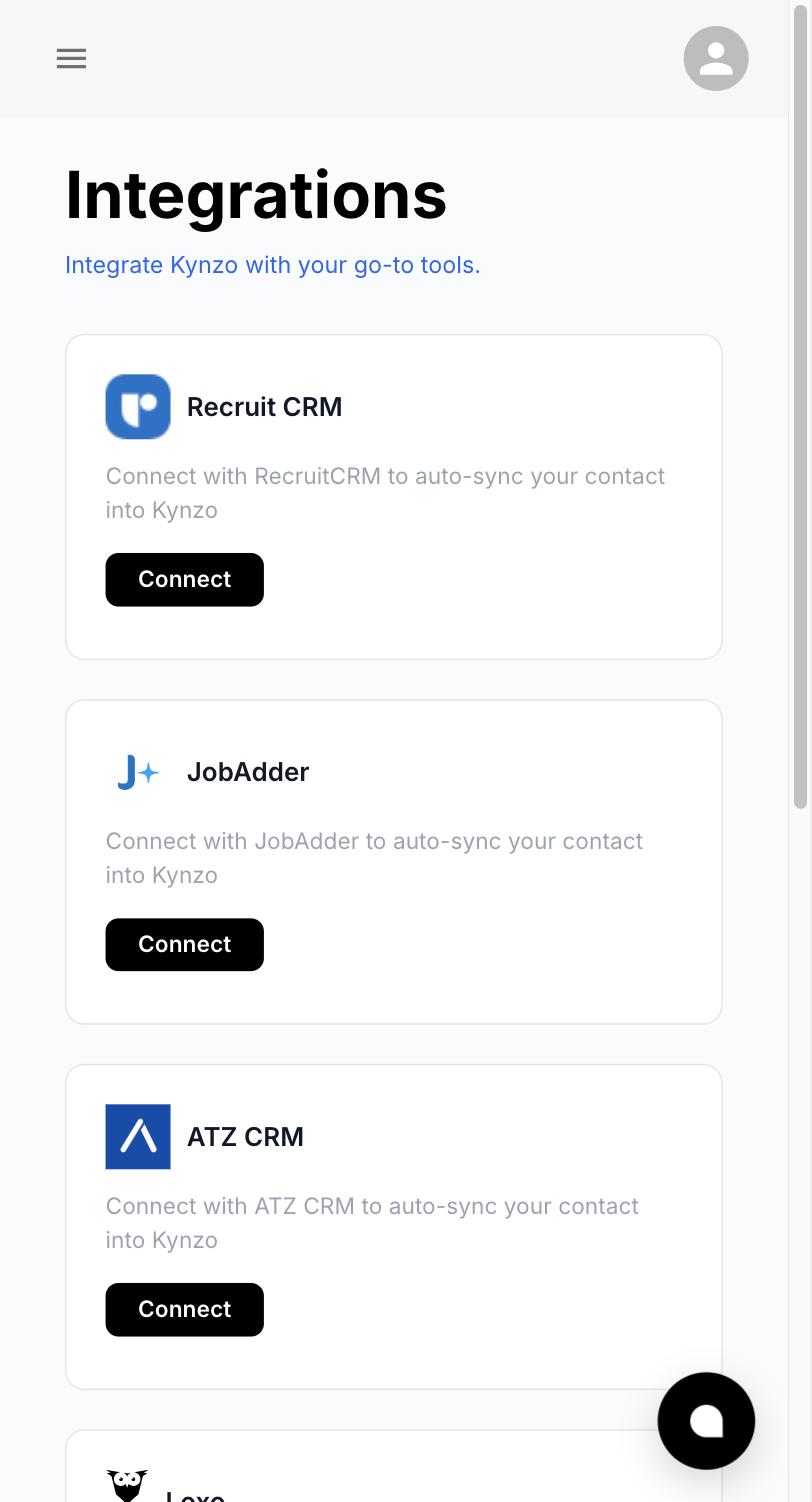
*Get the list into one place. If your agency runs a recruiting CRM, the target accounts should already live there. Kynzo can synchronize accounts from Recruit CRM, JobAdder, Zoho Recruit, HubSpot, Crelate and Loxo, and you can also save profiles or posts manually. The point is that your targets feed into a dedicated Customer Feed, so you watch only the people you chose, not LinkedIn's general feed.
Step 2: Build familiarity before you send anything
The familiarity phase is where most recruiters lose patience. It is also where warm outreach earns its name.
The idea: for roughly two to four weeks, you become a recognizable, useful presence in the target's feed. You do this through thoughtful comments on their posts and their company's posts, not through connection requests or messages. By the time you reach out, your name is not new.

What a good comment does
A comment that builds familiarity does one of three things: it adds a specific fact or experience, it asks a real question, or it respectfully extends the author's point. A comment that says "Great post!" does none of them. It might even work against you, because it signals you are farming engagement.
Compare:
- *Weak: "Congrats on the growth! Let me know if you need help hiring."
- *Strong: "Scaling the data team from 6 to 20 in a year usually breaks onboarding first. Curious whether you are hiring senior engineers ahead of the platform lead or after."
The second shows you understand the problem, invites a reply, and pitches nothing. For more patterns, see our collection of LinkedIn comment examples . If you want a quick draft to react to, the free LinkedIn comment generator produces comment options you can edit.
How often to show up
Consistency matters more than intensity. A realistic routine is one or two comments per target account per week, spread across the days they post. Hiring managers who see your name three or four times over a month will recognize it, and that recognition is what a connection request then leans on.
A simple weekly rhythm for a recruiter handling 40 targets:
| Day | Task | Time | |---|---|---| | Monday | Review the target feed and comment on 8 to 10 posts | 20 minutes | | Tuesday | Review signals, note replies and profile views | 10 minutes | | Wednesday | Comment on 8 to 10 posts, reply to anyone who responded | 20 minutes | | Thursday | Send connection requests to accounts that have engaged | 10 minutes | | Friday | Message the accounts that moved to warm or hot | 15 minutes |
That is under 90 minutes a week, which is why it survives a busy desk.
Step 3: Let the feed do the filtering
The hard part is not writing comments. It is seeing the right posts at the right moment. LinkedIn's general feed mixes your targets with everyone else, and a hiring manager's post about a new team can scroll past while you are looking at someone's vacation photos.
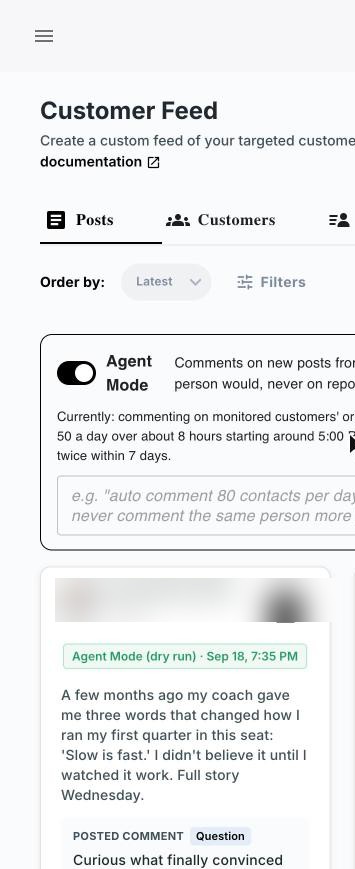
A dedicated feed solves this. Kynzo's Chrome extension and Customer Feed collect posts and activity from the hiring managers and company accounts you chose, so you can work through them in one sitting instead of hunting. Installation of the extension is free, and in-feed commenting works directly on LinkedIn.
This is the step where a purpose-built tool saves the most time. Doing it by hand means keeping a spreadsheet of profile URLs, opening each one, and checking for new posts. With the feed, the posts come to you, and your list stays in sync with your CRM.
Step 4: Draft comments in your own voice, at a human pace
Once you have the posts, you need comments that sound like you. Kynzo's AI Agent drafts or publishes context-aware LinkedIn comments using your voice and specialized tones. You can set active hours, daily caps and randomized delays, so activity follows a realistic human rhythm instead of landing in bursts.
Two habits keep this working in your favor:
- *Read what the agent drafts for the first few weeks. Adjust the tone until the comments match how you actually talk to clients. A comment from a retained search consultant should not read like a staffing agency's promotional blast.
- *Keep your caps modest. Warm outreach is about the quality of attention on a small list. A daily cap that fits your target list, not the maximum you could run, keeps the feed natural. Our guide to LinkedIn rate limits explains how to think about pacing.
It is worth reading LinkedIn's own position as well. LinkedIn's Help Center describes its rules on third-party software and extensions , including fake engagement. Review that page alongside your own workflow, keep your activity personal and relevant, and review drafts before they go out.
Step 5: Read the signals and decide when to reach out
Familiarity is only useful if you notice when it has worked. The signals to track, roughly in order of strength:
| Signal | What it usually means | Next move | |---|---|---| | Comment like on your comment | They saw you and approved | Keep commenting, no message yet | | Profile view | Curiosity about who you are | Send a personal connection request | | Reply to your comment | A live conversation has started | Continue the thread, then connect | | Connection accepted | Permission to talk directly | Send a short, specific first message | | Inbound question or inquiry | Active interest | Reply fast and propose a call |
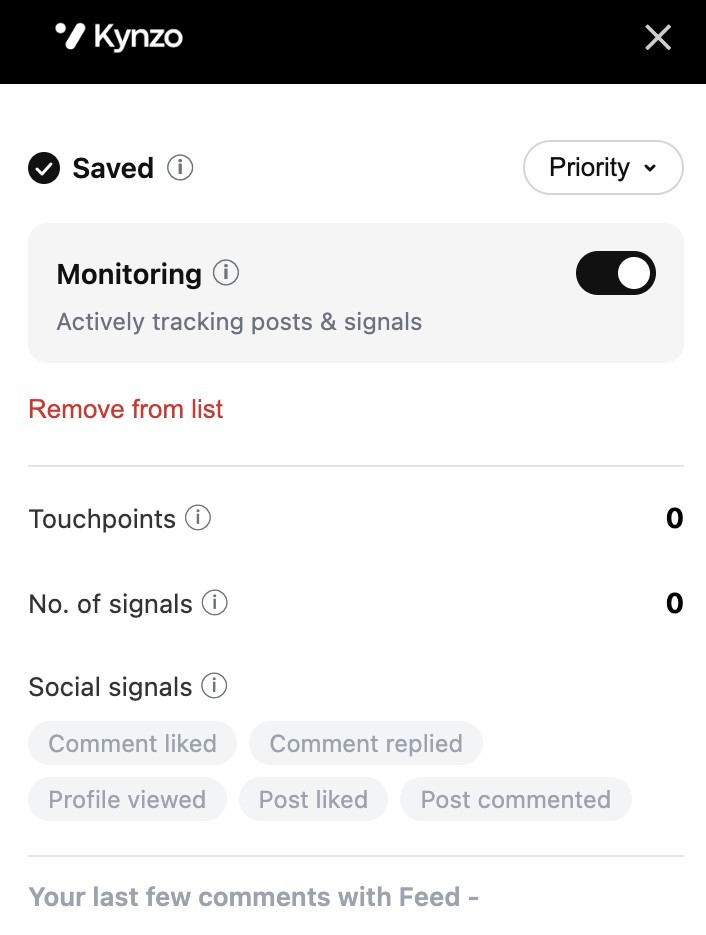
Kynzo tracks replies, comment likes, profile views, connection accepts and inquiries, so you are not relying on memory or scattered notifications. Think of it as a signal log: every target has a history, and the history tells you when a message is welcome. Our post on LinkedIn engagement signals explains how to rank them.
A practical rule: do not message on a single like. Wait for at least two signals from the same person, or one strong signal (a reply or an accepted request). That keeps your first message grounded in something real.
Step 6: Send a connection note and first message that fit the person
At this stage the hard work is done, so the message can be short. One principle applies to everything you write: it should be specific enough that it could only have been sent to that recipient, as this guide to LinkedIn introduction messages puts it.
The connection note
Reference the interaction, not your services.
"Thanks for the reply on the integration-hiring thread. I work with engineering leaders on senior searches and enjoyed your take. Would be glad to connect."
That is two sentences, no pitch, and one clear reason. More ideas are in our connection note examples .
The first message after they accept
Keep it to a few lines, tie it to a recent trigger, and ask a small question.
"Thanks for connecting. Your post about growing the platform team stayed with me. Are you hiring ahead of demand or waiting for the roadmap to settle? We have placed a few leads in that space and I am happy to share what we are seeing in compensation."
Notice what the message does not do: it does not attach a rate card, ask for 30 minutes, or list every role you can fill. It makes one relevant observation and asks one answerable question. The call request comes in the second or third exchange, once the person has engaged.
Timing the follow-up
Follow up soon after the trigger, ideally within a day or two, as the Ocean.io definition suggests. A hiring manager who replied to your comment on Tuesday will still remember it on Thursday. By the following Wednesday it is a stranger's message with an old reference. If your first message gets no reply, one gentle follow-up a week or so later is reasonable, ideally with new value such as a market note or a relevant article. After that, return to commenting and let the relationship breathe. Our guide to outreach cadence lays out a longer sequence.
Common mistakes that turn warm into cold
*Pitching in the comments. A comment is a conversation, not an ad. If the comment includes your services, the hiring manager reads it as a pitch and the familiarity you built becomes a negative.
*Commenting only when you want something. Familiarity needs a pattern. A burst of five comments the week before you pitch looks like a tactic. A steady month of useful comments looks like a person.
*Warming too many accounts. If you cannot remember what each target said last, your list is too long. Keep it to a number you can follow, then expand.
*Ignoring the replies. When a hiring manager responds to a comment and you do not answer for four days, you waste the warmest moment you will get. Reply promptly, and keep the reply as useful as the original comment.
*Sending the same first message to everyone. If two hiring managers could receive the identical note, it is a template, and the recipient can tell.
Putting it together: a 30-day warm outreach plan
| Week | Focus | Goal | |---|---|---| | 1 | Build the target list of 40 to 60 hiring managers, sync it with your CRM, choose tones and caps | List ready, feed running | | 2 | Comment one to two times per target, reply to any responses | First likes and profile views | | 3 | Continue commenting, send connection requests to accounts with signals | Accepts and replies | | 4 | Send first messages to warm and hot accounts, propose calls where a question was answered | First discovery calls booked |
Treat the first month as a pilot. At the end, review which targets moved to warm, which tone drew the most replies, and which kinds of posts produced the best conversations. Adjust the list and the comment style, then run the cycle again. The firms that get compounding results are the ones that keep the routine going quarter after quarter.
Where Kynzo fits
Everything above can be done manually, but the routine breaks down at the points where recruiters are busiest: tracking who posted, drafting comments that sound like you, pacing activity, and remembering who showed interest. Kynzo handles those steps in one workflow: the Customer Feed for your target hiring managers, CRM synchronization with Recruit CRM, JobAdder, Zoho Recruit, HubSpot, Crelate and Loxo, an AI Agent that drafts or publishes comments in your voice with active hours, daily caps and randomized delays, and tracking of replies, comment likes, profile views, connection accepts and inquiries.
Plans start at $12.90 per month for Starter, with Pro at $30 per month and Elite at $50 per month, and the Chrome extension installs free. See the Kynzo pricing page to compare plans, or look at the Kynzo platform overview first.

For teams, the benefit is consistency: every consultant works the same target list the same way, and the agency owner sees which relationships are warming before the pipeline reflects it.
FAQ
What is the difference between warm and cold outreach on LinkedIn?
Cold outreach goes to someone with no prior connection to you, so the message must create relevance from scratch. Warm outreach starts after a link exists, such as a comment exchange, an accepted request or a shared contact. For recruiters, warm outreach usually earns a reply faster because the hiring manager already recognizes your name.
How long should I warm up a hiring manager before messaging?
Two to four weeks of steady, useful commenting is a practical starting point, with one or two comments per week on their posts. The timing depends on signals, not the calendar: a reply or an accepted connection request is a better trigger than a fixed date. Once a trigger happens, message within a day or two.
What should I say in the first message to a hiring manager?
Tie it to something they posted or said, make one relevant observation, and ask a small question they can answer easily. Skip the services list and the call request in the first message. The message should be specific enough that it could only have gone to that person.
Which engagement signals show that someone is ready to talk?
Replies to your comments, accepted connection requests and direct inquiries are the strongest. Comment likes and profile views are softer, so wait for two or more before you message. Tracking them in one place, as Kynzo does, keeps you from relying on scattered notifications.
Can I run warm outreach for a whole recruiting team?
Yes. Give each consultant a clear slice of the target list, sync it with your CRM so ownership is visible, and keep every person's comments in their own voice. Shared rules on tone and daily caps keep the team's activity consistent and personal.
Sources
- What Is Warm Outreach? Definition and Examples, Ocean.io
- LinkedIn Introduction Message Templates, Social Rails
- Prohibited software and extensions, LinkedIn Help