

AI for LinkedIn Outreach: 3 Jobs, Human Review for Agency Recruiters
AI for LinkedIn outreach uses AI to draft personalized comments and messages and to orchestrate engagement sequences, so agency recruiters and search consultants can reach more hiring managers without sounding generic. The trade-off is real: scale and personalization on one side, platform risk on the other. Safety controls and human review are not optional extras. They are the price of entry.
***
*TL;DR:
>
- AI personalized first messages had a reported 4.19% reply rate versus 2.60% for non AI messages, but results depend on targeting and audience warmth.
- LinkedIn warns unauthorized automation can lead to restrictions or bans; use conservative caps, randomized delays, gradual ramp up, and pause sequences when prospects reply.
- Record a 30 day manual baseline before piloting, then compare acceptance, replies, meetings, and placements with pilot results, including review time in total cost.
- Prioritize drafts tied to specific post details and your voice, documented pacing controls, pause on reply, CRM sync, and outcome tracking rather than send counts.
- Publicly verified ROI evidence for agency recruiters is scarce, so ask vendors for methods and baselines, then test a defined segment of your own pipeline.
***
Table of Contents
- What does AI for LinkedIn outreach actually do?
- Which features should you evaluate before choosing a tool?
- How does LinkedIn's compliance position affect your account?
- What results can you realistically expect from AI personalization?
- How should agency recruiters choose an AI outreach solution?
- How do you implement AI outreach without putting your account at risk?
- Which ATS and CRM systems should the tool integrate with?
- What does onboarding look like for an agency team?
- What does it really cost to run AI outreach?
- What support and training should an agency expect?
- Are there case studies that prove ROI for agency recruiters?
- Where does Kynzo fit among recruiter-focused options?
- When should an agency adopt AI outreach?
- FAQ
- Sources
What does AI for LinkedIn outreach actually do?
At its core, this category of software does three jobs: it writes, it watches, and it sequences. Understanding each job helps you map a tool to the way you already work, rather than bending your workflow to fit a vendor's demo.
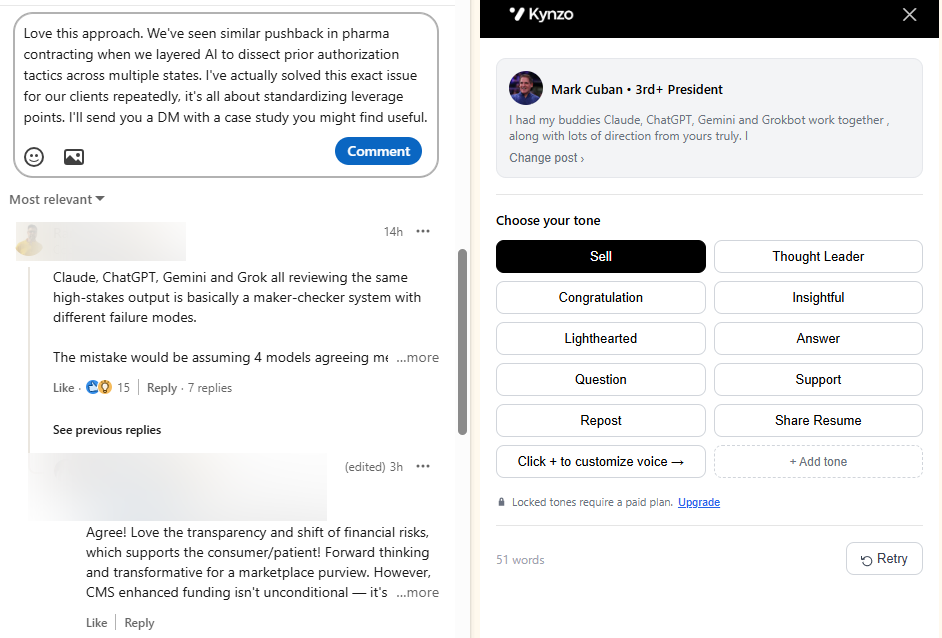
*Writing. The AI drafts first messages, connection notes and public comments. Good drafting is context-aware: it reads the post, the author's role and the tone of the thread, then proposes a reply in your voice. The comment-drafting side is the one most recruiters underestimate. A thoughtful comment under a hiring manager's post is a warm, public touchpoint that does not read as a pitch. We cover that approach in our LinkedIn AI commenting guide .
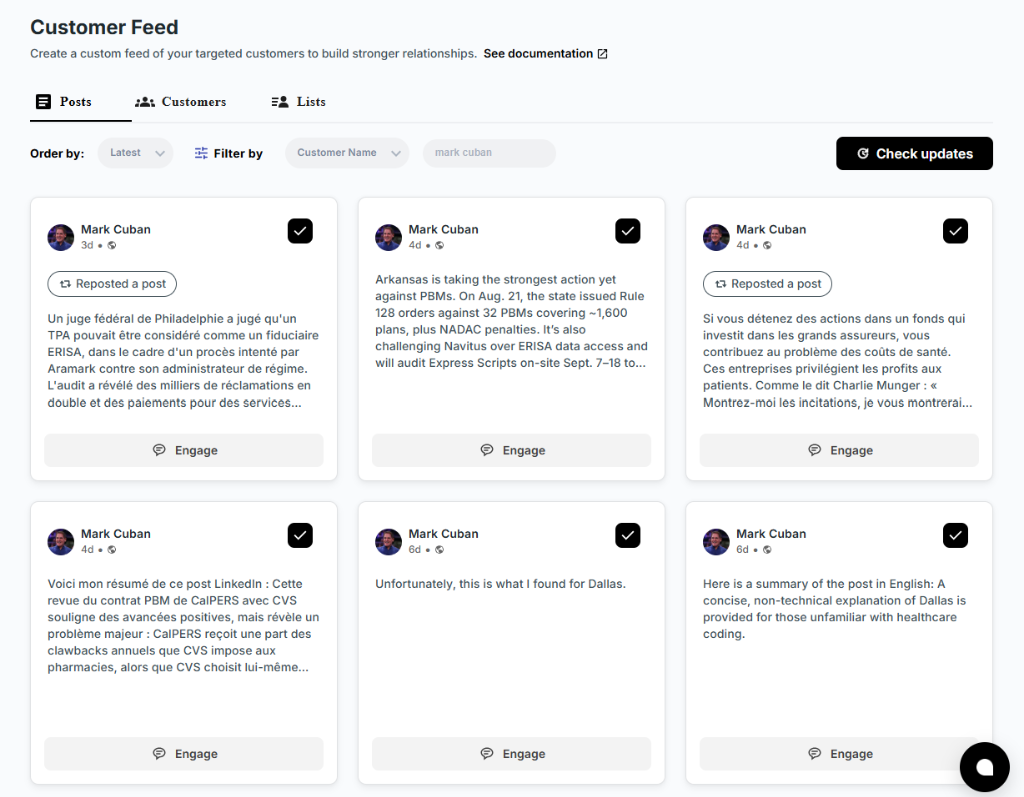
*Watching. Instead of scrolling LinkedIn's general feed, you follow a curated list of target accounts: hiring managers, talent leads and the companies you want as clients. A dedicated feed surfaces their posts and activity so you can respond while a post is still fresh. Triggers such as a new post or a job change can prompt a draft.
*Sequencing. Orchestration tools chain steps together, such as a profile view, a comment, a connection request and a follow-up, and some add email as a second channel. The sequence runs on rules you set: delays between steps, stop conditions and daily limits.
Here is how those capabilities usually break down in practice:
- *AI drafting: first messages and comments with post-level context and adjustable tone.
- *Automated triggers: actions prompted by a target's new post, comment or job change.
- *Multichannel sequencing: LinkedIn steps combined with email, so one prospect is not hit twice at the same moment.
- *CRM sync: target accounts pulled from your recruiting CRM so the feed reflects the clients you actually care about.
- *Signal tracking: replies, comment likes, profile views, connection accepts and inquiries, logged so you can see when someone is warm enough for a direct message.
That last item is where the value compounds. Drafting saves minutes. Signal tracking tells you where to spend your afternoon.
Which features should you evaluate before choosing a tool?
Vendor pages all promise personalization and safety. The differences show up in the details, so evaluate these areas in order.
Personalization depth
Real personalization references something specific: a line from the post, a recent promotion, a funding announcement, a team expansion. Shallow tools swap a first name and a company into a template. Ask to see output for different posts and judge whether the drafts could only have been written for those posts. Also check voice preservation. If every draft sounds like the same cheerful assistant, your prospects will notice quickly.
Automation controls
This is where account safety lives. Insist on these controls:
- Daily caps on comments, connection requests and messages, adjustable by you.
- Randomized delays between actions, so activity does not follow a metronome pattern.
- Active-hours scheduling that matches your time zone and working day.
- Pause-on-reply, so a prospect who answers is never sent the next automated step.
- Manual override at every stage, including the ability to edit or reject a draft before it posts.
Multichannel support
Pairing LinkedIn with email widens your reach and reduces dependence on a single platform. The point is coordination: a unified view of who has been contacted, on which channel and when. Without it, you risk double-touching the same hiring manager, which is how outreach starts to feel like spam.
Analytics and attribution
The metrics that matter are connection acceptance rate, reply rate and engagement signals per target account. Better still is CRM attribution: can you trace a booked call or a client meeting back to the comment that started it? If a tool only reports sends, it is measuring activity, not outcomes. A buyer's guide such as Overloop's comparison of LinkedIn outreach tools shows how vendors differ on pricing, channels and documented controls, and it can serve as a feature matrix when you build your own scorecard.
Operational fit
Check multi-account support if several consultants share a license, the list of CRM connectors, and whether you can export your data if you leave. A tool that traps your target lists is a liability.
How does LinkedIn's compliance position affect your account?
LinkedIn's user agreement does not welcome third-party automation. Bots, scrapers and extensions that automate or modify activity can lead to account restrictions or bans, and a compliance checklist for LinkedIn automation recommends staying within activity limits, scaling gradually, mixing manual and automated actions, and watching for unusual activity. We treat that as the baseline for every tool decision. Be cautious of any vendor that promises to eliminate risk.
Detection tends to key on patterns rather than single actions. The signals worth knowing:
- Rapid, uniform actions at fixed intervals.
- Repeated templates sent to many people.
- Login anomalies, such as sudden changes in device or location.
- High daily volumes on an account with little history.
The safeguards that answer those patterns are the same controls listed above, plus discipline on your side:
- Ramp up gradually instead of switching on full volume on day one.
- Keep daily caps conservative and treat vendor defaults as a ceiling, not a target.
- Use randomized delays and active hours.
- Pause on reply and hand the conversation to a human.
- Keep a mix of manual activity alongside anything automated.
Monitoring closes the loop. A falling acceptance rate or a sudden drop in replies is an early warning that your pattern looks unnatural or your messaging has gone stale. Check these numbers daily during the first weeks, and cut volume the moment they slip.
*Compliance reference: LinkedIn's user agreement and the automation compliance checklist both warn that unauthorized automation puts accounts at risk of restriction or ban, which is why gradual ramp-up, caps and monitoring belong in any tool you adopt.
This is the one place we state a caveat without softening it: automation carries account risk, and the controls reduce it but cannot erase it.
What results can you realistically expect from AI personalization?
Benchmarks help you judge vendor claims, but treat them as ranges, not promises. One published benchmark summary reports that AI-personalized first messages drew a 4.19% reply rate versus 2.60% for non-AI messages , a lift of 61% for the AI-written first touch.
*The takeaway: the same source reports a 4.19% reply rate for AI-personalized first messages against 2.60% for non-AI, so AI earns its place on the first touch.
Top-performer claims describe the best campaigns, not the average, and depend on tight targeting and a warm audience. Your agency results will depend on factors such as targeting and audience warmth.
Two patterns are worth planning around:
- *Hybrid wins. AI tends to do well on the first personalized message. Humans often do better on follow-ups, where nuance, timing and judgment matter.
- *Targeting beats volume. A smaller, well-chosen list with relevant drafts outperforms a large list with generic ones.
When a vendor quotes impressive results, ask for anonymized campaign data mapped to acceptance and response rates, audience size and the period measured. A claim with no method behind it is marketing, not evidence.
Track these metrics from day one:
- Connection acceptance rate.
- Reply rate on first messages and on follow-ups.
- Engagement signals per target account: comment replies, profile views, likes.
- Meetings booked, attributed to the originating touchpoint.
Set your own baseline during a manual period first, then compare. Without a baseline, every improvement is a guess.
How should agency recruiters choose an AI outreach solution?
Choose by workflow, not by feature count. Agency business development usually moves through three stages: identify the right hiring managers, engage them warmly over time, and carry the relationship into your CRM. A tool should support all three without forcing you to babysit it.
Work through this decision framework in order:
- *Define your target list first. Know which hiring managers and client companies matter before you evaluate anything.
- *Score each vendor on safety controls. Daily caps, randomized delays, active hours and pause-on-reply should be documented, not implied.
- *Test personalization on real posts. Judge the drafts, not the marketing page.
- *Confirm CRM connectors. Check that your recruiting system is supported and that sync runs in the direction you need.
- *Ask what signals are tracked. Replies, likes, profile views, connection accepts and inquiries should all be visible.
- *Clarify data handling. Ask how long data is retained and whether you can export it.
- *Pilot before you commit. Run a small, time-boxed trial with clear success criteria.
Put these questions to every vendor in the demo:
- How exactly does pacing work, and can I change the limits?
- Which CRMs do you connect to, and what data moves each way?
- What happens when a prospect replies?
- What are your retention and export policies?
- What does support look like in the first month?
Trust signals deserve weight too: documented controls, reachable support, case examples with stated methods, and product-level safety features rather than vague reassurance. Public reviews on sites such as G2, for example user reviews of Expandi , can show how real users describe automation and personalization, though you should read them as one input among several.
Industry commentary points the same direction. A Vc describes newer AI-first tools as focused on relevance and personalization rather than volume, and recommends a content-first approach with multichannel orchestration and gradual ramp-up.
How do you implement AI outreach without putting your account at risk?
Start with content, not with sends. The safest outreach begins with engagement: commenting on posts, appearing in your targets' notifications and building recognition before you ever send a pitch. Here is a rollout that keeps humans in control.
- *Build a manual baseline for about 30 days. Comment, connect and message by hand. Record acceptance and reply rates so you have something honest to compare against.
- *Load your target accounts. Pull hiring managers and client companies from your CRM, or save profiles and posts manually, so the feed shows only the people who matter.
- *Turn on AI drafting with approval. Review every draft before it posts. Edit anything that does not sound like you.
- *Add small automated volumes. Raise limits in small steps while watching acceptance and reply rates. Keep caps conservative.
- *Apply the hybrid rule. Let AI handle the first personalized touch. Take over personally once a prospect replies, and let pause-on-reply enforce it.
- *Set auto-stop rules. If acceptance rate falls or replies dry up, the system should slow down or stop without waiting for you to notice.
- *Monitor on a schedule. Check metrics daily in the early weeks, then weekly. Run small A/B tests on openers and comment styles, changing one variable at a time.
A content-first approach also changes how your messages land. When a hiring manager has already seen three thoughtful comments from you, a connection request is no longer a stranger's cold pitch. The signal log, meaning the record of who replied, liked or viewed, tells you when to move from public engagement to a direct message.
Keep the human role clear. AI proposes, you decide. That division is what separates a relationship-building workflow from mass messaging, and it is what keeps your recruiter voice recognizable.

Which ATS and CRM systems should the tool integrate with?
Your CRM or applicant tracking system holds the accounts and contacts that matter, so integration decides whether an outreach tool fits your day or sits beside it as one more tab. The practical question is direction and depth: does the tool read your target accounts from the CRM, write engagement activity back, or both?
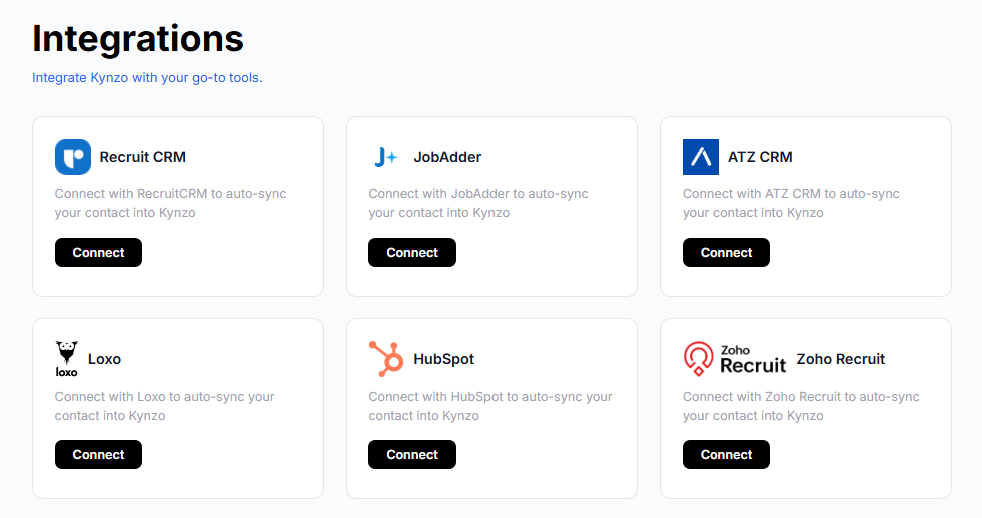
At minimum, look for a connector to the system your agency already runs. Recruiting platforms commonly used by agencies include Recruit CRM, JobAdder, Zoho Recruit, Crelate and Loxo, and general-purpose CRMs such as HubSpot are common too. We sync with all of these, so recruiters can bring target accounts straight into the feed instead of rebuilding lists by hand.
When you evaluate any vendor, ask:
- Which systems are supported natively, and which need a workaround?
- Is sync one-way or two-way, and how often does it refresh?
- Can engagement signals such as replies and profile views appear on the contact record?
- What happens to duplicates and to contacts removed in the CRM?
If a vendor cannot answer these plainly, assume the integration is shallower than the logo wall suggests. Manual saving of profiles and posts should remain available as a fallback for contacts that live outside your CRM.
What does onboarding look like for an agency team?
A realistic setup can be relatively quick, but the safe version includes a deliberate waiting period. Here is a timeline that works for a small agency team:
- *Day 1: Install and connect. Add the browser extension, sign in and connect your CRM if the tool supports it. Pick a voice setting and review sample drafts.
- *Days 2–3: Build the target list. Sync client accounts and hiring managers, or save profiles and posts manually. Group targets by priority so the feed is not overwhelming.
- *Days 4–7: Draft with approval. Review every comment before it posts. Adjust tone, active hours and daily caps. Keep volumes low.
- *Weeks 2–4: Hold a steady, low pace. Watch acceptance and reply rates against your manual baseline. Fix weak drafts and refine your target list.
- *Month 2 onward: Scale in steps. Raise limits gradually if metrics hold, and add team members one at a time.
Teams with several consultants should decide early who owns which targets, so two people do not comment on the same hiring manager's post. Written conventions for voice, approval and escalation take an hour to draft and prevent weeks of friction.
What does it really cost to run AI outreach?
Total cost of ownership is more than the subscription. Count the license, the seats, any usage limits on drafts or accounts, and the time your team spends reviewing and monitoring. Cheap tools that demand constant babysitting are not cheap.
For reference, our plans are listed on our pricing page : STARTER at 12.90 USD per month, PRO at 30 USD per month and ELITE at 50 USD per month. Our standalone tools, including the comment generator, Boolean search generator and connection request checker, are available to try on the tools page .
When comparing any vendor, put these line items side by side:
- Subscription tier and what it caps, such as accounts, drafts or tracked targets.
- Per-seat charges as your team grows.
- Add-ons for integrations or extra channels.
- Review time per day, multiplied by consultant hourly cost.
- Cost of switching, including whether you can export your data.
The calculation that matters is cost per warm conversation, not cost per message sent. One client meeting that traces back to a comment can outweigh a year of subscription fees for a high-fee search, though your own numbers will vary.
What support and training should an agency expect?
Recruiters are not growth marketers, and a tool built for generic sales teams will leave them guessing. Look for support that speaks the language of agency business development: how to pick target hiring managers, what to comment on, when to move to a direct message.
Evaluate support across these areas:
- *Onboarding help: a guided setup, not just a help-center link.
- *Training content: playbooks, comment examples and routines written for recruiters. Our blog carries guides of this kind.
- *Responsiveness: a real person who answers within a working day, especially during your first month.
- *Safety guidance: clear advice on caps, ramp-up and what to do if metrics drop.
Ask for a sample of the training material before you buy. If it reads as generic social-selling advice, expect to figure out the recruiter-specific parts on your own.
Are there case studies that prove ROI for agency recruiters?
Honest answer: public, independently verified case studies tying AI-powered LinkedIn outreach to agency recruiter revenue are scarce, and we will not invent one. What exists is a mix of vendor testimonials, benchmark summaries and anecdotal user reviews.
So build your own evidence. A simple ROI test looks like this:
- Record your manual baseline for 30 days: acceptances, replies, calls booked.
- Run the tool on a defined segment of targets for a set trial period.
- Compare warm conversations, meetings and placements or retained searches that trace back to the engagement.
- Divide total cost, including review time, by the outcomes.
When a vendor offers a case study, ask for the method: how many targets, what time period, which metrics and what the baseline was. Review sites such as G2's reviews of Salesflow can add user perspective on multichannel automation and personalization, though individual reviews are anecdotal. The most trustworthy proof is the one you generate on your own pipeline.
Where does Kynzo fit among recruiter-focused options?
We built Kynzo as a Chrome extension and SaaS platform for agency recruiters, recruitment agency owners and search consultants who want warm client relationships instead of mass messaging. Here is how it maps to the checklist above:
- *In-feed commenting: reply to hiring managers inside LinkedIn, in a dedicated Customer Feed that shows only the targets you chose.
- *AI comment drafting in your voice: our AI Agent drafts or publishes context-aware comments in specialized tones.
- *Pacing controls: active hours, daily caps and randomized delays.
- *CRM syncs: Recruit CRM, JobAdder, Zoho Recruit, HubSpot, Crelate and Loxo.
- *Engagement-signal tracking: replies, comment likes, profile views, connection accepts and inquiries.
You can start with no commitment. Try our free LinkedIn Comment Generator to see how drafts read in your voice, test the Boolean search tool and connection request checker, or view our pricing plans when you are ready to run a pilot. Our homepage walks through the full workflow.

When should an agency adopt AI outreach?
My view: not on day one. Wait until you have a manual baseline, because without one you cannot tell whether the tool helped or merely kept you busy. Then scale in small steps, keep a human on every conversation that replies, and start with low-risk segments, such as warm contacts or smaller client accounts, before touching your highest-value targets. Speed is tempting, but a restricted account costs far more than a slow month. The agencies that win with AI are the ones that treat it as a drafting assistant with guardrails, not an autopilot.
*— Jenny
FAQ
Can LinkedIn outreach be automated?
Yes, technically, but LinkedIn's user agreement discourages unauthorized automation and a compliance checklist warns that it can lead to restriction or a ban. Use daily caps, randomized delays and manual review to reduce risk.
What is the best tool for LinkedIn outreach?
It depends on your workflow. Agency recruiters should prioritize CRM sync, documented pacing controls, drafting in their own voice and engagement-signal tracking. A buyer's guide comparing outreach tools can help you build a feature scorecard.
Is Dripify worth it?
Evaluate it, like any tool, against your own criteria: safety controls, personalization depth, CRM integration and total cost. Read third-party reviews, run a short pilot and judge it on warm conversations generated, not messages sent.
Is there an AI agent that can automate LinkedIn messages?
Yes, several tools use AI to draft or send LinkedIn messages and comments. Keep a human in the loop for replies, and check that the tool offers caps, delays and pause-on-reply. Our AI Agent focuses on in-feed comments for agency recruiters.
Sources
- LinkedIn Automation Compliance Checklist: Stay Safe While Scaling
- LinkedIn Outreach Benchmarks 2026: What - DEV Community
- 13 Best LinkedIn Outreach Tools: Automation Compared
- Vc