

AI LinkedIn Comments: How Recruiters Use Them Without the Slop
AI can write a LinkedIn comment in seconds, but a comment that sounds like everyone else's does more harm than silence. The recruiters who get value from AI treat it as a drafting assistant: you bring the specific insight about the hiring manager's post, the AI tightens it, and a human decides what gets published. This guide covers what LinkedIn is doing about AI comments, where AI helps and hurts, and a daily routine built for agency recruiters who want warmer client conversations.
Key takeaways
- LinkedIn says AI help is fine, but comments need to represent your voice and perspective . Generic output is what gets punished.
- Automation is under active attack: LinkedIn now blocks hundreds of thousands of automated comment attempts daily , and it has added a "seems like AI slop" report option.
- The winning split is your insight first, AI structure second. Never let a tool write a comment from nothing.
- For agency recruiters, the target is a short list of hiring managers, not the whole feed. Quality on 30 accounts beats volume on 3,000.
- Track replies, profile views and connection accepts. They tell you when a warm message makes sense.
Table of Contents
- What LinkedIn is doing about AI comments
- Why generic AI comments fail with hiring managers
- Where AI actually helps
- Feed AI your voice, not just the post
- Build a target list before you comment
- A 20-minute daily routine
- Pacing and safety: treat automation with care
- Read the signals, then reach out
- Where Kynzo fits
- Common mistakes to avoid
- FAQ
- Sources
What LinkedIn is doing about AI comments
The platform's stance is more nuanced than "AI is banned." According to Yahoo Tech's report , LinkedIn says it does not want to punish people for using AI tools, only for posting low-value content that lacks original insight, expertise or perspective. It uses AI-based systems to detect generic posts and bot activity.
Three developments matter for recruiters:
- *A report button. In July 2026 LinkedIn announced a "seems like AI slop" reporting option . Your comment on a VP of Talent's post can now be flagged by that VP's network.
- *Reduced visibility for automated comments. In August 2025, LinkedIn said it would limit the visibility of comments made with automation tools . Flagged comments can drop out of the most relevant view, which defeats the point if your goal is to be seen by a client.
- *Penalties for template engagement. ContentIn's glossary explains the "comment for better reach" pattern : comments left only to boost a post's distribution. Shared phrases and pods create clusters of similar signals that look like coordinated noise rather than real conversation.
The practical read: LinkedIn is looking at both the language (does this read like a stock AI reply?) and the behavior (speed, volume, repetition). You have to pass both tests.
Why generic AI comments fail with hiring managers
You have seen the pattern. Someone posts about a hard hire, and the replies are "Great insights! Thanks for sharing" or a neat summary of the post restated back to the author. Gergely Orosz called out how common comments that simply summarize a post with ChatGPT have become. Reddit threads show users asking whether to even reply to them.
For a recruiter, the cost is higher than for a general creator. A hiring manager scanning notifications decides in a second whether you are a peer who understands their problem or a vendor running a script. A summary comment says vendor. It also teaches the manager to mentally filter your name, which makes the later outreach harder.
There is a second failure: the opener. The research we reviewed highlights that the hook is the most important element and that stock openers such as "In today's fast-paced world" kill momentum at once. In comments the same rule applies in miniature. If your first six words could sit under any post, the comment is wasted.
Where AI actually helps
The approach that holds up is your insight first, AI's structure second. The human supplies the specific context. The AI sharpens, trims and checks tone. Here is how that divides in practice.
| Task | Human | AI | |---|---|---| | Decide which post deserves a comment | Yes | Surfaces candidates | | Supply the market insight (a hiring trend, a candidate-side observation) | Yes | No | | Draft the first version | Short notes | Expands notes into a sentence or two | | Match your voice and tone | Sets the rules | Applies them consistently | | Remove stock phrases | Reviews | Flags likely culprits | | Final publish decision | Yes, at least at the start | Optional later |
That last row is the safety question, and we address it below. First, the writing itself.
A three-part comment structure
Use this structure on every comment you draft, with or without AI:
- *Anchor. Point to one specific thing in the post: a number, a claim, a phrase. This proves a human read it.
- *Add. Contribute something the author did not say: an observation from your desk, a counterpoint, a market detail.
- *Open. End with a light question or a thought that invites a reply, not a pitch.
Keep it to two to four sentences. No links, no mention of your agency, no calendar ask.
Before and after: a worked example
Say a VP of Engineering at a fintech posts that their team took five months to fill a senior backend role and they are rethinking the interview loop.
*Generic AI comment:
Great post! Hiring is so challenging today. Thanks for sharing these valuable insights.
*Summary-style AI comment:
You make a great point that long hiring processes can cost companies top talent. Shortening the interview loop is key.
*Anchor, Add, Open comment:
Five months for one senior backend hire says a lot about how long strong candidates stay on the market. In the searches we run, the drop-off usually happens between the first technical screen and the panel. Did you find the delay was scheduling or the number of rounds?
The third version is one a manager might answer. It also contains something no one else in the thread will have written, because it comes from your actual searches. If you want more patterns like this, our LinkedIn comment examples post walks through additional scenarios.
Feed AI your voice, not just the post
Most AI comment output sounds the same because most users give the tool only the post text. James Meads put the fix simply on LinkedIn: give it examples of what works and describe the tone . Do three things:
- *Paste in five comments you wrote that got replies. The tool learns your rhythm, sentence length and vocabulary.
- *Write a banned list. Include "Great post," "Thanks for sharing," "Spot on," "Love this," and any phrase you would never say on a call.
- *Name the stance. "Peer to peer, curious, no selling" is a better instruction than "professional."
A second habit from a Substack on writing comments with agents : periodically review a batch of your recent comments, find the patterns you like, and find where the output slipped back into AI defaults. Do this weekly and your instructions get sharper.
The same principle of using AI for a draft and a person for the final call shows up well beyond LinkedIn. One example is AI drafts with human review when recruiters produce job ads for several languages.
Build a target list before you comment
The best AI comment in the wrong place does nothing. LinkedIn's general feed is crowded with creators, thought leaders and memes, and the posts you care about, from a hiring manager at a target account, scroll past unseen.
Start with a list of 25 to 50 people: hiring managers, heads of talent and founders at companies whose searches you want. Pull them from your CRM, since those are the accounts you already know matter. Then view only their activity, not the whole feed.

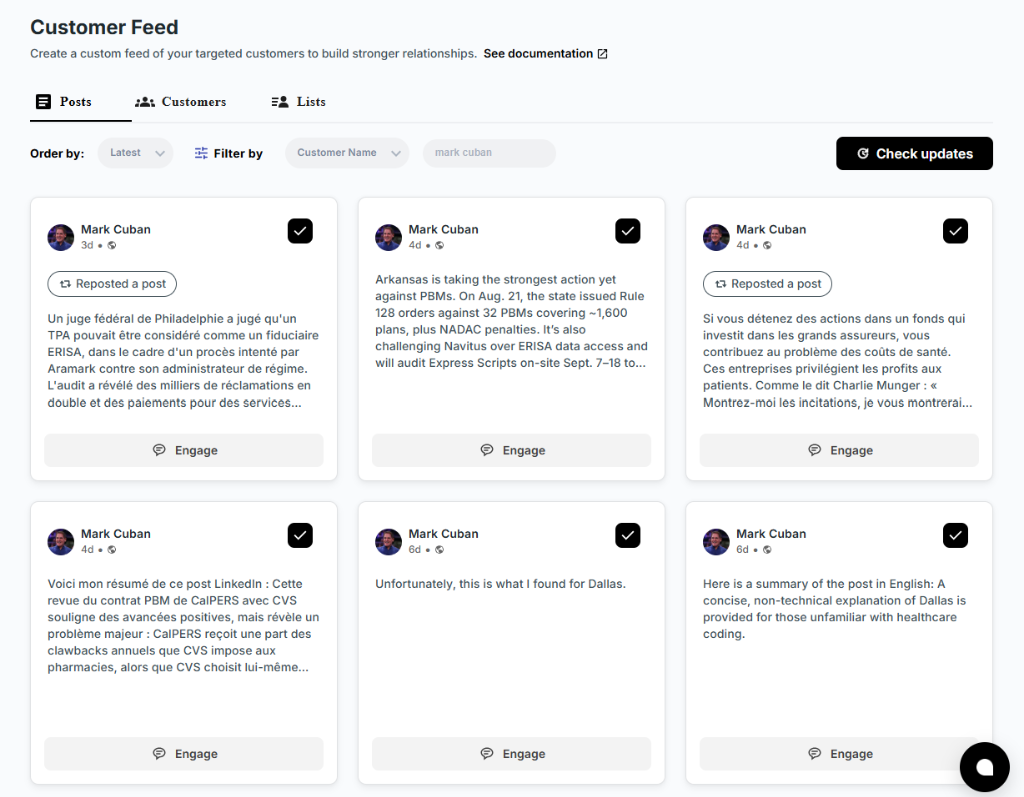
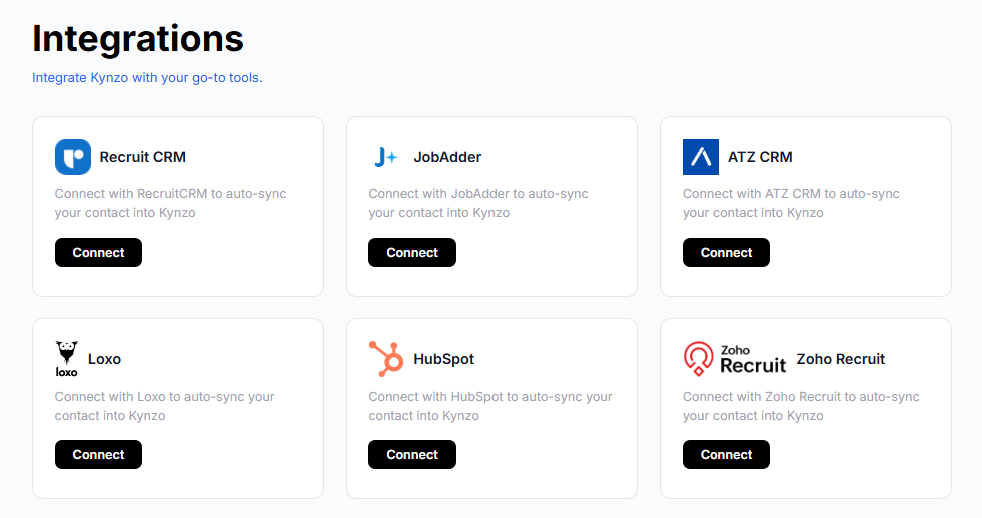
This is the problem Kynzo was built around. The Chrome extension and the Customer Feed collect posts from your target hiring managers and company accounts in one place. Kynzo can sync accounts from Recruit CRM, JobAdder, Zoho Recruit, HubSpot, Crelate and Loxo, and you can also save profiles or posts by hand. That means your commenting time goes to the people who might become fee-paying clients.
If you are still deciding how to structure this, our guides on LinkedIn comment strategy and the AI commenting guide cover the planning side.
A 20-minute daily routine
A routine you can keep beats a burst you abandon. Here is a pattern that fits between calls:
| Time | Action | |---|---| | 8:30 | Open your target feed. Scan for posts from the last 24 hours. | | 8:35 | Pick 5 posts where you have a real view. Skip the rest. | | 8:40 | Write a two-line note for each: your observation in plain words. | | 8:45 | Generate drafts from your notes, then edit each one. Delete stock phrases. | | 8:50 | Publish. Spread them out rather than posting all at once. | | 4:30 | Check replies. Answer every one within the day. |
Five thoughtful comments a day on a defined list is roughly 100 touches a month, enough that a hiring manager has seen your name many times before you ever message them.
We would rather you comment on five posts and mean it than on fifty and risk a pattern. Semrush's analysis of 89,000 LinkedIn URLs cited in AI search found that relevance and consistency matter more than virality , with the most cited content often showing only modest engagement. Steady and specific wins.
Pacing and safety: treat automation with care
There is a real difference between an assistant that drafts and a bot that publishes. LinkedIn's own enforcement is aimed at the second. If you let any tool post for you, you are accepting some platform risk, and you should decide that deliberately.
Controls that reduce the robotic signature:
- *Active hours. Comment during the hours you would actually be online.
- *Daily caps. A low ceiling keeps your volume human.
- *Randomized delays. Comments should not land at fixed intervals.
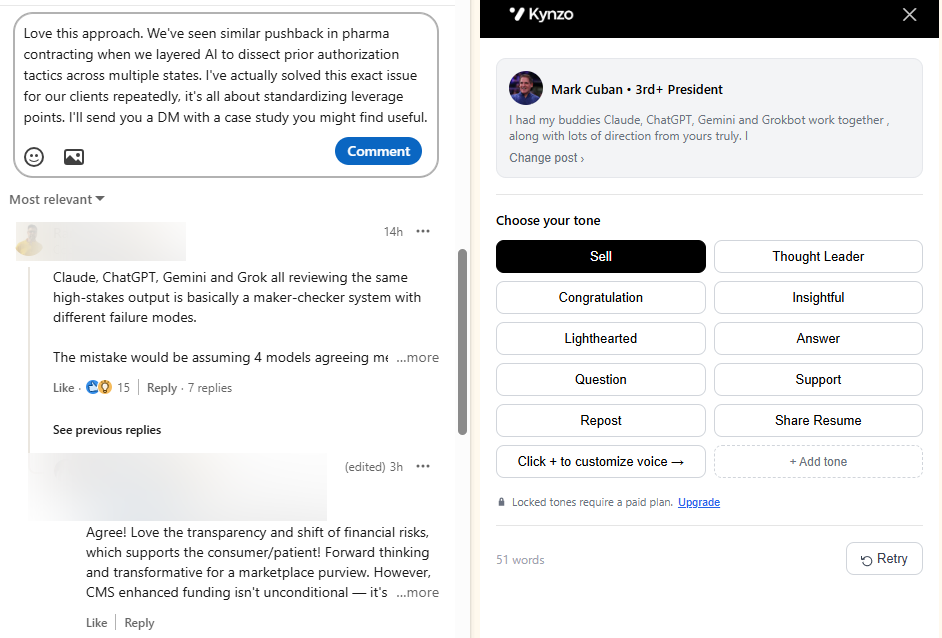
- *Tone and voice settings. Different tones for a founder versus a head of talent.
- *Review before publish. The conservative option is to approve every draft yourself.
Kynzo's AI Agent offers these: it drafts or publishes context-aware comments in your voice, with specialized tones, active hours, daily caps and randomized delays. Our advice is to begin in draft mode, read every comment for a few weeks, and only then decide how much to hand off. Whichever route you choose, no tool removes the need to read what goes out under your name. For the tradeoffs in more depth, see our comparison of automation approaches .
And skip engagement pods. They are the clearest example of the pattern LinkedIn's systems are tuned to catch, and they put your comments in front of other recruiters instead of clients.
Read the signals, then reach out
Commenting is a means to a conversation, not the conversation itself. The signal log tells you when to move:
- *A reply to your comment. The strongest sign. Respond, then consider a connection request.
- *A profile view after a comment. They looked you up. Worth noting, not yet acting on.
- *A connection accept. Warm context exists. A short message referencing your comment thread now feels natural.
- *A direct inquiry. Respond personally and promptly.
- *Comment likes. Mild interest. Keep commenting.
Kynzo tracks replies, comment likes, profile views, connection accepts and inquiries so you can see which hiring managers have warmed up. When you do reach out, refer to the earlier exchange and keep the note short. Our LinkedIn connection request checker previews your note and its length before you send. For deeper reading on what to measure, see LinkedIn engagement metrics .
Where Kynzo fits
If you recruit for agencies and your growth depends on a handful of high-fee clients, a dedicated feed, CRM sync, an AI Agent that writes in your voice and a signal tracker in one place saves real hours. Kynzo has a free Chrome extension, and paid plans are listed on the pricing page : Starter at 12.90 USD per month, Pro at 30 USD per month and Elite at 50 USD per month.
Want to test the writing first? The free LinkedIn comment generator lets you try drafts before you commit to anything. Other tools exist in this space, and some are plain writing assistants that leave publishing entirely to you. We built Kynzo for recruiters specifically, which is why the feed, CRM sync and signal tracking are part of it.
Common mistakes to avoid
- *Commenting on everything. Pick posts where you have something to add.
- *Letting AI start from scratch. Without your notes, you get summary comments.
- *Pitching in the thread. A comment that sells gets ignored or reported.
- *Ignoring replies. If someone answers and you stay silent, you wasted the comment.
- *Reusing phrases. Repeated wording across comments creates the template pattern that systems flag.
- *Measuring by likes alone. Replies and connection accepts are the numbers tied to revenue.
FAQ
Does LinkedIn allow AI-written comments?
LinkedIn has said it is fine to use AI to help you write, as long as your comments represent your voice and perspectives. What it targets is low-value, generic content and automated activity. A comment you reviewed, edited and posted yourself is on the safest side of that line.
Can LinkedIn detect AI comments?
LinkedIn says it uses classifiers to spot both AI-style language and automation behavior such as speed, volume and repetition, according to Social Media Today . Readers can also report comments that seem like slop. Specific, personal comments are far less likely to trigger either.
How many LinkedIn comments should a recruiter post per day?
There is no official number. We suggest starting with around five considered comments a day aimed at your target hiring managers, then adjusting as you see replies. Lower volume with real content is safer and more effective than a high count.
Should I reply to AI-generated comments on my own posts?
Only if they say something worth answering. A generic comment does not deserve a long reply, and you can leave it alone. Spend your time on the people who add real points, especially hiring managers.
Sources
- AI in LinkedIn Posts: How It Affects Your Reach in 2026
- LinkedIn adds a button to report AI-generated slop (TechCrunch)
- LinkedIn Outlines New Measures To Combat Fake Engagement (Social Media Today)
- What Is CFBR on LinkedIn? (ContentIn)
- LinkedIn Is Fighting Back Against AI Slop (Yahoo Tech)
- We Analyzed 89K LinkedIn URLs Cited in AI Search (Semrush)
- Gergely Orosz's LinkedIn post
- James Meads on spotting AI-written comments
- How I write 10+ LinkedIn comments in 20 minutes