

Dux-Soup Alternatives for Agency Recruiters in 2026
The best Dux-Soup alternative depends on what you are replacing it for. If you want higher-volume connection requests and drip sequences, look at cloud tools such as Expandi, Waalaxy or HeyReach. If you are an agency recruiter who wants warm client conversations with hiring managers, a comment-first tool like Kynzo fits better than any sequence builder. Below we compare the realistic options on workflow, CRM fit, pricing and account risk, then give you a checklist for switching.
Key takeaways
- Dux-Soup is built around profile visits, connection requests and message sequences. Most alternatives copy that model. Kynzo takes a different route: it tracks target hiring managers in a dedicated feed and drafts or publishes comments in your voice.
- Every tool in this category automates activity on LinkedIn, and LinkedIn's rules do not permit that. Pacing controls reduce friction but do not remove the risk.
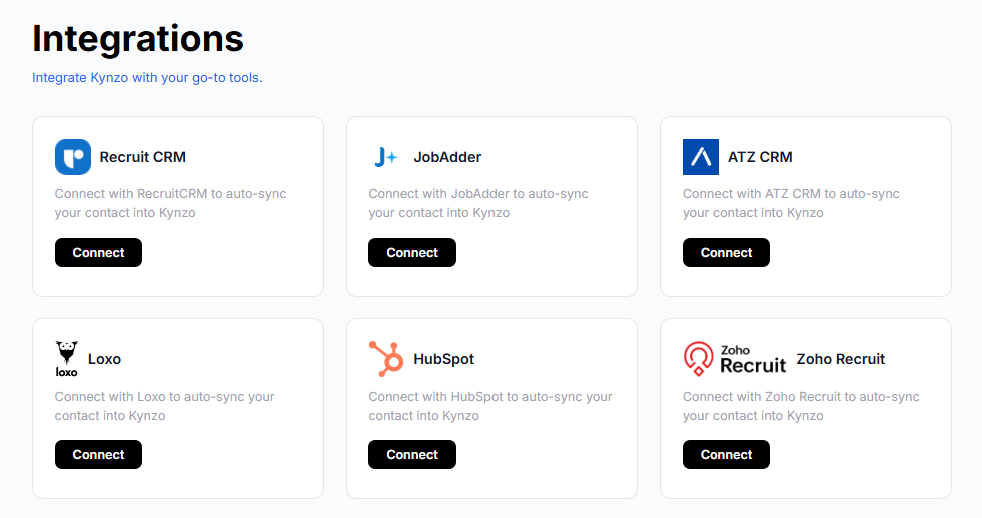
- For agency recruiters, CRM sync matters more than sequence count. Kynzo syncs with Recruit CRM, JobAdder, Zoho Recruit, HubSpot, Crelate and Loxo.
- Kynzo plans run $12.90, $30 and $50 per month. Cloud tools aimed at outbound volume tend to cost more per seat.
- If you switch, pause old campaigns first and restart at low volume. Do not carry over your old daily limits.
Table of Contents
- Why recruiters look beyond Dux-Soup
- What the main alternatives do
- Comparison table
- The account safety question
- Which tool fits which recruiting workflow
- How Kynzo works in a weekly routine
- Pricing: what you pay
- How to switch from Dux-Soup
- Try Kynzo if client relationships are the goal
- FAQ
- Sources
Why recruiters look beyond Dux-Soup
Dux-Soup is a long-standing browser-based tool for LinkedIn prospecting. It visits profiles, sends connection requests and messages, and exports data. That works well for lead lists. It works less well when your business is a handful of high-fee client relationships, where a templated message to a VP of Engineering can cost you the account.
Three complaints come up repeatedly in recruiter communities and in the comparison pages that rank for this keyword:
- *Browser dependence. Extension-based tools run while your browser is open. Cloud alternatives run in the background.
- *Templated outreach. Sequences that send the same note to hundreds of people are easy to recognize, and hiring managers ignore them.
- *Weak recruiting context. Generic sales tools do not know the difference between a candidate, a client contact and a target company.
The third point is where agency recruiters feel it most. A BD-focused recruiter needs to know when a hiring manager posted about a new team, not how many connection requests went out today.
What the main alternatives do
Most lists of Dux-Soup alternatives name the same group of products. Here is what each is built for, so you can match it to your own workflow.
Kynzo: warm engagement for agency recruiters
Kynzo is a LinkedIn engagement platform for agency recruiters, recruitment agency owners and executive search consultants. It does not run connection-request blasts. Instead:
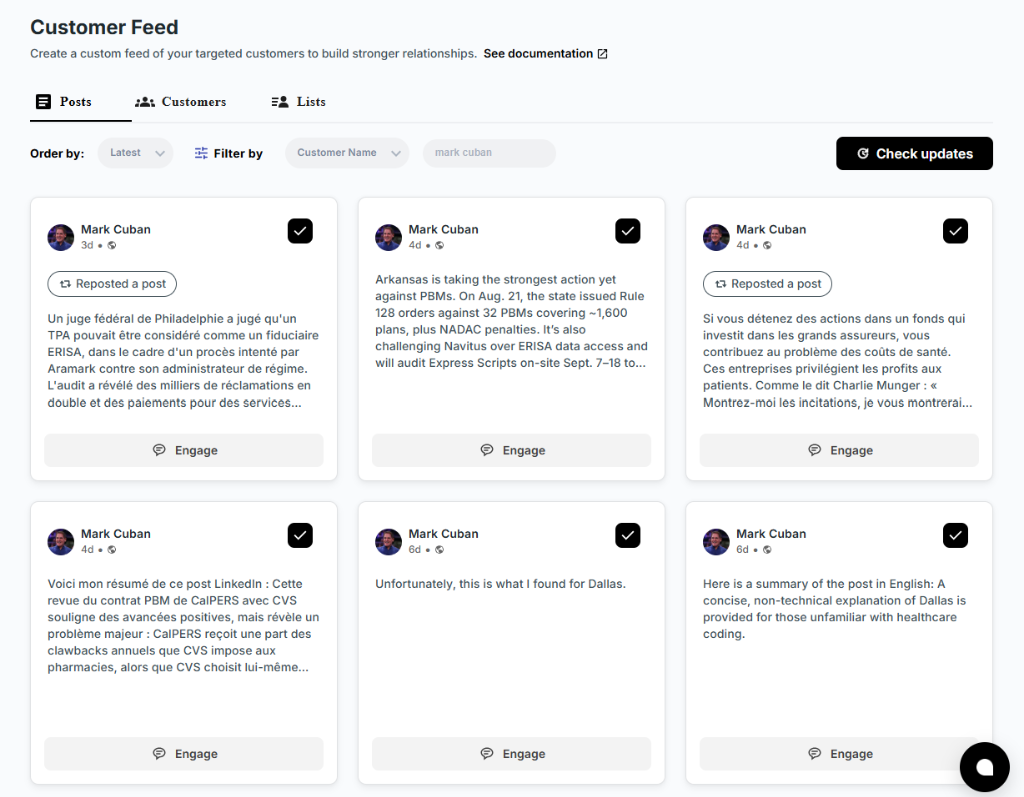
- A *Chrome extension and a dedicated *Customer Feed let you follow posts and activity from target hiring managers and company accounts, without scrolling LinkedIn's general feed.
- Target accounts *sync from your recruiting or CRM system (Recruit CRM, JobAdder, Zoho Recruit, HubSpot, Crelate, Loxo), or you can save profiles and posts by hand.
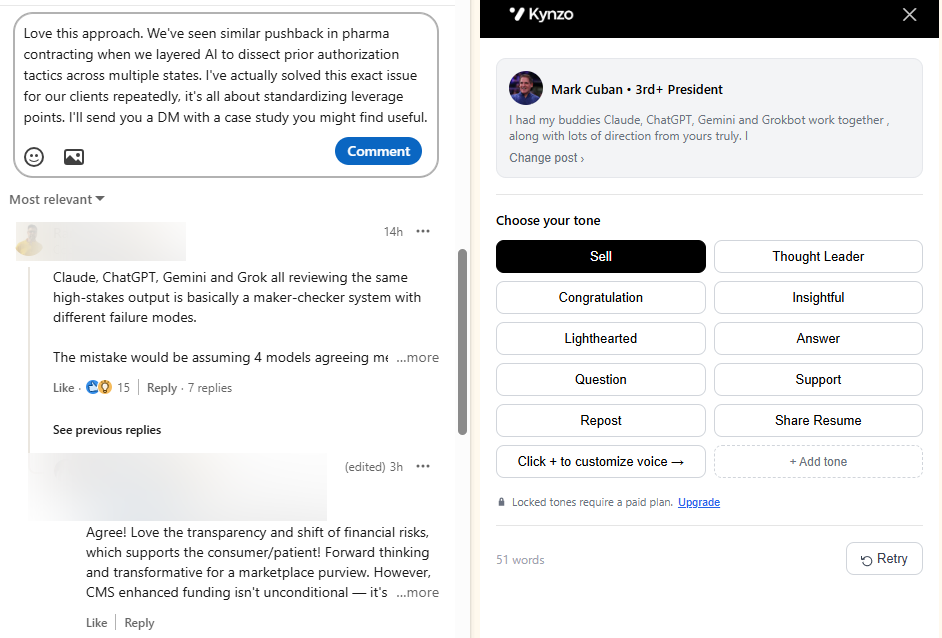
- An *AI Agent drafts or publishes context-aware comments in your own voice, with tone options, active hours, daily caps and randomized delays.
- *Engagement signals such as replies, comment likes, profile views, connection accepts and inquiries are tracked, so you know when a prospect is warm enough for a direct message.
The approach is the lower-spam route: you earn visibility through useful comments, then reach out once someone has responded. You can read the side-by-side Kynzo and Dux-Soup comparison for the feature-level detail.
Waalaxy: simple prospecting sequences
Waalaxy is a beginner-friendly automation tool that combines LinkedIn and email sequences. According to a 2026 roundup of LinkedIn automation tools , paid plans start at €19 per month (Pro, 300 invitations), then €49 (Advanced, 800) and €69 (Business). It suits teams who want ready-made sequences and a gentle learning curve. It is a volume tool, so the same caution about templated outreach applies. Kynzo's Waalaxy comparison covers how the two differ for agency work.

Expandi: cloud automation with dedicated IPs
Expandi is a cloud-based tool for high-volume teams. The same roundup lists it at $99 per month per seat, or $79 per month billed annually, with no free tier. It also reports native integrations with CRMs and email tools, plus webhooks and Zapier. If you run large outbound campaigns and have someone to manage the setup, it is a serious option. For a recruiter with 30 target clients, it is probably more machinery than you need.
HeyReach: multi-account outreach for agencies
HeyReach is often recommended when an agency needs to run campaigns across many LinkedIn senders from one dashboard. It is a fit for lead-generation agencies and large staffing teams that split outreach over several accounts. Confirm current seat pricing on the vendor's own page before you budget, since multi-sender plans change often.
Skylead, Dripify, SalesRobot, Meet Alfred and We-Connect
These tools cover similar ground: cloud-based LinkedIn sequences, some with email steps, visual campaign builders or AI-assisted messaging. They differ mainly in interface, multichannel features and price. They are strongest for outbound lead generation and weaker on recruiter-specific CRM sync and relationship tracking.
Dux-Soup itself
For reference, Dux-Soup lists plans from a free trial up to a cloud agency license. The G2 pricing page showed a Pro plan from $11.25 per seat per month and a five-seat Cloud Agency license at $371 per month as of April 2026. Vendor pages show different monthly and annual figures, so check Dux-Soup's own pricing before you compare.
Comparison table
| Tool | Best for | Core model | CRM and integrations | Published price | |---|---|---|---|---| | Kynzo | Agency recruiters building client relationships | Comment engagement, Customer Feed, AI Agent, signal tracking | Recruit CRM, JobAdder, Zoho Recruit, HubSpot, Crelate, Loxo | $12.90, $30 and $50 per month | | Waalaxy | Beginners running simple sequences | LinkedIn and email prospecting sequences | Check vendor | €19, €49 and €69 per month | | Expandi | High-volume outbound teams | Cloud automation with dedicated IPs | CRM and email tools, webhooks, Zapier | $99 per month per seat ($79 annual) | | HeyReach | Agencies managing many sender accounts | Multi-account campaigns | Check vendor | Check vendor | | Dux-Soup | DIY prospecting from a browser | Profile visits, connection requests, messages | Check vendor | Varies by plan and billing period |
Prices are the figures published at the time of the sources cited above. Confirm current numbers on each vendor's page.
The account safety question
No tool in this table is risk-free. LinkedIn's prohibited software policy says it does not permit third-party software, including bots, browser plug-ins and browser extensions, that automates activity on its site. It also bars tools that try to manipulate its content algorithms. Members who use such tools violate the User Agreement, and the tools may stop working without notice.
That applies to Dux-Soup, to its cloud competitors and to us. Vendors of cloud tools argue that dedicated IPs make detection harder, and that is a claim about detection, not about permission. What you can control is how much automated activity you create:
- *Volume. Commenting on 10 to 15 posts a day from people you actually want to work with looks very different from 100 connection requests.
- *Pacing. Randomized delays, active hours and daily caps keep activity close to how a person behaves. Kynzo includes all three.
- *Review. Draft mode lets you read each comment before it posts. For a client-facing account, we recommend using it for your top targets.
- *Relevance. A comment that responds to the content of the post is both safer and more effective than a generic one.
If an account is your primary business asset, think hard before you automate anything on it, and make the decision on purpose.
Which tool fits which recruiting workflow
Business development with a short list of clients
If you chase 20 to 100 hiring managers and want them to know your name before you call, you need monitoring and thoughtful engagement, not sequences. This is the case Kynzo was built for. Our guide to LinkedIn lead generation for recruiters walks through the approach, and the comment automation guide explains how the AI Agent fits in.

Candidate sourcing at scale
If your main need is reaching many candidates with connection requests and follow-ups, a sequence tool such as Waalaxy, Expandi or Dux-Soup is the closer match. Pair it with a Boolean builder; Kynzo's free tools include a Boolean search string creator, a comment generator and a connection note audit.
Multi-consultant agencies
If several consultants share target accounts, CRM sync decides whether the tool gets used. Syncing from the system of record keeps your target list current without double entry. See how to connect LinkedIn to your CRM , or the specific HubSpot and LinkedIn integration walkthrough.
Teams that mix tools
Many teams use one tool for sourcing and another for client engagement. That is reasonable, as long as only one tool handles a given account's activity at a time. Running two automation tools on the same profile multiplies your risk and muddies your data. For a broader view of what else is on the market, this overview of recruitment automation tools is a good starting point.
How Kynzo works in a weekly routine
A realistic setup for an agency recruiter looks like this:
- *Build the target list. Sync accounts from your CRM or save hiring manager profiles by hand.
- *Set the guardrails. Choose active hours, a daily cap and your tone. Start low.
- *Review the Customer Feed. Each morning, scan what your targets posted. Approve or edit AI-drafted comments for the people who matter most.
- *Watch the signals. When a hiring manager replies, likes your comment, views your profile or accepts a connection, that is your cue to send a personal note.
- *Log the outcome. Move the contact in your CRM and note what triggered the conversation.
The point of step 4 is timing. You are not cold messaging. You are following up on a public exchange that already happened.
Pricing: what you pay
Kynzo's published plans are STARTER at $12.90 per month, PRO at $30 per month and ELITE at $50 per month . Installing the Chrome extension is free. For a solo recruiter, that is less than a single week of many sequence tools, and it covers the engagement workflow rather than a message queue.
When you compare costs, include everything the plan needs to work: per-seat fees, extra accounts, email add-ons, proxies and the time someone spends maintaining campaigns.
How to switch from Dux-Soup
A move between tools is where accounts get flagged, because new tools tempt people to run at full speed on day one. Use this order:
- *Export what you need. Save your lead lists, tags and message history from Dux-Soup.
- *Pause old campaigns. Stop all active sequences. One published migration guide suggests waiting about 48 hours before launching anything new, which is a sensible buffer.
- *Restart small. Run roughly 10 to 15 actions a day for the first two weeks, then increase gradually.
- *Connect your CRM. Confirm the sync works before you trust any reporting.
- *Compare results after a month. Measure replies, calls booked and conversations started, not raw activity counts.
Five checks before you commit to any tool: CRM integration, how sessions or proxies are handled, per-account pacing controls, total cost per seat, and whether you can cancel monthly.
Try Kynzo if client relationships are the goal
If your revenue comes from a few high-fee clients rather than thousands of leads, Kynzo gives you a feed of the people you care about, an AI Agent that comments in your voice, and signals that tell you when to reach out. Install the extension and see the plans to start with a low daily cap and review every comment at first.
FAQ
What is the best Dux-Soup alternative for recruiters?
For agency recruiters focused on client development, Kynzo fits best because it monitors hiring managers, syncs with recruiting CRMs and drafts comments in your voice. For high-volume candidate outreach, cloud sequence tools such as Waalaxy or Expandi are closer to what Dux-Soup does.
Are Dux-Soup alternatives safe for my LinkedIn account?
None are risk-free. LinkedIn's policy does not permit third-party tools that automate activity on its site, and enforcement can vary. Lower daily volume, randomized delays and reviewing drafts reduce exposure but do not remove it.
Is Dux-Soup cheaper than Kynzo?
It depends on the plan and billing period. Kynzo costs $12.90, $30 or $50 per month. Dux-Soup's entry plan is in a similar range, but its higher tiers cost more, so compare the plan with the features you actually need.
Can I use Kynzo and Dux-Soup together?
We advise against running two automation tools on one LinkedIn account. Combined activity is harder to pace and raises your risk. Pick one tool for that profile, or split sourcing and engagement across clearly separate workflows.
Sources
- 5 best LinkedIn automation tools (tested and compared)
- LinkedIn: Prohibited software and extensions
- Dux-Soup pricing on G2