

LinkedIn Comment Automation for Recruiters: Save Hours, Review First
! Sketch accents framing the article title
LinkedIn comment automation means using AI-driven, paced tools to draft and publish comments on target posts on a recruiter's behalf, within daily caps and human review. It works best for agency recruiters and search consultants who need consistent visibility with hiring managers and target accounts. Manual commenting still wins for high-stakes relationships where every word needs a personal touch, but for routine engagement, paced automation with tight targeting saves hours each week.
***
TL;DR:
>
- Start with 20 to 30 saved target accounts in one recruiter segment, then run the pilot for two weeks before expanding.
- Track replies and profile views, not comment counts alone, and begin direct outreach only after those signals show that a target account is warm.
- LinkedIn’s policy requires comments created with AI to remain editable and monitored, so keep a human approval step before each one is published.
- Choose drafts tailored to each post when relevance matters; template libraries are faster but repetitive and easier for recipients to spot.
***
Table of Contents
- Benefits and practical use cases for automating LinkedIn comments
- How comment automation actually works: components and workflows
- Step-by-step setup and controls to automate comments safely
- Safety, LinkedIn policy notes, and best practices
- Publisher perspective: a recruiter-focused implementation
- Practical perspective: when automation helps and what trade-offs recruiters should accept
- Try a recruiter-focused tool and free comment generator
- FAQ
- Sources
Benefits and practical use cases for automating LinkedIn comments
For recruiters juggling dozens of client relationships, the biggest win is time. Instead of scrolling a noisy general feed hoping to catch a hiring manager's post, automation keeps a recruiter's presence active across target accounts without the manual hunt.
Agency recruiters and search consultants get the most value from this approach. Common use cases include:
- Monitoring posts and activity from specific hiring managers and target company pages.
- Warming up prospects before a connection request or InMail by commenting consistently on their content.
- Increasing profile views and recognition ahead of outreach, so a later message lands with a familiar name.
The payoff shows up in measurable signals: replies, comment likes, profile views, connection accepts, and inbound inquiries. Watching these signals, rather than just comment counts, tells a recruiter when a target account is warm enough for direct outreach.
How comment automation actually works: components and workflows
Most comment automation tools share the same core architecture, even when the branding differs. Understanding the parts helps you evaluate any vendor's claims instead of taking them at face value.
- Target feed: A curated list of accounts or posts, built from saved searches, manual selections, or CRM sync, that replaces the general feed.
- Triggers: Rules that fire on a new post, a keyword match, or specific activity from a tracked profile.
- Comment library or AI generator: Either a bank of pre-written templates or a context-aware AI draft tied to the post's content.
- Publishing engine with pacing controls: Daily caps, active-hour windows, and randomized delays that make activity look human rather than scripted.
- Monitoring layer: A way to review drafts, flag odd outputs, and track engagement after publishing.
The real difference between tools is template libraries versus context-aware AI drafts. Templates are fast but repetitive and easy to spot; AI drafts tied to the specific post read more naturally, especially when the recruiter edits before publishing. Integration also matters: a browser extension handles one account at a time, while API-based tools with CRM synchronization keep target lists current across a whole desk.
Step-by-step setup and controls to automate comments safely
A disciplined pilot beats a wide rollout every time. Here's a sequence that keeps you in control from day one.
- Build a small target feed from saved searches, LinkedIn lists, or a CRM sync, limited to one client vertical or one hiring manager segment to start.
- Draft comment templates and tones that match your voice. If you're using AI generation, require every draft to be editable before it posts.
- Set pacing controls: a daily comment cap, defined active hours, and randomized delays between actions so the pattern doesn't look automated.
- Define triggers and monitoring rules, such as new-post alerts or keyword matches, with a flag process for any output that reads off-tone or inaccurate.
- Track engagement signals for two to three weeks before expanding, and only move to direct outreach once replies, likes, or profile views show real interest.
Pro Tip: Run your pilot on a small number of target accounts for the first two weeks. A smaller feed makes it easier to catch a bad draft before it publishes.
Safety, LinkedIn policy notes, and best practices
LinkedIn's own developer AI policy restricts training AI models on member and page data and limits which AI use cases are permitted, generally requiring user consent and control. The same policy requires that AI-generated content published on a member's behalf stay editable, with monitoring in place rather than fully hands-off publishing.
That editability requirement is the single most important compliance rule for any automation workflow, and it also happens to produce better comments. Practical habits that follow from it:
- Require a human edit-before-publish step for every AI-generated comment.
- Avoid posting identical or near-identical comments across many posts in a short window.
- Keep a feedback or moderation channel open so flagged drafts get reviewed before they repeat.
Monitoring doesn't stop at publishing. Checking recent activity for tone drift or factual errors, and pulling a trigger or account out of rotation when something looks off, keeps the whole system aligned with both the policy and your reputation.
Publisher perspective: a recruiter-focused implementation
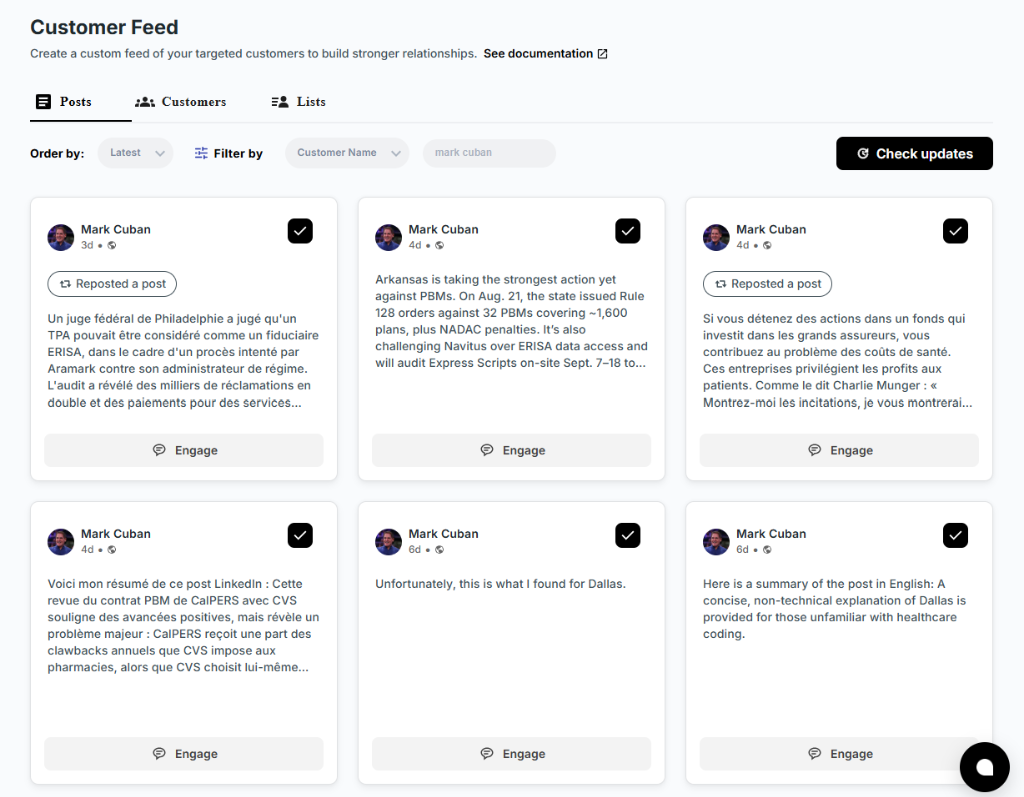
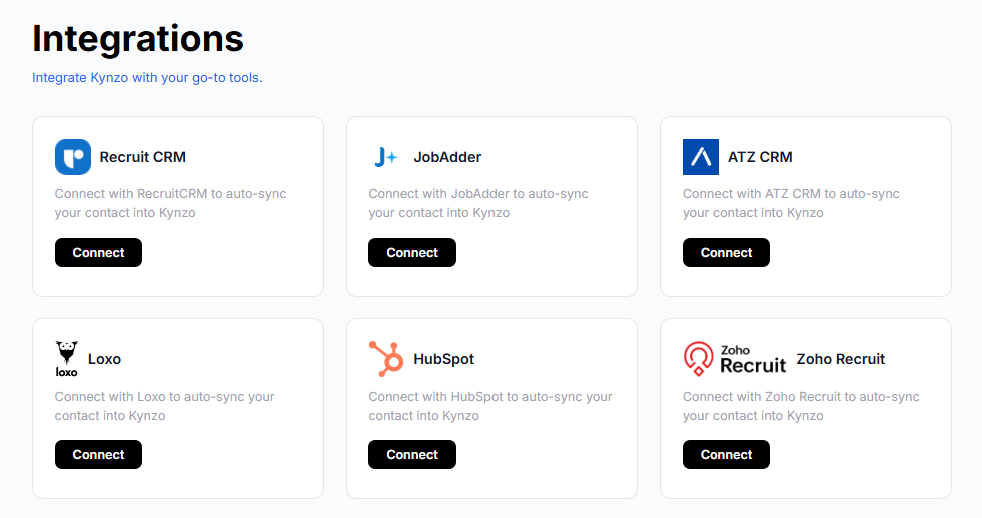
Kynzo was built around this exact workflow for agency recruiters, recruitment agencies, and search consultants managing high-fee client relationships. Rather than relying on LinkedIn's general feed, the platform's Customer Feed pulls activity from target hiring managers and company accounts into one curated view, with syncing available from recruiting and CRM systems including Recruit CRM, JobAdder, Zoho Recruit, HubSpot, Crelate, and Loxo.
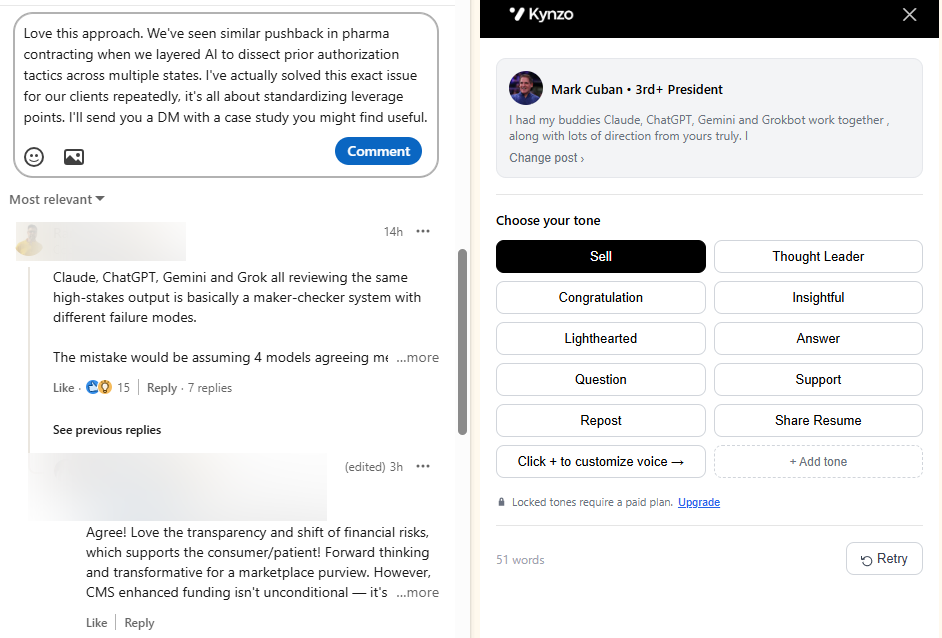
The AI Agent drafts and can publish context-aware comments that mimic a recruiter's voice, with pacing controls built in, including customizable tones, active-hour windows, daily caps, and randomized delays to keep activity looking human, as well as tracking engagement signals like replies, comment likes, profile views, and connection accepts to help identify warm outreach timing.
Readers who want to see the drafting side before committing to a full workflow can test the free LinkedIn comment generator first.
Practical perspective: when automation helps and what trade-offs recruiters should accept
! Comment drafts pass through a recruiter review gate
Automation earns its keep on volume: staying visible across dozens of target accounts a human simply can't track by hand every day. It earns less on the handful of relationships where a single well-timed, personal comment matters more than consistent presence.
The trade-off is personalization versus scale, and the fix is editing every draft before it posts rather than letting templates run unsupervised. A sound pilot stays small: one segment, one or two KPIs like reply rate and profile views, and a two-week window before you decide to expand.
— Jenny
Try a recruiter-focused tool and free comment generator
We built Kynzo for recruiters who want consistent visibility with target accounts without the spam risk of mass messaging or cold InMail. Instead of guessing which hiring managers are active, we sync your CRM data into one feed and let our AI Agent draft comments in your voice, paced to look human.
! Kynzo
A short pilot is the easiest way to see the fit:
- Explore the full tools page for the Boolean search generator and connection note checker.
- Review STARTER, PRO, and ELITE plans when you're ready to automate a full target feed with CRM sync.
Refer to the Kynzo pricing page for current plan details and pricing.
Start with a saved feed of 20 to 30 accounts, run it for two weeks, and check your reply and profile-view signals before scaling up.
FAQ
How to use AI to comment on LinkedIn posts?
Most tools let you connect a target feed, choose a tone, and generate a draft comment tied to the specific post's content, which you then edit before publishing. Kynzo's free comment generator works this way, producing a draft you can adjust to match your own voice before it goes live.
What is the 4-1-1 rule on LinkedIn?
The 4-1-1 rule is a content-mix guideline suggesting that for every one promotional post, you share four pieces of other people's content and one piece of your own non-promotional content. It's a posting-ratio heuristic rather than a platform rule, and it applies to original posts more than to comment activity.
Does LinkedIn do automated messages?
LinkedIn's own developer AI policy permits certain AI-assisted content creation and prioritization features under specific conditions, generally requiring user consent and editability rather than fully autonomous messaging. Third-party automation tools that publish on a member's behalf need to follow those same editability and monitoring requirements to stay compliant.
Do scheduled posts do well on LinkedIn?
Scheduled posts can perform as well as posts published in real time, since timing consistency and relevance to your audience matter more than whether a human clicked "publish" at that exact moment. What tends to hurt performance is identical or repetitive content published on a rigid schedule without variation.