

LinkedIn Comment Strategy for Agency Recruiters
A good LinkedIn comment strategy comes down to three decisions. Choose a short list of hiring managers worth knowing. Comment on their posts with a point of view, not praise. Move to a direct message only after they have responded to you. Everything below turns those three decisions into a routine you can run in about ten minutes a day, including the comment structure we use, the pacing rules that protect your account, and the signals that tell you when to reach out.
TL;DR
- Comment on a curated list of 20 to 50 target hiring managers and company pages, not on whatever the general feed serves you.
- Use the A-A-O structure: reference their specific *Argument, add your own *Analytical insight, and close with an *Open-ended question.
- Skip "Great post" and "Thanks for sharing." They signal inauthenticity and bury you.
- LinkedIn restricts third-party automation, so draft with AI if you like, but review every comment and keep your pacing human.
- Begin warm outreach only after a real signal: a reply, a profile view, or a connection accept.
Table of Contents
- Why comments beat cold InMail for client development
- Build the target list before you write a word
- The A-A-O comment structure
- The bridge comment: disagree politely
- A daily commenting workflow that takes ten minutes
- Stay on the right side of LinkedIn's automation rules
- Our perspective: signals, not volume
- Knowing when to move from comment to DM
- Tools that make the routine easier
- Metrics worth tracking each week
- FAQ
- Sources
Why comments beat cold InMail for client development
Agency recruiters have a specific problem. The people you want as clients, the VPs of Talent, heads of engineering and founders who own a hiring budget, get dozens of cold messages a week. A cold InMail from a stranger asks for attention before you have earned any.
A comment reverses that order. You show up in a hiring manager's notifications with something useful to say, in public, where their peers can see it. By the time you send a message, your name is already familiar.
Platforms treat comments as a strong signal too. EveryoneSocial's guidance notes that LinkedIn measures whether people stop and engage properly, and that a substantive comment is among the strongest signals available. That is good for visibility, but for a recruiter the bigger prize is the relationship, not the reach.
This is also why the usual advice for creators only half applies to you. Most guides ranking for this topic are about growing your own audience. Your goal is narrower and more valuable: be known by 30 people who can hire you.
Build the target list before you write a word
The most common mistake is commenting where the traffic is instead of where the buyers are. A viral post from a famous founder will give you impressions from people who will never use a recruiter. A modest post from a hiring manager at a company you could place into is worth ten of those.
Build your list like this:
- *Start from your pipeline. Pull in the companies you have placed with, pitched, or lost to a competitor. They already know your category.
- *Add by trigger. Funding rounds, new leadership, a department that just posted six roles. These are the moments a hiring manager is open to outside help.
- *Name the person, not just the company. Company pages post rarely and in corporate language. The hiring manager's own posts are where the real conversation happens.
- *Cap it. A list of 20 to 50 people is enough to keep each comment thoughtful. A list of 500 turns into the general feed you were trying to escape.
- *Keep it in your CRM. If the list lives in a spreadsheet nobody opens, it dies in two weeks.
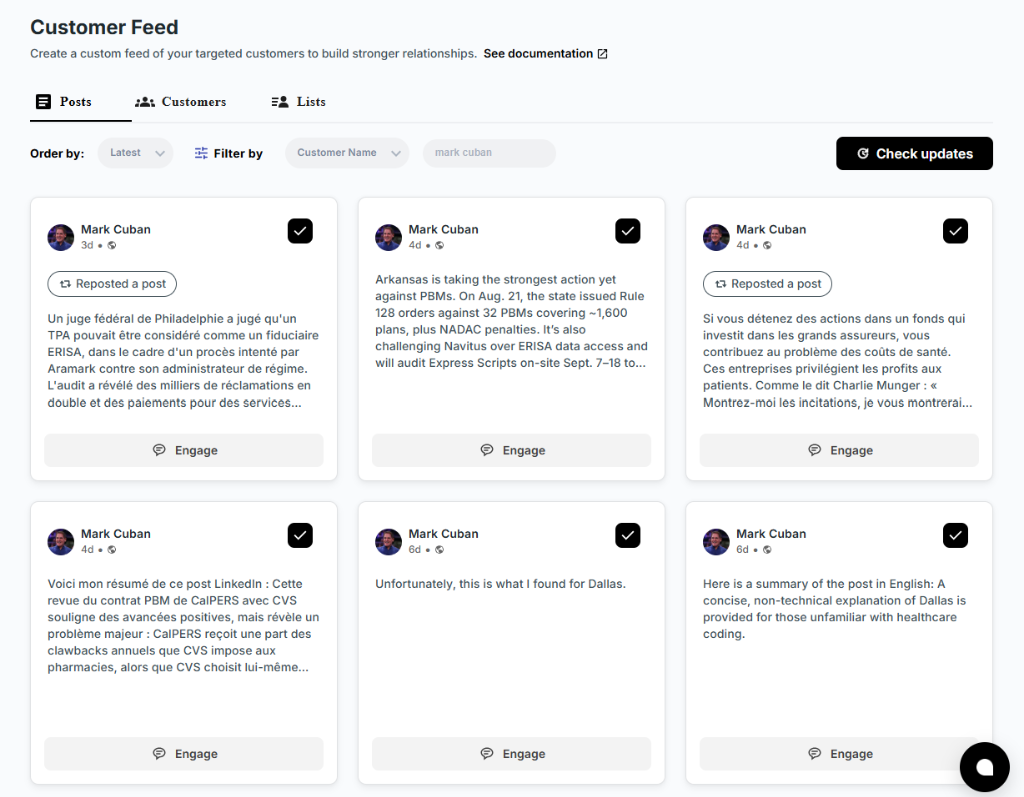
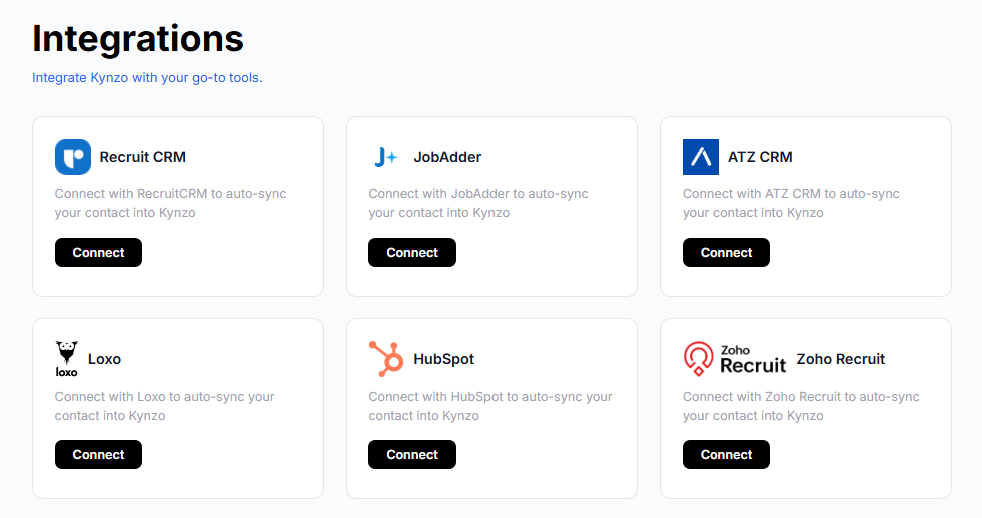
This is the problem Kynzo's Customer Feed solves. It syncs target accounts from recruiting and CRM systems such as Recruit CRM, JobAdder, Zoho Recruit, HubSpot, Crelate and Loxo, or lets you save profiles and posts by hand, then shows only their activity. You work from a short, curated list instead of scrolling past everything else LinkedIn wants you to see.
The A-A-O comment structure
A comment that starts a conversation has a predictable shape. The A-A-O logic, which is also described in EveryoneSocial's commenting guide , has three parts:
| Part | What you do | Why it works | |---|---|---| | *Argument | Reference one specific claim or detail from the post | Proves you read it | | *Analytical insight | Add an experience, a metric, or a trade-off | Shows domain expertise | | *Open-ended question | End with a question they can answer in a sentence | Invites a reply |
Here is the structure applied to a real recruiter scenario. A VP of Engineering posts that they cut time-to-hire by dropping a take-home assignment.
*Weak: "Great insight, thanks for sharing!"
*A-A-O: "Dropping the take-home is a bold call. In the senior backend searches we run, the strongest passive candidates often decline anything over two hours, though the trade-off is less signal on code quality. What did you replace it with to keep the bar steady?"
The second comment is two or three sentences. It cannot be pasted under another post. It gives the VP an easy and flattering thing to answer.
What to avoid
- *Generic praise. According to a recruiting-focused networking guide citing the 2025 SHRM Talent Trends , social networking is still the most used recruitment tactic, but "Great post" and "Thanks for sharing" read as inauthentic. Treat them as wasted comments.
- *The pitch. A comment saying you have three candidates who would fit ends the relationship before it starts. Save it for a DM, after they engage.
- *Copy-paste. Identical text under many posts is both obvious to readers and, as we cover below, a pattern LinkedIn can flag.
- *Length for its own sake. Two to three sentences is enough. A lawyer-marketing guide from Jaffe PR gives the same advice: write one to three sentences and avoid empty phrases.
The bridge comment: disagree politely
Most recruiters are afraid to disagree with a prospective client. That fear costs them the best opening available.
A bridge comment adds a nuanced trade-off to a hiring manager's post, or politely questions part of it. Prospectory's playbook on social selling describes it as a reliable way to open a thread that shows expertise and leads naturally to a follow-up DM, in contrast to praise that most hiring managers ignore.
A few rules keep it safe:
- Agree with the premise first, then complicate it.
- Use something you have actually seen, such as a candidate pattern or a market shift, rather than an opinion with nothing behind it.
- Never criticize the person or their company. Disagree with a claim, not a human.
- Keep it to one point. A bridge comment is an invitation, not a debate.
A daily commenting workflow that takes ten minutes
Consistency beats volume. A repeatable system is described in Ligosocial's safe AI comment workflow , which puts the daily time at around ten minutes. Here is how we would structure that for a recruiter.
*Morning (about 5 minutes)
- Open your curated feed of target accounts, not the general feed.
- Pick three to five fresh posts from people on your list. Prioritize anyone with a trigger event.
- Comment using A-A-O. Aim to be early on the post, while the thread is still small and the author is likely to see you.
*Afternoon (about 3 minutes)
- Reply to anyone who answered your comment. A reply that continues the conversation is worth more than a thank-you.
*End of day (about 2 minutes)
- Log signals: who replied, who liked your comment, who viewed your profile, who accepted a connection request.
- Flag anyone who has engaged twice. They move to your warm outreach list.
If you also post your own content, answer the comments you receive. EveryoneSocial's guidance points out that replying to each comment with a question within 24 hours is among the best ways to keep a thread alive. It also warns that dropping a link in an "extra" comment under your own post tends to look like a clumsy attempt at boosting.
Stay on the right side of LinkedIn's automation rules
This is where most advice gets vague, so let us be direct. LinkedIn's help center states that it does not permit third-party software, including bots and browser extensions that automate activity on its site. You should read that page before you choose any tool, ours included.
Enforcement is about patterns more than words. According to Saylink's guide to the User Agreement , LinkedIn looks for abnormal behavior such as excessive volume and identical comment text, and consequences range from reduced visibility of your comments to permanent restriction. Ligosocial's analysis adds that erratic hourly volume, rapid IP changes and identical timing across multiple users are the kinds of session anomalies that get flagged. It also draws a clear line: using AI to draft text that you review and post yourself keeps the action human-originated, whereas handing publishing to a bot is high-risk.
The quiet danger is suppression. A comment can stay live but be shown only to your own network, so you never see an error and your effort simply disappears.
Practical rules that follow from this:
- *Review every comment before it goes out, whether you or an AI wrote the first draft.
- *Set a daily cap. Ten thoughtful comments beat sixty quick ones. A recruiter's list is small anyway.
- *Vary timing. Comment during your normal working hours, with natural gaps between comments.
- *Never reuse text. Each comment should refer to something only that post contains.
- *Do not combine tools that all act on your account at once.
Our perspective: signals, not volume
We built Kynzo around one observation: recruiters do not lose client relationships because they comment too little. They lose them because their effort is scattered. They scroll a noisy feed, leave a generic reply, forget who responded, and then jump to a cold message when the moment has already passed.
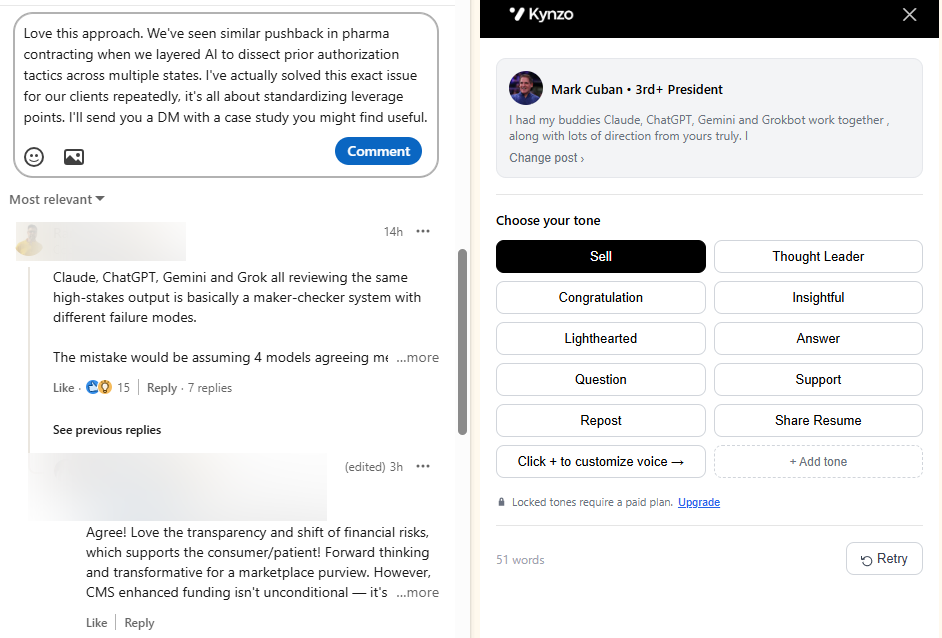
So our approach has three layers. A dedicated Customer Feed keeps attention on the hiring managers and company accounts you chose. An AI Agent drafts context-aware comments in your own voice, with specialized tones, active hours, daily caps and randomized delays, so your pacing looks like a person working a normal day. And signal tracking records replies, comment likes, profile views, connection accepts and inquiries, so you know when a conversation is warm enough for outreach.

We would add one honest recommendation. Given LinkedIn's stated position on automation, the lower-risk way to use any AI tool is as a drafting partner whose output you read and approve. The AI should save you the blank page and the research, not replace your judgment. Your voice and your point of view are the asset a hiring manager is responding to. Keep them.
We also think the measure of success should change. Likes are a vanity metric. The number that matters is how many qualified discovery calls begin with someone who already knows your name.
*— Jenny
Knowing when to move from comment to DM
A comment is not a license to pitch. Prospectory's playbook advises moving to a direct message only when the conversation gives you a reason. In practice, wait for at least one of these signals:
| Signal | What it suggests | Next step | |---|---|---| | They replied to your comment | Direct interest in your view | Reply once more, then consider a connection request | | They liked your comment | Mild positive, low commitment | Keep commenting, no DM yet | | They viewed your profile | Curiosity about who you are | Make sure your headline states what you recruit | | They accepted your connection | Open to contact | Send a short, specific note referencing the thread | | They asked a question or inquired | Active interest | Offer a call |
When you do message, reference the thread. Something like: "Your point about take-home assignments stuck with me. I have seen the same pattern in senior backend searches and have a few numbers that might be useful. Want me to send them over?" That offers value, asks permission, and sounds like the continuation of a conversation, because it is.
If you send a connection request first, keep the note short. Our free Connection Request Checker previews your note and checks it against the character limit before you send.
Tools that make the routine easier
You can run this entire strategy by hand with a spreadsheet and a calendar reminder. It works. The friction appears when your list passes about 30 people and your CRM, your notes and your LinkedIn tabs stop agreeing with each other.
Kynzo is a Chrome extension and platform for exactly that stage. You can install the extension for free and comment in-feed, sync target accounts from your CRM, and let the AI Agent draft in your voice. Plans are published on the pricing page : STARTER at $12.90 per month, PRO at $30 per month, and ELITE at $50 per month.
If you want to test the approach first, the free LinkedIn Comment Generator drafts a comment from a post you paste in. For a deeper walkthrough of AI-assisted commenting, see our guide to LinkedIn AI commenting .
Metrics worth tracking each week
Commenting without measurement is just activity. Keep a simple weekly log with five numbers:
- *Comments posted on target accounts, against your daily cap.
- *Reply rate: the share of comments that drew a response from the author.
- *Repeat engagement: targets who engaged with you more than once.
- *Profile views and connection accepts from people on your list.
- *Conversations opened: DMs or calls that started from a comment thread.
Expect the last number to lag the others by several weeks. Relationships built in public move at the speed of the hiring manager's attention, not yours. If reply rate is low after a month, the problem is almost always the comment (too generic) or the list (wrong people), not the platform.
One more benchmark worth knowing: Growtempo's analysis of LinkedIn comments argues that replies, not thank-yous, are what turn one comment into several in a thread. That fits what we see in the routine above. The reply is where the relationship begins.
FAQ
How do I write a good LinkedIn comment?
Reference something specific from the post, add one experience or trade-off from your own work, and finish with a question. Two to three sentences is enough. If your comment could be pasted under any other post, rewrite it.
Is it better to comment or repost on LinkedIn?
For building client relationships, comment. A comment puts your name and view in front of the author and their network in a conversation. A repost mostly benefits your own audience and gives the original author less reason to notice you.
Can I use AI to write LinkedIn comments?
Yes, as a drafting aid. LinkedIn's help center says it does not permit third-party tools that automate activity on its site, so read that policy and review every comment yourself before it goes out. Generic or identical AI text is also easy for readers to spot.
How many comments should a recruiter post per day?
There is no official number, but a small, steady volume is safer and more effective than bursts. Three to five considered comments on target accounts fits the ten-minute routine above. Sudden spikes in volume are the kind of abnormal pattern that enforcement looks for.
When should I message a hiring manager after commenting?
Wait for a signal, such as a reply to your comment, a profile view or an accepted connection request. Then reference the thread and offer something useful before asking for a call.
Sources
- LinkedIn Help: Prohibited software and extensions
- EveryoneSocial Help Center: Commenting well, and why it beats posting
- Saylink: How to automate LinkedIn comments without breaking TOS
- Ligosocial: LinkedIn AI comment agent, automate without the bot
- Prospectory: LinkedIn commenting for social selling
- Jeff Seebinger: How to use social media to network
- Jaffe PR: How lawyers can engage on LinkedIn
- Growtempo: LinkedIn comment strategy