

How to Monitor LinkedIn Activity as an Agency Recruiter
To monitor LinkedIn activity as a recruiter, track what hiring managers and target companies publicly post and comment on, and log the engagement signals that follow your own interactions. Do it in a dedicated feed, not in LinkedIn's general feed. LinkedIn does not give you a complete record of another member's behavior, and you should not build a process that assumes it does.
This guide covers what is visible and what is not, the native ways to watch a contact, the signals worth logging, and a daily routine. It also covers where a tool like Kynzo fits. We wrote it for agency recruiters, agency owners and search consultants who want warmer client conversations, not more cold InMail.
TL;DR
- Public posts and comments are the most reliable thing to monitor. Likes, follows, shares and profile views are visible only subject to each member's settings.
- A missing signal is not proof of inactivity. Qualify every signal by source and confidence before you act on it.
- Native tools (the Activity section, the notification bell) work for a handful of contacts. They break down at 50 or 100 target accounts.
- The best trigger for warm outreach is a two-way signal: a reply to your comment, a connection accept, or a profile view that follows your engagement.
- Keep monitoring to public activity. Private browsing, messages and job searches are not yours to track.
Table of Contents
- What "monitoring LinkedIn activity" means for a recruiter
- What you can and cannot see
- Native ways to watch a contact
- Why the general feed fails agency recruiters
- Build a signal log, not a stalking habit
- A 20-minute daily routine
- Private accounts, employers and the governance question
- Where a dedicated tool earns its place
- Perspective: monitoring is only useful if it changes what you do next
- How Kynzo handles this workflow
- Mistakes that make monitoring backfire
- FAQ
- Sources
What "monitoring LinkedIn activity" means for a recruiter
Search results for this phrase split into three groups. Some pages explain how to check your own activity history. Some cover brand monitoring: mentions of a company, product or competitor. A third group answers privacy questions such as whether your employer can see what you do.
Agency recruiters mean something narrower. You want to know what a specific hiring manager, talent leader or founder is saying and reacting to, so that your first message to them is not a cold pitch. That is relationship monitoring. It is closer to account-based selling than to reputation tracking.
It has two halves:
- *Inbound watching: what your target accounts publish and comment on.
- *Outbound signal logging: how those people respond to you after you engage.
Most recruiters only do the first half, and badly, by scrolling a feed built to keep them scrolling.
What you can and cannot see
Before choosing a method, be clear about the boundaries. They shape what a defensible workflow looks like.
LinkedIn's privacy policy distinguishes posts, likes, follows, comments and shares from profile views, messages and job searches. Social actions are visible according to the poster's settings. Whether someone is told about a profile view depends on the settings of both the viewer and the viewed member. Members can also choose whether organizations learn that they viewed a Page.
LinkedIn's profile-visibility guidance adds that what another member sees depends on settings, connection degree, account usage and the type of search. A profile showing up in search does not mean its whole activity history is open to you.
A conservative signal hierarchy follows from this:
| Signal | Visibility | How much to trust it | |---|---|---| | Public post | Directly observable | High | | Public comment | Directly observable | High | | Reply to your comment | Observable, tied to your content | High | | Like, follow, share | Visible subject to settings | Medium | | Profile view | Conditional on both members' settings | Low to medium | | Connection accept | Observable on your side | High | | Private messages, job searches | Not visible to you or to employers | Do not track |
The lesson is that no single metric deserves your trust. Profile views in particular create false certainty. A viewer in private mode is invisible, and a visible view says nothing about intent.
Native ways to watch a contact
You can do a lot without software, and you should know these methods before paying for anything.
The Activity section
Open a member's profile, scroll to the Activity section and use the show-all option to filter by posts, comments or reactions. What you see depends on that member's visibility settings. This is useful for pre-call research on one person. It is slow for monitoring, because you must visit each profile to check.
The notification bell
LinkedIn added a bell to member profiles in 2022. According to this walkthrough of the feature , you can subscribe to a member's content and get a notification when they post. You need to follow or be connected to the person first. For ten key contacts, this is a quick win.
Its limits show up fast:
- Notifications mix with everything else in your bell, so they get buried.
- It covers new posts only. It does not tell you what the person commented on.
- It does not tell you whether your engagement is landing.
- Nothing links it to your CRM, so the context lives in your head.
Saved searches and lists
You can keep a spreadsheet of profile URLs and check them each morning. Recruiters do this, and it works until the list outgrows the time you have. At that point you quietly stop checking, and the best accounts go cold.
Why the general feed fails agency recruiters
The home feed is ranked for engagement, not for your pipeline. A hiring manager at a target client can post a hiring announcement or a complaint about slow agencies, and it may never reach you. Meanwhile you see influencer posts and recycled motivational content.
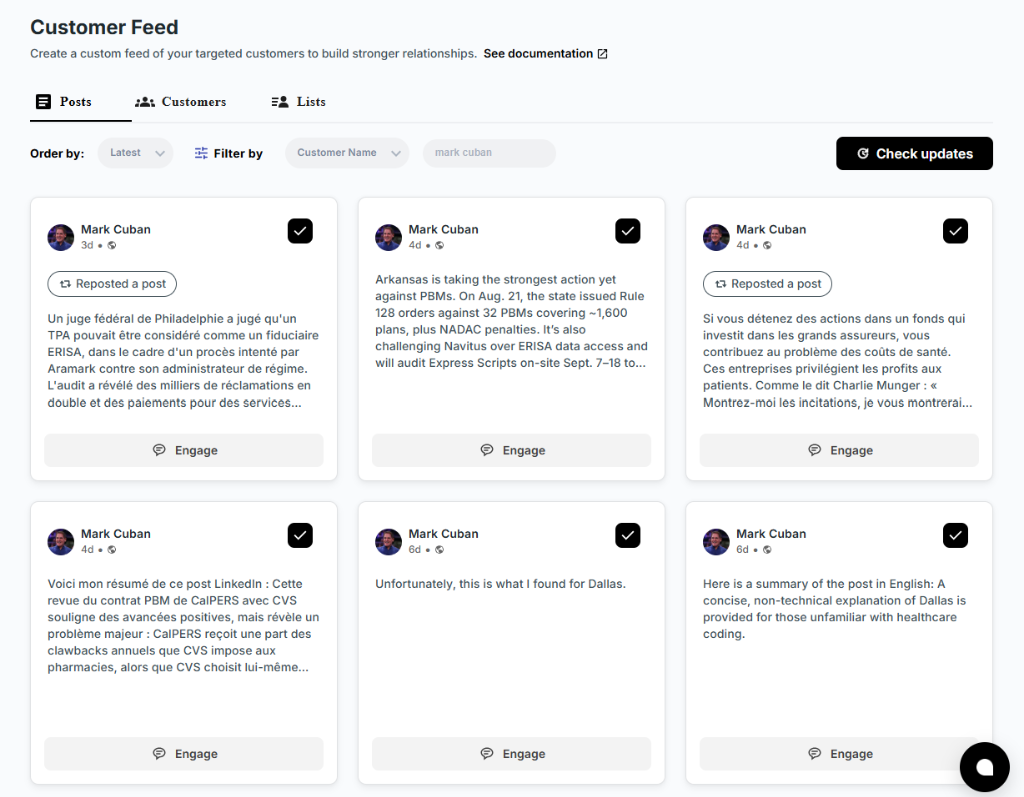
That is why the useful unit is a curated feed: only the people and companies you chose, in chronological order, with the post text in front of you. You open it once or twice a day, see what changed, and act.

Build a signal log, not a stalking habit
A signal log is a simple record: who, what happened, where you saw it, how reliable it is, and what you did next. Qualify each entry by source and confidence, exactly as the table above does.
A good log entry looks like this:
| Date | Contact | Signal | Source | Confidence | Next step | |---|---|---|---|---|---| | Mon | VP Engineering, Client A | Posted about scaling a platform team | Public post | High | Comment with a specific point | | Tue | Same | Replied to your comment | Reply | High | Send a connection request with a note | | Thu | Same | Viewed your profile | Profile view | Medium | Wait for one more signal | | Fri | Same | Accepted connection | Connection accept | High | Warm message referencing the thread |
Treat a missing signal as unknown. The guidance on profile visibility makes clear that settings and connection degree change what you can see, so silence does not mean disinterest.
Signals that justify starting outreach
We suggest a rule: begin warm outreach when you have at least one two-way signal, or two one-way signals within a short window.
- *Two-way signals: a reply to your comment, a connection accept, an inquiry sent to you.
- *One-way signals: a comment like, a profile view, a new relevant post from the contact.
This keeps you out of the habit of messaging someone because they happened to post. It also gives you something concrete to reference in the first message.
A 20-minute daily routine
Consistency beats volume. This routine assumes 30 to 100 target accounts.
- *Minutes 0 to 5: scan the curated feed. Look for new posts from hiring managers, talent leaders and company accounts. Mark the three or four with a real hook: a hire, a launch, a problem, an opinion.
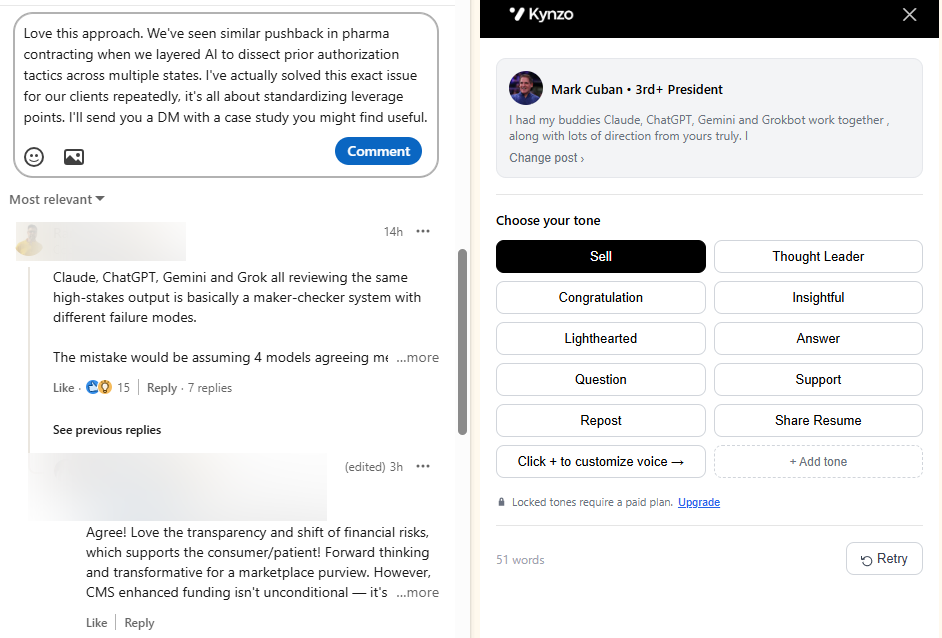
- *Minutes 5 to 12: comment. Add a specific observation, not praise. Reference something in the post, add an angle from the market you recruit in, and keep it short.
- *Minutes 12 to 16: check the signal log. Look for replies, comment likes, profile views and connection accepts from earlier engagement.
- *Minutes 16 to 20: act on warm contacts. Send connection requests with a short note where a signal exists. Move anyone who has accepted into a warm conversation.
You can check your connection notes with the free LinkedIn Connection Request Checker before sending, and draft a first-pass comment with the LinkedIn Comment Generator . Edit anything it produces so it sounds like you.
Private accounts, employers and the governance question
Two questions from the search results deserve a straight answer for agency teams.
*Can an employer see an employee's LinkedIn activity? It depends on the service. LinkedIn's privacy policy says an employer may see how an employee uses services the employer provides for work, such as Recruiter or Sales Navigator. LinkedIn says it will not show the employer the employee's job searches or personal messages. For agency owners, keep personal LinkedIn use and employer-administered products clearly separate, and document what each data source covers.
*Can you make your own activity invisible to someone? Partly. LinkedIn's visibility guidance describes limiting post and share visibility, adjusting profile and public-profile settings, and blocking members. It does not make publicly shared content invisible in every context.
For agency owners managing teams, Fisher Phillips' 2024 employer guidance is a useful reminder that employer interest in LinkedIn does not automatically authorize access to an employee's private social-media account. If you run a recruiting team, use transparent policies and do not pressure people to hand over personal-account access. Employment rules differ by state and country, so ask an employment lawyer before writing a policy.
Where a dedicated tool earns its place
Software is worth it when the manual process stops scaling. Typical signs: your target list is past what you can check by hand, you lose context between LinkedIn and your CRM, and you want to comment consistently without it eating your morning.
There are three broad types of tools:
- *Brand-monitoring tools: built for mentions of a company or topic. They are strong on reputation, weak on watching named individuals.
- *Mass-messaging and automation tools: built for volume outreach. They carry the spam and account-risk profile you are trying to avoid.
- *Relationship-engagement platforms: built around a curated list of people, in-feed engagement and signal tracking. This is the category that suits agency business development.
Perspective: monitoring is only useful if it changes what you do next
We built Kynzo around one belief: a recruiter's problem is rarely a lack of data. It is a lack of a reason to start a conversation that a hiring manager will welcome.
Cold InMail and mass messaging give a hiring manager no reason to answer. A thoughtful comment on their post, repeated over a few weeks, does. By the time you message, you are a familiar name who said something useful in public. That is why we pair a dedicated Customer Feed with an engagement agent and a signal log, instead of building another sequencing tool.

We are also cautious about what monitoring claims. LinkedIn visibility is contextual, so we track replies, comment likes, profile views, connection accepts and inquiries as signals, and we do not pretend to reveal private behavior. Pacing matters for the same reason. Active hours, daily caps and randomized delays exist to make engagement look like what it should be: a recruiter showing up consistently, not a script.
If your monitoring process does not end in a better first conversation, change the process.
*— Jenny
How Kynzo handles this workflow
Kynzo is a Chrome extension and platform for agency recruiters. Here is how it maps to the routine above:
- *Customer Feed: a dedicated feed of posts and activity from your target hiring managers and company accounts, away from LinkedIn's general feed.
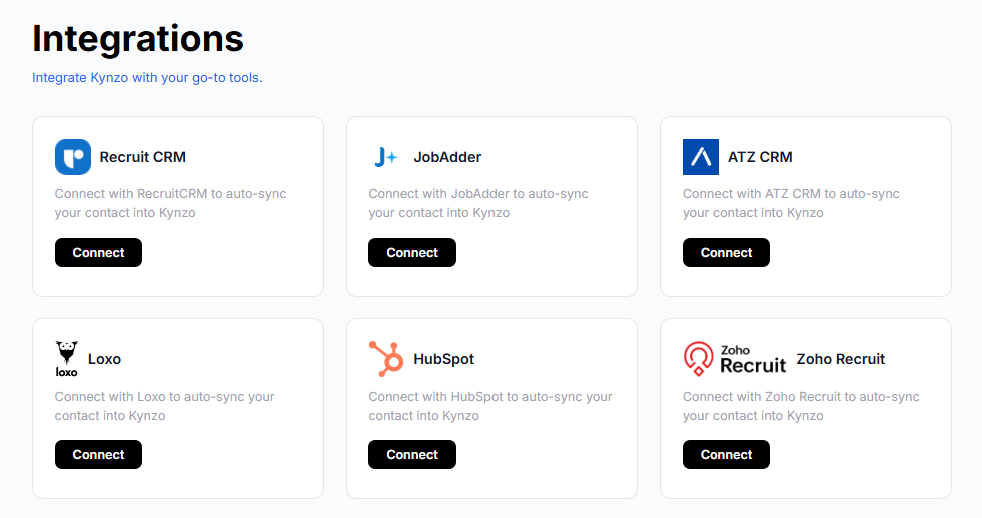
- *Account sync: target accounts can sync from Recruit CRM, JobAdder, Zoho Recruit, HubSpot, Crelate and Loxo. You can also save profiles or posts manually.
- *AI Agent: drafts or publishes context-aware comments in your voice, with tones, active hours, daily caps and randomized delays.
- *Signal tracking: replies, comment likes, profile views, connection accepts and inquiries, so you can see when warm outreach makes sense.
Installation is free, and in-feed commenting and CRM sync are part of the platform. Paid plans are STARTER at $12.90 per month, PRO at $30 per month and ELITE at $50 per month. See the Kynzo pricing page for what each includes, or start from the Kynzo homepage . If you want a view of the wider approach first, the Kynzo blog covers LinkedIn business development for agency recruiters.
Mistakes that make monitoring backfire
- *Treating profile views as buying intent. One view is a weak signal. Wait for a second signal.
- *Commenting on everything. Ten sharp comments on the right people beat fifty generic ones.
- *Messaging right after a post. If your first direct message arrives within minutes of a like, it reads as automation.
- *Ignoring pacing. Bursts of activity at odd hours look unnatural. Spread comments across working hours with caps.
- *Keeping signals outside the CRM. If the log lives in a notebook, nobody else on the team benefits.
- *Monitoring the wrong people. Prioritize decision-makers with budget for fees over junior HR contacts.
To sharpen who goes on the list in the first place, you can also build candidate and prospect searches with the free Recruiter Boolean Search Generator .
FAQ
How do I check my LinkedIn activity history?
Open your own profile, scroll to the Activity section and use the show-all option. You can filter by posts, comments and reactions. The same path on another member's profile shows only what their settings allow you to see.
Can my employer see my activity on LinkedIn?
It depends on the account. LinkedIn's policy says an employer may see use of services it provides for work, such as Recruiter or Sales Navigator. LinkedIn also says it will not show the employer your job searches or personal messages.
Is it possible to know who visited my LinkedIn profile?
Only in part. Whether a view is disclosed depends on the settings of both the viewer and the viewed member, so the list is never a complete record of visitors. Treat views as one weak signal among several.
Can I hide my activity from someone on LinkedIn?
Yes, to a degree. You can limit who sees posts and shares, adjust profile and public-profile settings, or block a member. Content you shared publicly can still be visible in other permitted contexts.
Is it okay to monitor a hiring manager's LinkedIn posts?
Watching what someone has chosen to post publicly is normal professional behavior, and it is how most social selling starts. Stay with public posts and explicit engagement, and do not try to infer private activity. Check LinkedIn's current terms before using any automation.