

How to Monitor Prospects on LinkedIn: A Recruiter's Guide
To monitor prospects on LinkedIn, build a short list of the hiring managers and company accounts you want as clients, watch their posts and hiring activity in one place instead of your general feed, and act when two or three signals line up. Then start the conversation with a useful comment before you send any pitch. This guide shows how to choose who to watch, what to watch for, and how to run the routine in under an hour a week.
Key Takeaways
- Monitor a focused list, not the whole network. Five to eight trigger roles and a few dozen accounts beat hundreds of names you never review.
- One signal is a reason to look. Two or three at the same company are a reason to reach out.
- The most useful signals for agency recruiters are hiring activity, leadership changes, funding, and what the hiring manager posts and comments on.
- Comment first, message second. Specific, thoughtful comments open a warmer door than cold InMail.
- Keep a person in charge of every interaction, and follow LinkedIn's rules on automation.
Table of Contents
- What it means to monitor prospects on LinkedIn
- The signals worth watching
- Choose who goes on your watchlist
- Set up the monitoring routine
- Turn signals into a warm conversation
- Monitor within LinkedIn's rules
- Where Kynzo fits
- A quick checklist
- FAQ
- Sources
What it means to monitor prospects on LinkedIn
Monitoring is a repeatable habit of checking a defined set of people and companies for changes that tell you when to act. It is different from prospecting, which is finding names, and different from outreach, which is contacting them.
For a recruiter, the prospects are not job seekers. They are hiring managers, heads of function, founders and talent leaders at companies that might pay a placement fee. Your general LinkedIn feed is a poor tool for watching them. It is ranked by an algorithm, mixes in thousands of unrelated posts, and shows you a hiring manager's update only when LinkedIn decides it should.
A dedicated watchlist fixes that. You decide who is on it, and you see what they do.
The signals worth watching
Not every post deserves attention. The American Translators Association's guide to researching people and companies on LinkedIn suggests reviewing a person's experience, responsibilities, recommendations, skills, follows, groups and recent activity , including posting frequency, topics and interactions. Applied to client development, that gives you four families of signals.
Hiring signals
A public job posting is the clearest sign that a company needs help. Useful patterns include a first hire in a function, several roles opening in one team within a month, and a posting that stays open for weeks. GetSendable's guide to hiring signals describes the same pattern: the company is building, scaling or changing the team around the role.
Watch the Jobs tab on a company page, the People section for recent hires, and "we're hiring" posts from the manager themselves. Egrabber's guide walks through these places and treats sustained employee-count growth on company pages as a sign of expansion.
Company trigger events
Funding, acquisitions, product launches, new offices and leadership changes often come before a hiring push. Marmalade Marketing's piece on intent data in recruitment lists these as high-value trigger events for recruiters in the UK, and they apply just as well to US clients.
Content signals
What a hiring manager writes about tells you what keeps them busy. A VP of Engineering posting about slow releases, or a COO complaining about turnover in operations, is describing a problem you may be able to solve. Salesforge's guide to signal-based outreach puts it simply: reach out when something relevant happens, rather than messaging everyone who fits your target profile.
Engagement signals toward you
The fourth family runs the other way: how the prospect responds to you. Replies to your comments, likes on those comments, profile views, accepted connection requests and inbound messages all show interest. Jeb Blount and Brynne Tillman's book The LinkedIn Edge builds prospecting lists from signals such as post engagement, profile visitors and job-transition triggers.
On profile views, know what you can see. LinkedIn's help page on who has viewed your profile says Basic accounts see the three most recent viewers from the last 90 days, while Premium accounts see a full list for up to 365 days. Viewers who browse in private mode will not appear by name.
Choose who goes on your watchlist
The biggest mistake is tracking too much. Cleverly's guide to finding companies hiring specific roles recommends working backwards from your offer and choosing five to eight trigger roles to track consistently, rather than reacting to every hiring update.
For an agency recruiter, that means starting with your niche. If you place finance leaders, the trigger roles might be a first Controller hire, a new VP Finance, or a CFO departure. Everything else is noise.
Find the hiring manager, not just the company
The person to watch is usually not in HR. Leedo's recruiter playbook explains that the hiring manager is almost always one level up from the advertised role, in the same function. A Software Engineer opening points to an Engineering Manager or Head of Engineering. An Account Executive opening points to a Sales Manager or VP of Sales.
To confirm the right person, Identifyd's guide suggests mapping the titles that would own the role, searching by title, company and location, confirming the person on the company's website, and checking the reporting line in the job posting.
Leedo's second guide adds a size rule: for companies under roughly 500 employees, the People filter on the company page is usually enough. For larger ones, use a Boolean search such as `("Head of Marketing" OR "VP Marketing" OR "Director of Marketing") AND "Acme Corp". Sales Navigator filters such as function, seniority, headcount and "posted on LinkedIn recently" narrow it further.
Size the list to your week
A workable watchlist is small enough to review fully. As a starting point:
| List size | Who it suits | What to expect | |---|---|---| | 25 to 50 accounts | Solo recruiter or desk of one | Review daily in 10 minutes, comment on a few posts per week | | 50 to 100 accounts | Small desk with a defined niche | Split by sector, review in two sessions | | 100+ accounts | Agency with a BD function | Needs CRM sync and tiers, or the list goes stale |
These ranges are our working guidance, not an industry standard. Adjust them to the time you can protect.
Set up the monitoring routine
You can do all of this by hand. LinkedIn lets you follow people and companies, save leads in Sales Navigator, and open a person's recent activity. HubSpot's LinkedIn skim guide points to the Recent Activity section as the place to browse a prospect's updates, comments, likes and published posts and see what they care about.
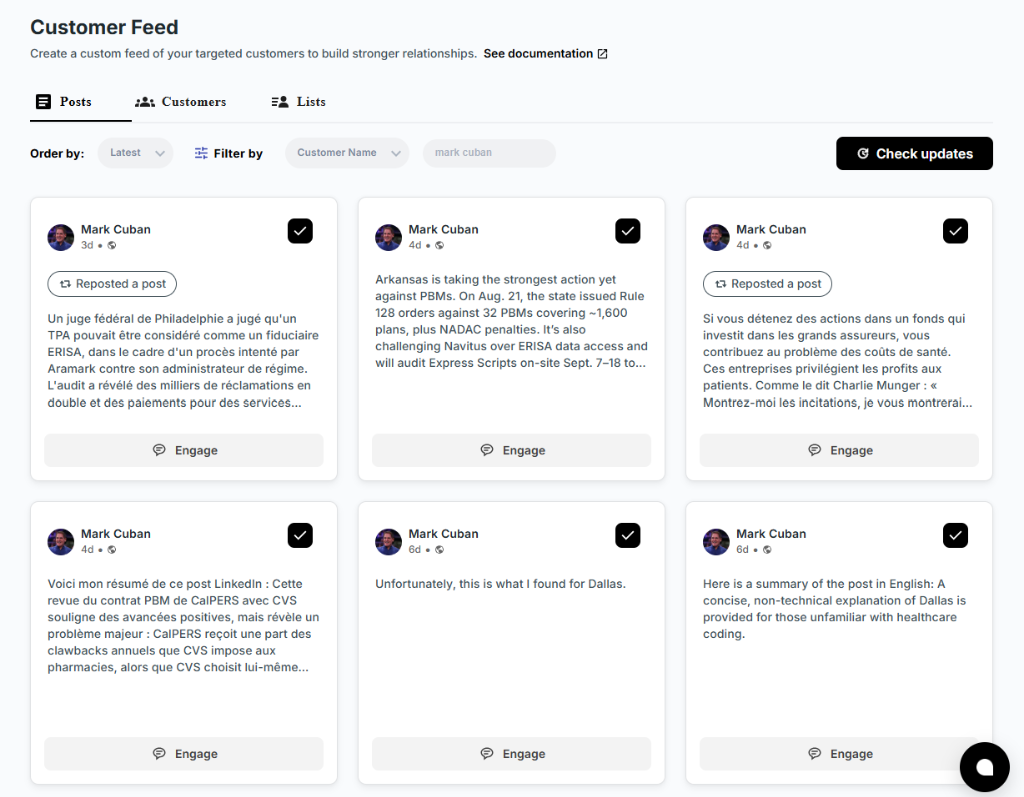
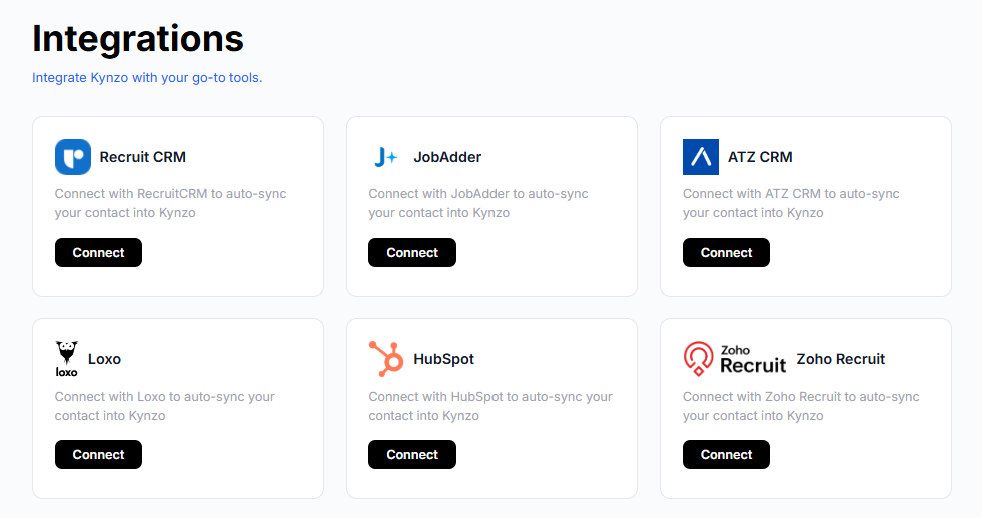
The manual route works for 20 accounts. Past that, the list gets buried in tabs and bookmarks. This is the problem Kynzo was built for: its Chrome extension saves profiles and posts into a dedicated Customer Feed, so you see target hiring managers and company accounts in one place rather than hunting through the general feed. It can also sync accounts from recruiting systems and CRMs such as Recruit CRM, JobAdder, Zoho Recruit, HubSpot, Crelate and Loxo, so the watchlist matches the clients you already track. For the CRM side, see our guide to connecting LinkedIn to your CRM , and for the wider method, our post on how to monitor LinkedIn activity .

A weekly rhythm that holds up

Boilr's outbound guide for recruiters lays out a weekly workflow worth borrowing: review new matches and signal changes on Monday and rank accounts by fit, signal strength and clarity of stakeholders. Make first touches from Tuesday to Thursday and log the angle used. On Friday, review which triggers actually produced movement.
Here is how that looks for a recruiter monitoring LinkedIn prospects:
- *Monday, 30 minutes. Scan the feed for new hiring posts, job openings and leadership changes. Move accounts between tiers.
- *Tuesday to Thursday, 15 minutes a day. Comment on two or three posts from tier-one managers. Check who replied.
- *Thursday. Send a connection request or message only to people who have engaged with you or whose account shows two or more signals.
- *Friday, 15 minutes. Log outcomes in your CRM: replies, accepts, calls booked. Drop accounts that went quiet.
Boilr's author also argues that the weekly output should be accounts progressed with sensible reasoning attached, not a count of messages sent. That is a good measure for any recruiter.
Do not watch everything
Salesforge's advice is to start with two or three signals tied to a possible need, chosen for what they say about the prospect rather than how often they appear. For a recruiter, a good starting trio is a new job posting by the manager's team, a leadership change, and a post by the manager about hiring or team strain.
Turn signals into a warm conversation
Monitoring only pays off when it leads to contact. The order matters.
Step 1: Score the signals
One signal is a reason to look. Identifyd puts the threshold at two or three signals at the same company before you call. A funding round plus two open roles in the same team plus a manager's post about scaling is a stronger case than any one of them.
Step 2: Comment before you message
Morgan J Ingram's LinkedIn prospecting process on HubSpot advises leaving thoughtful comments on relevant posts, avoiding generic lines like "Great post!", and adding an insight or a question. He notes that comments give you a relatively open space to engage with executives.
For a hiring manager who posts about a stalled search, a useful comment might read:
"We see the same pattern with senior data roles: the strongest candidates are already employed and only move for a clear mandate. Curious whether you've found it easier to hire for scope or for the tech stack?"
That comment shows you know the market, asks something real, and does not pitch. For more patterns, see our LinkedIn comment examples and comment strategy guides. If you are drafting from scratch, the free LinkedIn comment generator gives you a starting point to edit in your own words.
The same principle applies when you engage technology buyers: relevant LinkedIn discussions beat generic comments and mass messages.
Step 3: Read the response
After two or three comments over a couple of weeks, check what happened. Did the manager reply or like your comment? Did they view your profile or accept a connection request? Those are your cues to move to a short, specific message. Our post on LinkedIn engagement signals explains how to read each one, and engagement metrics covers what to track.
Step 4: Open with their situation
When you do message, start from the problem the hire will solve. A good first message names the opening or event you noticed, one relevant observation from your own searches, and a low-pressure question. Avoid attaching a fee discussion or a candidate list to the first note. Origami's Austin Kennedy argues for contacting the hiring manager rather than only the new hire , because the hiring manager owns the pain point and the budget.
Monitor within LinkedIn's rules
LinkedIn's help page on prohibited software and extensions states that it does not permit third-party software, including bots and browser extensions, that scrapes, modifies the appearance of or automates activity on the site. It also rules out fake engagement and tools that try to manipulate its content algorithms. Read that page before you choose any tool, because LinkedIn can restrict accounts that break its terms.
The safe way to work with this is to keep yourself in control of what goes out under your name:
- *Read every draft. Whatever helps you write a comment, edit it so it says what you would say, and only then post.
- *Keep volumes human. A handful of considered comments a day is more effective and more credible than dozens.
- *Stay out of mass messaging. Copy-pasted InMail and connection spam is what gets noticed and ignored.
- *Use official features for the basics. Following accounts, saved searches and alerts in Sales Navigator are built into LinkedIn.
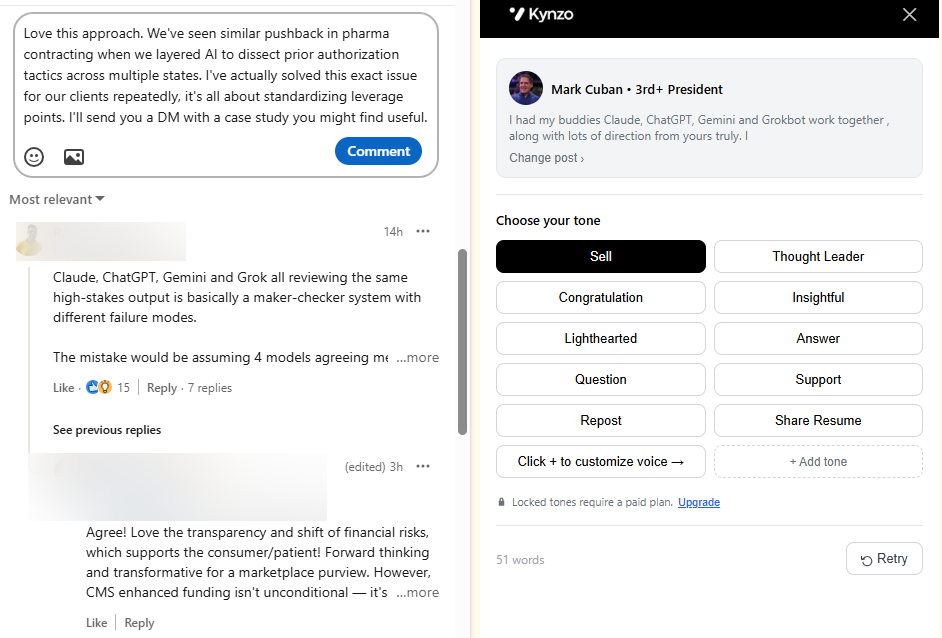
Kynzo's AI Agent is designed around human pacing: active hours, daily caps and randomized delays, in your own voice and tone. Our guide on how to avoid LinkedIn spam covers the habits that keep engagement useful. Use those controls conservatively and review what the agent drafts.
Where Kynzo fits
If you manage more than a couple of dozen target accounts, a manual routine becomes the bottleneck. Kynzo gives agency recruiters a single Customer Feed for the hiring managers and companies they care about, an AI Agent that drafts context-aware comments in the recruiter's voice, and tracking for replies, comment likes, profile views, connection accepts and inquiries, so you can see when an account is ready for warm outreach.

The Chrome extension is free to install. Paid plans are STARTER at $12.90 per month, PRO at $30 per month and ELITE at $50 per month . You can see the full workflow on the Kynzo homepage . For more on turning this into a client pipeline, read our guides to LinkedIn lead generation for recruiters , recruiter business development on LinkedIn and executive search on LinkedIn .
A quick checklist
- Pick five to eight trigger roles tied to your niche.
- Identify the hiring manager one level above each role.
- Keep your list to a size you can review fully each week.
- Track hiring, trigger-event, content and engagement signals.
- Wait for two or three signals before a direct message.
- Comment with substance first, and log results in your CRM.
- Check LinkedIn's rules on automation and keep a human in the loop.
FAQ
Can you tell who has looked at your LinkedIn profile?
Yes, to a degree. According to LinkedIn, Basic accounts see the three most recent viewers from the last 90 days, while Premium accounts see up to 365 days of viewer data. People who browse privately do not show their names. Treat a profile view as a soft signal, strongest when it follows a comment you made.
How many prospects should I monitor at once?
Start with 25 to 50 accounts and expand only when you can review them all weekly. A shorter list reviewed consistently produces more conversations than a long one you skim. Tie the list to five to eight trigger roles in your niche.
What should I look for on a hiring manager's profile?
Check their recent activity, including posts, comments and reactions, along with their role history and their team's open jobs. The topics they post about show their current priorities. Look for changes such as new team members or new openings under their name.
How do I find the hiring manager behind a job posting?
The hiring manager is usually one level above the advertised role in the same function. Search by likely title and company, confirm the person on the company website, and check the reporting line in the posting. For small companies, the People filter on the company page often does it.
Is it safe to use automation to monitor LinkedIn?
LinkedIn's rules restrict third-party software that automates activity on its site, so read its prohibited software page and keep your own judgment in every interaction. Review each comment before it is posted, keep activity low and natural, and avoid mass messaging.
Sources
- Using LinkedIn to Research People and Companies, American Translators Association
- Hiring Signals: Turn LinkedIn Job Posts Into Leads, GetSendable
- How to Find Companies Actively Hiring, Egrabber
- Using Intent Data in Recruitment, Marmalade Marketing
- Signal-Based LinkedIn Outreach, Salesforge
- The LinkedIn Edge, O'Reilly
- Who's viewed your profile, LinkedIn Help
- How to Find Companies Hiring Specific Roles, Cleverly
- How to Find the Hiring Manager for a Job, Leedo
- How to Find a Hiring Manager on LinkedIn, Leedo
- How to Find Decision-Makers at Companies That Are Hiring, Identifyd
- The LinkedIn Skim Guide, HubSpot
- Outbound for Recruiters, Boilr
- My 10-Step Process for Nailing Prospecting on LinkedIn, HubSpot
- Hiring Signals for B2B Sales, Origami
- Prohibited software and extensions, LinkedIn Help