

How to Track LinkedIn Posts From Hiring Managers and Target Accounts
To track LinkedIn posts, you have three options: use LinkedIn's own tools (the Activity section on a profile, Follow, and the notification bell), run saved searches for keywords, or build a dedicated feed of only the people and companies you care about. Native tools work for a handful of profiles. Once you are watching 50 or more hiring managers, you need a curated list and a daily routine, or the posts that matter get buried.
This guide is written for agency recruiters and search consultants. It covers each method, where each one runs out, and how to turn a tracked post into a warm client conversation.
Key Takeaways
- LinkedIn's built-in options (profile Activity, Follow, the bell) are free, but they are manual and do not scale past a short list.
- A dedicated feed of target hiring managers and company accounts removes the noise of the general feed.
- Syncing target accounts from your recruiting CRM keeps your monitoring list current without retyping it.
- Tracking is only half the job: comment, log the signals, and start outreach after a few genuine touchpoints.
- Keep pacing human and read LinkedIn's rules on automated activity before you use any extension.
Table of Contents
- What "tracking LinkedIn posts" means for a recruiter
- Method 1: Use LinkedIn's native tools
- Method 2: Build a dedicated feed of target accounts
- Build a target account list worth tracking
- What to look for in a tracked post
- The three-touchpoint approach
- A 15-minute daily tracking routine
- Which signals say "start the conversation"
- Tracking topics and keywords
- Use automation safely
- Track, comment and log the signals in one place with Kynzo
- FAQ
- Sources
What "tracking LinkedIn posts" means for a recruiter
The phrase covers three different jobs, and the right method depends on which one you are doing.
- *Tracking your own post performance. Impressions, reactions, comments, profile views. LinkedIn's post analytics handle this.
- *Tracking other people's posts. A hiring manager announces a new office, a founder complains about slow hiring, a VP of Engineering shares a reorg. This is business development intelligence.
- *Tracking topics. Conversations around a keyword, such as "hard to fill roles" or a niche skill.
Most pages that rank for this query focus on job 1. If you are an agency recruiter, jobs 2 and 3 are where the revenue is. A post from a target hiring manager is a reason to speak, and it is a far better opener than a cold InMail with no context.
Method 1: Use LinkedIn's native tools
These cost nothing and are the right place to start.
Profile Activity section
On any member's profile, scroll to the Activity section and click Show all activity, then use the filters to narrow to posts, comments or other types. LinkedIn's help page on viewing member activity describes the steps and notes that if nothing shows, the member may have set their activity to private or may simply have no recent activity.
*Limit: it is one profile at a time. Checking 40 profiles every morning means 40 page loads, and you will stop doing it by Thursday.
Follow and the notification bell
Following a person puts their updates in your feed. According to reporting on LinkedIn's push to have members follow more people , followed people's updates appear alongside activity from connections, and a bell on the profile can notify you when a followed person publishes an update.
*Limit: your target hiring managers' posts still compete with everything else in the general feed. The bell helps for a few VIPs, but a notification for every post from 60 people becomes noise you mute.

Saved searches and keyword search
LinkedIn's content search lets you filter posts by keyword and by date. It is useful for topic monitoring, for example finding posts where hiring managers discuss a hard-to-fill role in your niche. It is not a monitoring system: you have to remember to run the search, and results are mixed with posts from people who will never buy from you.
Company pages
Following a company page shows its announcements, funding news and job posts. Company accounts rarely reveal what a specific hiring manager is thinking, so pair them with the personal profiles of the people who own the hiring decision.
Method 2: Build a dedicated feed of target accounts
The core problem with the general feed is that it is ranked for engagement, not for your pipeline. A dedicated feed solves this by showing only posts from a list you control.
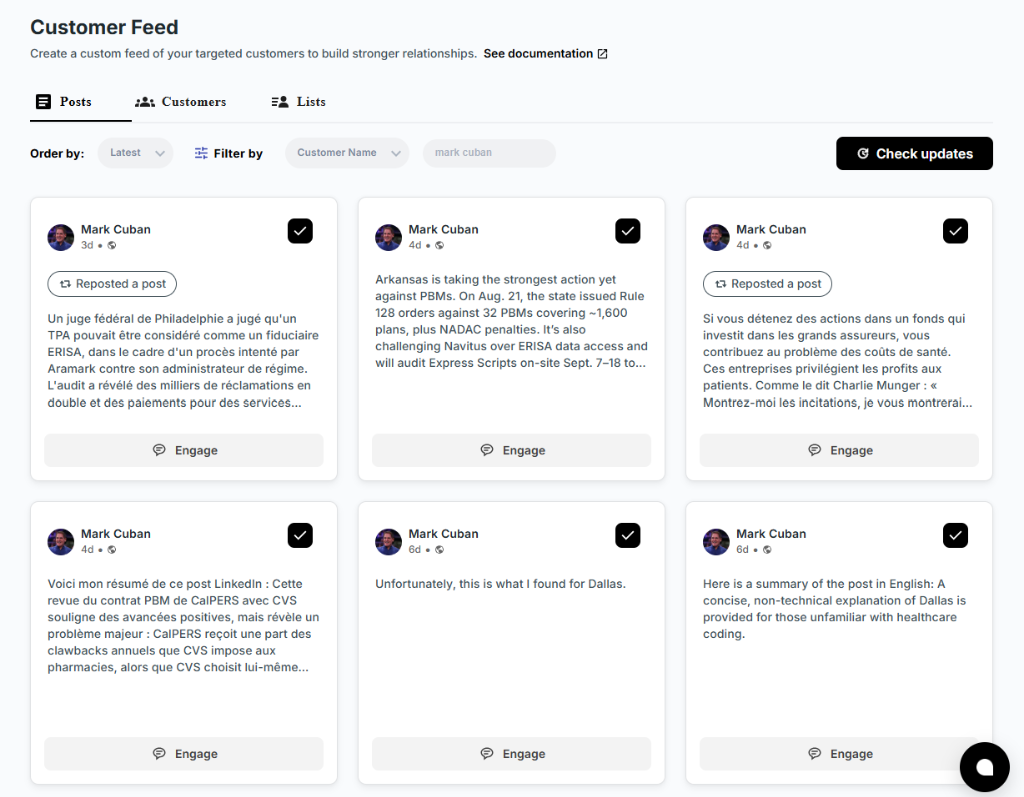
That is what the Kynzo Chrome extension and its Customer Feed are built for. You add hiring managers and company accounts, and the feed shows their posts and activity in one place. There are two ways to fill it:
- *Save manually. Save a profile or a post as you come across it while browsing LinkedIn.
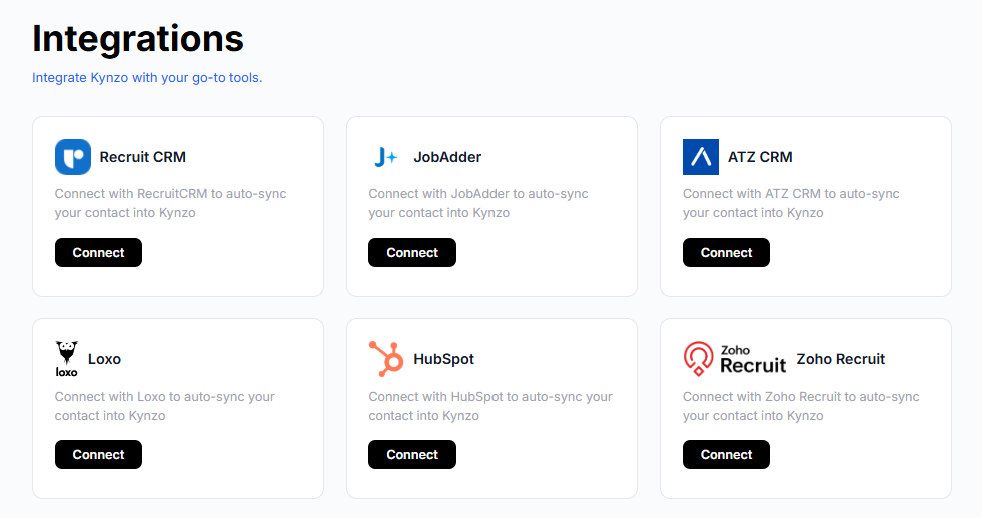
- *Sync from your CRM. Kynzo can synchronize accounts from Recruit CRM, JobAdder, Zoho Recruit, HubSpot, Crelate and Loxo, so the clients and contacts you already track become your monitored list.
If you want a deeper look at the mechanics, our guides on how to monitor LinkedIn activity and how to monitor prospects on LinkedIn walk through the setup, and the piece on filtering your LinkedIn feed covers the noise problem in more detail.
Native tools vs. a dedicated feed
| Need | LinkedIn native | Dedicated feed (Kynzo) | |---|---|---| | Cost | Free | Free Chrome extension install; paid plans from $12.90 per month | | Watch a few people | Follow plus bell works | Works | | Watch 50+ hiring managers | Manual and noisy | One curated feed | | Import from your CRM | No | Recruit CRM, JobAdder, Zoho Recruit, HubSpot, Crelate, Loxo | | Draft comments in your voice | No | AI Agent | | Log replies, profile views, connection accepts | Scattered across notifications | Tracked as engagement signals |
Build a target account list worth tracking
A feed is only as good as the list behind it. Most agencies fill it badly: they add every contact in the CRM, then drown.
Start with a tiered list:
- *Tier 1 (10 to 15 people): hiring managers and decision-makers at clients you want to win or grow into high-fee relationships. You will comment on their posts often.
- *Tier 2 (25 to 40 people): active prospects with live or likely roles. You will comment when a post gives you something real to say.
- *Tier 3 (the rest): company accounts and wider market voices. You scan these for triggers such as funding, expansion and leadership changes.
For executive search, the Tier 1 list is usually smaller and the posts more infrequent, so patience matters. Our guides on executive search LinkedIn outreach and hiring manager outreach on LinkedIn cover how to approach each audience.
If you also publish your own content to be seen by these same buyers, guidance on measuring executive LinkedIn content shows how to judge what is working on the posting side.
What to look for in a tracked post
Not every post deserves a reaction. These are the post types that tend to open a client conversation:
- *Hiring pain. "We've had this role open for four months." A direct invitation to help, though not one to answer with a pitch.
- *Growth news. New funding, a new market, a new team lead. Headcount often follows.
- *Leadership changes. A new VP or CHRO often reviews agency suppliers.
- *Opinion posts. A hiring manager sharing a view on the talent market. Thoughtful comments here build familiarity fastest.
- *Replies to your comments. The strongest signal of all: they noticed you.
The three-touchpoint approach
A widely repeated rule in social selling holds that you should have several genuine interactions before a direct ask. Koka Sexton's social selling field guide describes a 3-touchpoint rule: three meaningful interactions, such as thoughtful comments or genuine shares, before you send the ask. Treat it as a practical guideline rather than a law of nature.
Here is how it looks in practice:
- *Touch 1: a comment that adds a specific observation to their post.
- *Touch 2: a reply to someone else's comment on their thread, or a comment on a second post a week later.
- *Touch 3: a connection request or a short note that references what they posted.
Then, and only then, a message that offers something relevant. For help structuring the commenting side, see our LinkedIn comment strategy and LinkedIn comment examples . Teams that want to turn tracked posts into follow-up can also look at personalized AI outreach for reply rates .
A comment that earns a reply
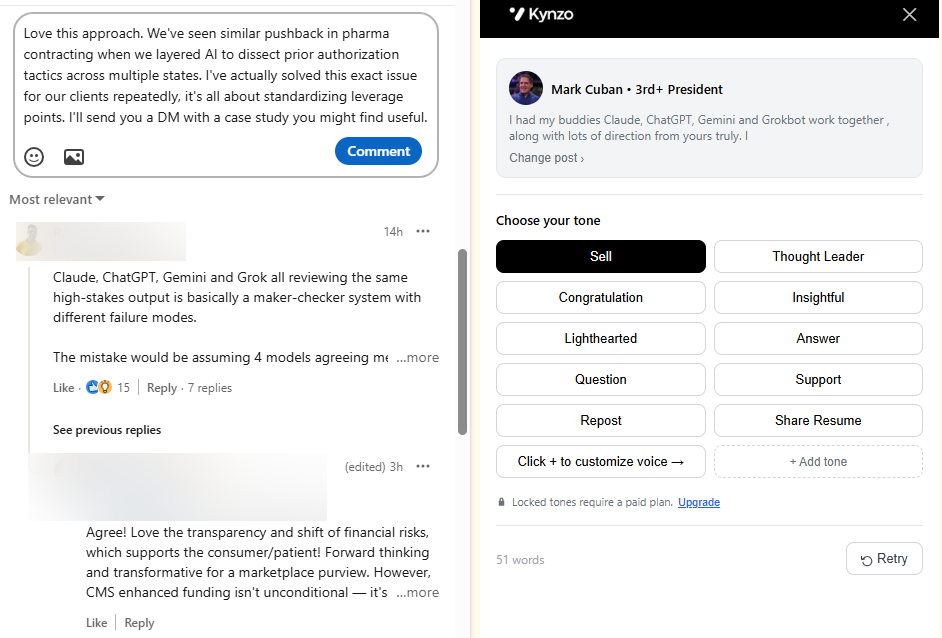
Say a hiring manager posts about struggling to hire senior data engineers. Weak: "Great post! So true." Stronger: "We see the same split in the data engineering market: candidates with streaming experience are taking multiple offers while batch-focused profiles sit. Are you finding the bottleneck is sourcing or closing?"
The second comment shows market knowledge, asks one real question, and sells nothing. You can draft variations with the free LinkedIn Comment Generator .
A 15-minute daily tracking routine
Consistency beats volume. This routine fits before your first call.
| Time | Task | |---|---| | Minutes 0 to 3 | Open your dedicated feed. Scan Tier 1 posts first. | | Minutes 3 to 9 | Write or approve three to five comments on Tier 1 and Tier 2 posts. | | Minutes 9 to 12 | Check signals: replies to your comments, comment likes, profile views, connection accepts. | | Minutes 12 to 15 | Move anyone with two or more positive signals to your outreach list and note the context in your CRM. |
Once a week, spend 20 minutes pruning. Remove accounts that never post and add new ones from your CRM or your last three discovery calls.
Which signals say "start the conversation"
Kynzo tracks engagement signals including replies, comment likes, profile views, connection accepts and inquiries. Together they work as a signal log for each target account. A simple scoring guide:
| Signal | What it suggests | Action | |---|---|---| | Like on your comment | Mild awareness | Keep commenting | | Profile view after a comment | Curiosity | Send a connection request | | Reply to your comment | Active interest | Reply back, then plan a personal note | | Connection accepted | Permission to continue | Send a short, context-based message | | Inbound question or inquiry | Buying or hiring intent | Offer a call |
These thresholds are our working guidelines, so adjust them to your own sales cycle and how often each client posts.
Tracking topics and keywords
If you want to find conversations rather than people, use LinkedIn's search with content filters and keywords tied to your niche, for example a role title plus "hiring". Run two or three searches on a set day each week and save promising authors into your target list. That turns one-off topic discovery into long-term account tracking.

Use automation safely
LinkedIn's help center states that it does not allow third-party software or browser extensions that scrape, modify the appearance of, or automate activity on its website, and describes restrictions on accounts where such tools are detected. Read that page before you choose any extension, and decide for yourself what level of automation fits your agency.
What we can say about our own approach: Kynzo is built around human-pacing controls. The AI Agent can draft comments for your review or publish them, and you set active hours, daily caps and randomized delays. Whatever tool you choose:
- Keep daily comment volume modest and well under what a person could realistically write.
- Review drafts, especially for Tier 1 accounts.
- Never paste the same comment across multiple posts.
- Stay away from mass messaging and generic cold InMail, which carry their own spam risk.
Our guides on LinkedIn rate limits , avoiding LinkedIn spam and LinkedIn comment automation go into pacing in detail.
Track, comment and log the signals in one place with Kynzo
Kynzo is a LinkedIn engagement platform for agency recruiters, recruitment agencies and search consultants. The free Chrome extension gives you in-feed commenting and a dedicated Customer Feed of your target hiring managers and company accounts. Paid plans add the AI Agent, which drafts context-aware comments in your voice, and engagement signal tracking to show when to begin warm outreach.

Plans are published at kynzo.io/pricing : Starter at $12.90 per month, Pro at $30 per month and Elite at $50 per month. If you are comparing it with a social content scheduler, our Kynzo vs Supergrow comparison explains why agency recruiters pick it for LinkedIn business development.
FAQ
Can I see when someone posts on LinkedIn without following them?
Yes, in part. You can open their profile and view the Activity section to see recent posts, unless the member has limited that visibility. For ongoing alerts, following the person and turning on the profile bell is the native option. A dedicated feed lets you watch many people at once.
How do I track posts from many hiring managers at once?
Make a tiered target list and view all of it in one dedicated feed instead of the general feed. With Kynzo, you can save profiles manually or sync accounts from CRMs such as Recruit CRM, JobAdder, Zoho Recruit, HubSpot, Crelate and Loxo. Review the feed daily for 15 minutes.
How often should I check tracked posts?
Once a day is enough for most recruiters, with Tier 1 accounts first. Posts get the most value from a comment when you add it while the thread is still active. Use a weekly review to clean up the list.
When should I message a hiring manager after tracking their posts?
After a few genuine interactions, such as thoughtful comments, and at least one positive signal like a reply, a profile view or an accepted connection. Reference what they posted and offer something relevant to their hiring situation.
Sources
- View your activity or a member's activity on LinkedIn, LinkedIn Help
- Automated activity on LinkedIn, LinkedIn Help
- LinkedIn Wants You To Follow More People, Not Connect With, Wersm
- Social Selling Foundations: A Field Guide for B2B Teams, Koka Sexton
- Executive LinkedIn Content: What to Post and How to Measure It, Authority Engine
- Boost B2B Reply Rates with Personalized AI Outreach, Sonta AI